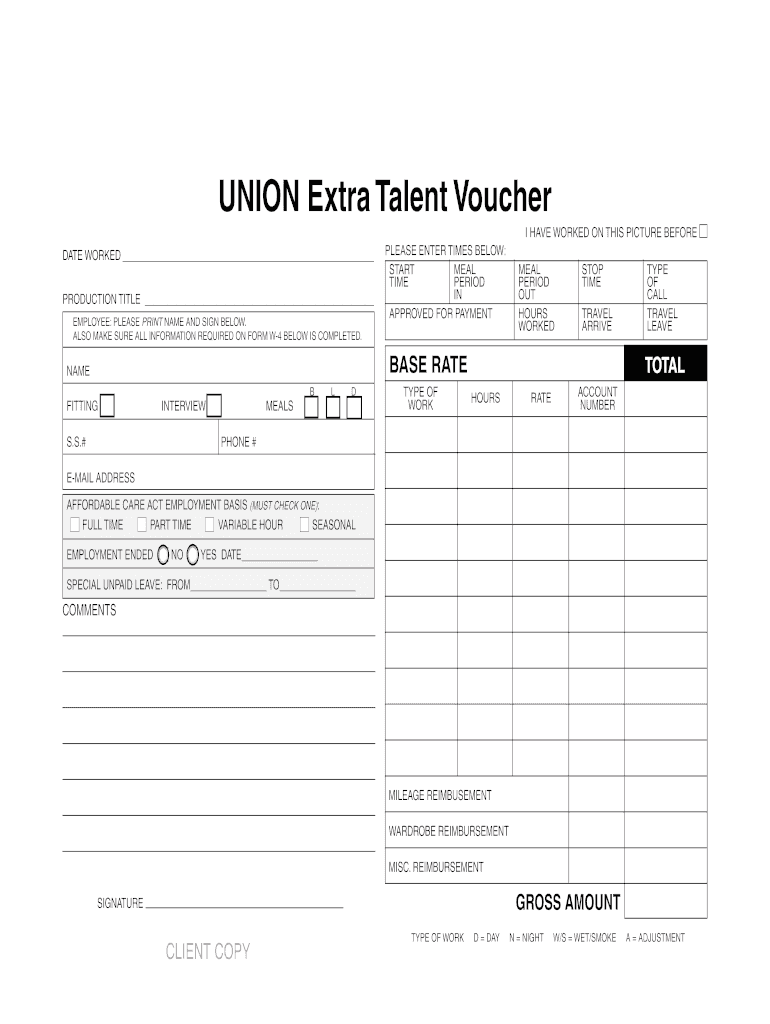
Union Nonunion Extra Talent Vouchers 912014 Union 9/28/14 3:50 PM Page 2 UNION Extra Talent Voucher I HAVE WORKED ON THIS PICTURE BEFORE c DATE WORKED PRODUCTION TITLE EMPLOYEE: PLEASE PRINT NAME.

Open form follow the instructions

Easily sign the form with your finger

Send filled & signed form or save
How to fill out the Media Services Payroll UNION Extra Talent Voucher online
Filling out the Media Services Payroll UNION Extra Talent Voucher online is a straightforward process designed to ensure accurate compensation for your work. This guide will walk you through each section of the form, providing clear instructions to help you complete it efficiently.
Follow the steps to successfully complete your voucher.
- Click ‘Get Form’ button to obtain the form and open it in the editor.
- Begin by entering the date you worked in the designated field labeled 'DATE WORKED'. Ensure the date is accurate to reflect your work schedule.
- Next, fill in the 'PRODUCTION TITLE' field with the name of the production you were involved in. This helps in tracking your work for specific projects.
- Users should print their name in the 'EMPLOYEE: PLEASE PRINT NAME AND SIGN BELOW' section. After printing your name, be sure to provide your signature to authenticate the document.
- In the 'PLEASE ENTER TIMES BELOW' section, accurately record your work times: Start time, Stop time, and Meal periods. Fill out these fields to represent your working hours clearly.
- Calculate and enter the total hours worked in the 'TOTAL HOURS' field, ensuring this aligns with the time entries made.
- Then, provide your base rate or pay rate in the 'BASE RATE' section to indicate your compensation terms.
- Fill out personal details including name, Social Security number, phone number, and email address. These details are essential for payroll processing.
- Select your employment basis under the 'AFFORDABLE CARE ACT EMPLOYMENT BASIS' section by checking one of the options: Full time, Part time, Variable hour, or Seasonal.
- Indicate if your employment has ended by checking 'YES' or 'NO' and, if applicable, provide the end date.
- If you have taken special unpaid leave, fill in the 'FROM' and 'TO' dates in the corresponding fields.
- Next, add any potential reimbursements for mileage, wardrobe, or miscellaneous expenses you incurred during your work.
- Finally, review all the information you have entered for accuracy, then save your changes. You can choose to download, print, or share the completed form as needed.
Start completing your Media Services Payroll UNION Extra Talent Voucher online today for a smooth payroll process.
Experience a faster way to fill out and sign forms on the web. Access the most extensive library of templates available.
Related content
Jan 18, 2022 — EXTRA HELP POSITION shall mean a position which is intended to be...
Guide to preparing payroll vouchers for contractors and other non-employees providing...
Oct 14, 2021 — The SAP S/4HANA family is fully built on the in-memory platform SAP HANA...
Get answers to your most pressing questions about US Legal Forms API.
How do you fill out a payment voucher?
To fill out a payment voucher, gather all necessary information regarding the payment request. This includes the vendor's contact information, invoice number, and the total amount due. Make sure to describe the services provided clearly and attach any supporting documents, like contracts or receipts. Incorporating the Media Services Payroll UNION Extra Talent Voucher allows for a more organized approach to this process, simplifying record-keeping and reporting.
How do I fill out a military travel voucher?
Filling out a military travel voucher requires specific details related to your travel. Begin by entering your travel dates and locations, along with any authorized expenses. Always remember to provide supporting documentation for your claims, which can include receipts and orders. Using the Media Services Payroll UNION Extra Talent Voucher can help you manage these expenses more efficiently while ensuring compliance with military travel regulations.
How do I fill out a voucher in DTS?
To fill out a voucher in DTS, start by logging into your account and selecting the appropriate travel authorization. Next, input all relevant expenses, ensuring you categorize them accurately. When submitting your expenses, make sure to attach any necessary receipts. Utilizing the Media Services Payroll UNION Extra Talent Voucher can streamline this process, making it easier to track your expenses.
How many union vouchers do I need?
Typically, you need at least three Media Services Payroll UNION Extra Talent Vouchers to apply for membership in SAG. Each voucher signifies a completed job under union terms, helping you build a solid portfolio. Accumulating these vouchers is critical for advancing your career in the industry and paving the way to broader opportunities.
How many SAG jobs must I join?
You must complete at least three jobs under SAG-AFTRA to qualify for membership, which will help increase your chances of landing more opportunities. Each job can help you earn Media Services Payroll UNION Extra Talent Vouchers, contributing to your overall standing within the union. This process not only enhances your credibility but also connects you to a network of industry professionals.
How many waivers do you need to join a SAG?
Joining SAG usually requires one waiver per project to credit work towards membership. These waivers are important because they acknowledge your contributions and help you accumulate the required vouchers. Keeping track of how many waivers you have will facilitate a smoother transition into the union, especially when combined with your Media Services Payroll UNION Extra Talent Vouchers.
What is a payroll voucher used for?
A payroll voucher is used to document and verify payments for work done in the entertainment industry. Specifically, the Media Services Payroll UNION Extra Talent Voucher ensures that your earnings are reported correctly and that you receive the benefits associated with union work. This includes contributions to your health and pension plans, which are vital for long-term security.
How many vouchers do you need to become SAG?
To become a member of the Screen Actors Guild (SAG), you typically need to earn three Media Services Payroll UNION Extra Talent Vouchers. These vouchers serve as proof of your work under union guidelines and demonstrate your commitment to the profession. It is essential to keep track of your work and ensure that you meet this requirement efficiently.
How do I create a payroll voucher?
To create a payroll voucher, begin by logging into the US Legal Forms platform. Select the Media Services Payroll UNION Extra Talent Voucher template that suits your needs. Fill in essential details, such as the employee's name and payment amount, and verify the information. Finally, save or submit the voucher depending on your workflow requirements.
What is a payroll voucher?
A payroll voucher is an essential document that outlines payment details for employees. It serves as proof of payment and includes important information such as wages, hours worked, and deductions. Using a Media Services Payroll UNION Extra Talent Voucher helps ensure compliance and clarity in payroll processes, streamlining your accounting practices.
Use professional pre-built templates to fill in and sign documents online faster. Get access to thousands of forms.
If you believe that this page should be taken down, please follow our DMCA take down process here.