We use cookies to improve security, personalize the user experience, enhance our marketing activities (including cooperating with our marketing partners) and for other business use.
Click "here" to read our Cookie Policy. By clicking "Accept" you agree to the use of cookies. Read less
Read more
Accept
Loading
Form preview
  • US Legal Forms
  • Form Library
  • More Forms
  • More Multi-State Forms
  • Cardholder Request Form - California State University, Sacramento

Get Cardholder Request Form - California State University, Sacramento

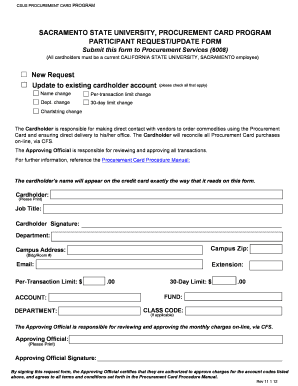
Lders must be a current CALIFORNIA STATE UNIVERSITY, SACRAMENTO employee) New Request Update to existing cardholder account Name change Per-transaction limit change Dept. change 30-day limit change (please check all that apply) Chartstring change The Cardholder is responsible for making direct contact with vendors to order commodities using the Procurement Card and ensuring direct delivery to his/her office. The Cardholder will reconcile all Procurement Card purchases on-line, via CFS. Th.

How it works

  1. Open form

    Open form follow the instructions

  2. Easily sign form

    Easily sign the form with your finger

  3. Share form

    Send filled & signed form or save

How to fill out the Cardholder Request Form - California State University, Sacramento online

Filling out the Cardholder Request Form at California State University, Sacramento is a straightforward process that ensures you can effectively manage your procurement card needs. This guide will take you through each step necessary to complete the form accurately and efficiently.

Follow the steps to fill out the Cardholder Request Form online.

  1. Press the ‘Get Form’ button to access the Cardholder Request Form and open it for editing.
  2. Begin by indicating whether you are making a new request or updating an existing cardholder account. Check all applicable options such as a name change, per-transaction limit change, departmental change, or 30-day limit change.
  3. Fill in the cardholder's information, including your full name, job title, department, campus address, campus zip code, email address, and extension. Ensure that the cardholder's name is written exactly as it should appear on the card.
  4. Enter the per-transaction limit and 30-day limit for your procurement card, making sure to specify the dollar amounts clearly.
  5. Complete the account, department, fund, and class code sections if applicable to your request.
  6. Provide the name and signature of the approving official, confirming their authorization to approve charges for the specified account codes. Ensure that this is printed clearly.
  7. Review all sections of the form thoroughly for accuracy before finalizing.
  8. Once completed, save the changes to your form. You can choose to download, print, or share the form as required.

Take action today and complete your Cardholder Request Form online to facilitate your procurement card management.

Get form

Experience a faster way to fill out and sign forms on the web. Access the most extensive library of templates available.
Get form

Related content

California State University
Jul 6, 2000 — CSU generally calls these procurement cards PRO-. Cards. Each authorized...
Learn more
Procurement Card Program | Sacramento State
Sacramento State now offers a VISA Procurement Card program through US Bank. The...
Learn more
Campus Catalog - BPPE
All classroom reservations and event requests need to be filled out via an event request...
Learn more

Related links form

Small Ten Frame Cards LIMITED TERM CONTRACT FOR ON-CALL SPEECH-LANGUAGE & AAC ASSESSMENT PROTOCOL WJEC EDUQAS Anthology Poetry

Questions & Answers

Get answers to your most pressing questions about US Legal Forms API.

Contact support

To communicate with a counselor at Sac State, you can utilize online appointment booking. By filling out the Cardholder Request Form - California State University, Sacramento, you will ensure a direct line of communication. Counselors are eager to assist you with your academic journey, so don't hesitate to reach out.

Talking to your counselor can be done through various communication methods. It's best to schedule a meeting using the Cardholder Request Form - California State University, Sacramento for a face-to-face discussion. Alternatively, you may reach out via email or phone, if that's more convenient for you.

To make an appointment with a counselor at Mt SAC, you should first access the college’s counseling website. Look for the scheduling system and select the Cardholder Request Form - California State University, Sacramento to secure your spot. This ensures you receive dedicated time for discussing your academic and personal goals.

Meeting with a counselor at Sac State is straightforward. You can start by filling out the Cardholder Request Form - California State University, Sacramento, to book an appointment. Additionally, checking online for available slots and counselor profiles can help you choose the right counselor for your needs.

To obtain your SAC state ID, you need to provide valid identification and complete the Cardholder Request Form - California State University, Sacramento. This form requires you to include personal details, such as your name and student number. Once submitted, the processing team will verify your application and provide instructions on how to receive your ID.

At Sacramento State, a grade of D- is generally the minimum passing grade for most courses. However, keep in mind that specific programs may have stricter requirements. It’s advisable to review your program guidelines and, if needed, reach out regarding the Cardholder Request Form - California State University, Sacramento, for any academic concerns.

Sacramento State offers various majors, with Business Administration, Criminal Justice, and Psychology consistently ranking among the top. These programs are popular due to their strong faculty, resources, and network opportunities. If you plan to apply, the Cardholder Request Form - California State University, Sacramento, could be your first step towards accessing the resources you need.

The Bursar's Office at Sacramento State typically opens at AM and closes at PM, Monday through Friday. However, checking the official website for the most current hours is always a good idea. For any inquiries related to payments or the Cardholder Request Form - California State University, Sacramento, it’s best to reach out during these hours.

You can contact any California State University Admissions office through their respective email addresses found on their websites. When emailing, ensure you provide all necessary details, including your inquiry and personal information. For assistance with formal requests or documents, the Cardholder Request Form - California State University, Sacramento, can help guide your submissions.

To contact the California State University, Bakersfield (CSUB) Admissions office, send your email to admissions@csub. It is important to present your questions clearly to receive a prompt response. If you need to follow up with any documentation, consider the Cardholder Request Form - California State University, Sacramento, for efficient handling.

Get This Form Now!

Use professional pre-built templates to fill in and sign documents online faster. Get access to thousands of forms.
Get form
If you believe that this page should be taken down, please follow our DMCA take down processhere.

Industry-leading security and compliance

US Legal Forms protects your data by complying with industry-specific security standards.
  • In businnes since 1997
    25+ years providing professional legal documents.
  • Accredited business
    Guarantees that a business meets BBB accreditation standards in the US and Canada.
  • Secured by Braintree
    Validated Level 1 PCI DSS compliant payment gateway that accepts most major credit and debit card brands from across the globe.
Get Cardholder Request Form - California State University, Sacramento
Get form
Form Packages
Adoption
Bankruptcy
Contractors
Divorce
Home Sales
Employment
Identity Theft
Incorporation
Landlord Tenant
Living Trust
Name Change
Personal Planning
Small Business
Wills & Estates
Packages A-Z
Form Categories
Affidavits
Bankruptcy
Bill of Sale
Corporate - LLC
Divorce
Employment
Identity Theft
Internet Technology
Landlord Tenant
Living Wills
Name Change
Power of Attorney
Real Estate
Small Estates
Wills
All Forms
Forms A-Z
Form Library
Customer Service
Terms of Service
Privacy Notice
Legal Hub
Content Takedown Policy
Bug Bounty Program
About Us
Help Portal
Legal Resources
Blog
Affiliates
Contact Us
Delete My Account
Site Map
Industries
Forms in Spanish
Localized Forms
State-specific Forms
Forms Kit
Legal Guides
Real Estate Handbook
All Guides
Prepared for You
Notarize
Incorporation services
Our Customers
For Consumers
For Small Business
For Attorneys
Our Sites
US Legal Forms
USLegal
FormsPass
pdfFiller
signNow
airSlate WorkFlow
DocHub
Instapage
Social Media
Call us now toll free:
+1 833 426 79 33
As seen in:
  • USA Today logo picture
  • CBC News logo picture
  • LA Times logo picture
  • The Washington Post logo picture
  • AP logo picture
  • Forbes logo picture
© Copyright 1997-2025
airSlate Legal Forms, Inc.
3720 Flowood Dr, Flowood, Mississippi 39232
Form Packages
Adoption
Bankruptcy
Contractors
Divorce
Home Sales
Employment
Identity Theft
Incorporation
Landlord Tenant
Living Trust
Name Change
Personal Planning
Small Business
Wills & Estates
Packages A-Z
Form Categories
Affidavits
Bankruptcy
Bill of Sale
Corporate - LLC
Divorce
Employment
Identity Theft
Internet Technology
Landlord Tenant
Living Wills
Name Change
Power of Attorney
Real Estate
Small Estates
Wills
All Forms
Forms A-Z
Form Library
Customer Service
Terms of Service
Privacy Notice
Legal Hub
Content Takedown Policy
Bug Bounty Program
About Us
Help Portal
Legal Resources
Blog
Affiliates
Contact Us
Delete My Account
Site Map
Industries
Forms in Spanish
Localized Forms
State-specific Forms
Forms Kit
Legal Guides
Real Estate Handbook
All Guides
Prepared for You
Notarize
Incorporation services
Our Customers
For Consumers
For Small Business
For Attorneys
Our Sites
US Legal Forms
USLegal
FormsPass
pdfFiller
signNow
airSlate WorkFlow
DocHub
Instapage
Social Media
Call us now toll free:
+1 833 426 79 33
As seen in:
  • USA Today logo picture
  • CBC News logo picture
  • LA Times logo picture
  • The Washington Post logo picture
  • AP logo picture
  • Forbes logo picture
© Copyright 1997-2025
airSlate Legal Forms, Inc.
3720 Flowood Dr, Flowood, Mississippi 39232