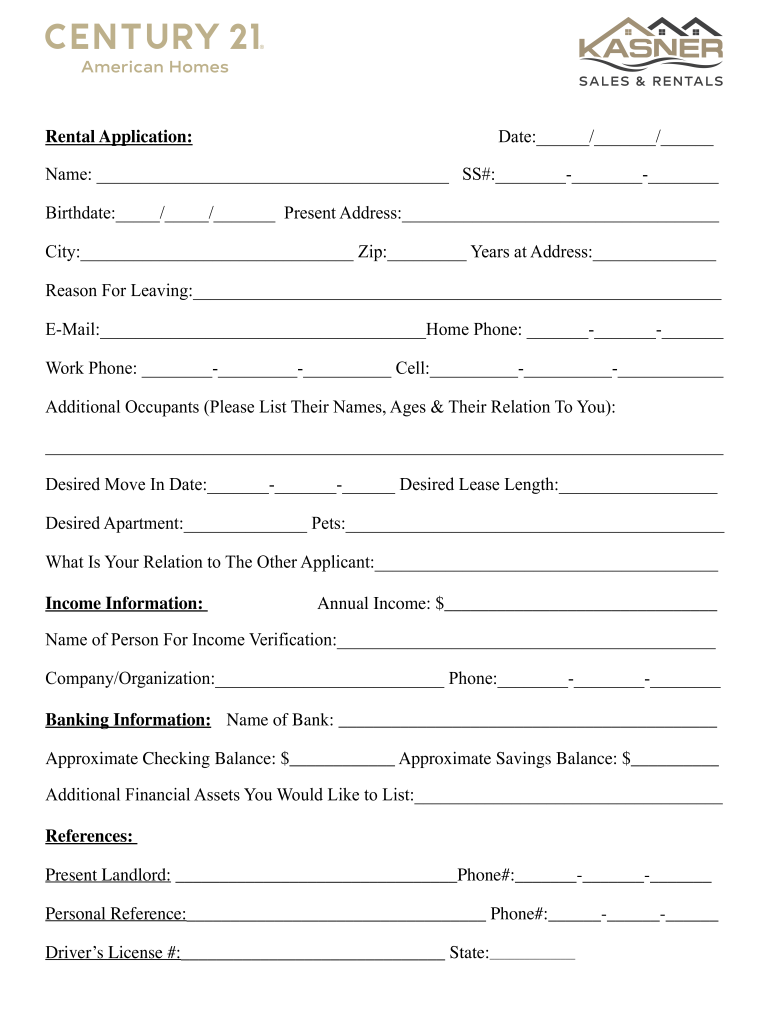
City: Zip: Years at Address: Reason For Leaving: E-Mail: Home Phone: - - Work Phone: - - Cell: - - Additional Occupants (Please List Their Names, Ages & Their Relation To You):.
Loading

Open form follow the instructions

Easily sign the form with your finger

Send filled & signed form or save
How to fill out the Kasner Sales & Rentals Rental Application online
Filling out the Kasner Sales & Rentals Rental Application online is a straightforward process that requires careful attention to detail. This guide will walk you through each section of the application, ensuring that you provide all necessary information accurately.
Follow the steps to complete your rental application online.
- Click ‘Get Form’ button to access the rental application. This action will allow you to open the form in your preferred editor.
- Fill in the date of your application in the provided field: Date: ____/______/______. Make sure to use the correct format.
- Enter your full name in the designated space: Name: ________________________________________ and include your Social Security number in the format: SS#: _______-_______-________.
- Input your birth date in the following section: Birthdate:_____/_____/_______.
- Complete your present address by providing the following details: Present Address: ____________________________________, City: __________________, Zip: _________.
- Indicate the number of years you have lived at your current address: Years at Address: ______________.
- State the reason for leaving your current residence in the provided space: Reason For Leaving: ____________________________________________________________.
- Provide your email address in the field labeled: E-Mail: _______________________________________.
- List your contact numbers, including Home Phone: _______-_______-_______, Work Phone: ________-________-__________, and Cell: __________-__________-____________.
- If applicable, please mention additional occupants by listing their names, ages, and relation to you: Additional Occupants (Please List Their Names, Ages & Their Relation To You): _____________________________________________________________________________.
- Indicate your desired move-in date: Desired Move In Date: _______-_______-_______.
- Specify your desired lease length in the section: Desired Lease Length: ______________.
- Identify the apartment you are interested in: Desired Apartment: ______________.
- If you have pets, note this in the corresponding field: Pets: ___________________________________________.
- Clarify your relation to the other applicant, if applicable: What Is Your Relation to The Other Applicant: _________________________________________.
- Provide your annual income in the section: Annual Income: $___________________________.
- Name the person who can verify your income: Name of Person For Income Verification: ___________________________________________.
- Include the company or organization along with their contact number: Company/Organization: __________________________ Phone: ________-________-________.
- State your banking information, including: Name of Bank: ___________________________________________ and your approximate checking and savings balances: Approximate Checking Balance: $____________ Approximate Savings Balance: $__________.
- If you have any additional financial assets, list them in the provided space: Additional Financial Assets You Would Like to List: ____________________________________.
- Fill in your references, starting with your present landlord: Present Landlord: ________________________________ Phone#: _______-_______-_______.
- Add a personal reference in the section: Personal Reference: ____________________________________ Phone#: ______-______-______.
- Input your driver's license number and state: Driver’s License #: ________________________________ State: __________________.
- Review the notice about tenant screening reports to understand how it may affect your application.
- Confirm all declarations by signing at the bottom of the form and dating it: X __________________________________________ Applicant Signature ____/______/_______ Date.
- After filling out the form completely, you can save changes, download, print, or share the form as needed.
Complete your application easily online today to secure your new rental!
Experience a faster way to fill out and sign forms on the web. Access the most extensive library of templates available.
Related content
[House Hearing, 116 Congress] [From the U.S. Government Publishing Office] LANDLORD AND...
Rental Properties. 2015 US Department of Housing and. Urban Development ... 2019 Book...
Cover: The plume maps represent the distribution of TCE in one groundwater zone at the MEW...
Get answers to your most pressing questions about US Legal Forms API.
How to fill out a landlord application?
Filling out a landlord application is straightforward if you gather all necessary information first. Ensure you have your employment details, income records, and personal references ready. By accurately completing your Kasner Sales & Rentals Rental Application and being upfront about your history, you demonstrate your commitment as a future tenant.
How to make yourself stand out on a rental application?
To stand out on a rental application, highlight your reliability and responsibility as a tenant. Provide references from previous landlords or personal contacts who can vouch for your character. Alongside a well-prepared Kasner Sales & Rentals Rental Application, showcasing your positive rental history can set you apart from other applicants.
How much income do most landlords require?
Most landlords require that your income be at least two to three times the monthly rent. This requirement ensures that you can comfortably afford the rent, along with other living expenses. By demonstrating your financial stability in the Kasner Sales & Rentals Rental Application, you enhance your chances of approval.
What are red flags on a rental application?
Red flags on a rental application include insufficient income to cover rent, inconsistent employment history, or a poor rental history with prior evictions. Additionally, a lack of references or unexplained gaps in your rental history may raise concerns. Being aware of these red flags can help you prepare a strong Kasner Sales & Rentals Rental Application that addresses potential issues upfront.
How to pass a rental application check?
To pass a rental application check, provide accurate details about your financial and rental history. Landlords often look for stable employment and a good rental track record. By preparing your documentation in advance, such as proof of income and references, you can strengthen your Kasner Sales & Rentals Rental Application. This preparation shows landlords that you are a reliable candidate.
How can I make my rental application stand out?
You can make your rental application stand out by including references from previous landlords and ensuring all your information is accurate. Demonstrating a strong understanding of the local rental market also helps. Using the Kasner Sales & Rentals Rental Application allows you to present yourself effectively, attracting the attention of prospective landlords.
How common are background checks for rentals?
Background checks for rentals are quite common and often considered a standard procedure. Most landlords want to verify an applicant's credit history, previous rental behavior, and any criminal records. Using the Kasner Sales & Rentals Rental Application can help provide landlords with the necessary information quickly and efficiently.
What looks bad on rental history?
Items that negatively impact rental history include late payments, evictions, and lease violations. Furthermore, frequent changes in residence without justifiable reasons can raise concerns. To mitigate these issues, ensure your Kasner Sales & Rentals Rental Application presents your history clearly and positively.
How do I pass a rental application?
To pass a rental application, ensure that all information is accurate and complete. Highlight your rental history and provide glowing references from previous landlords. Utilizing the features on the Kasner Sales & Rentals Rental Application can also help showcase your strengths as a prospective tenant.
Can I appeal a rental application rejection?
Yes, you can appeal a rental application rejection. Start by asking the landlord for specific reasons behind the decision, as this can provide clarity. If the rejection involved inaccuracies in your application or background check, addressing those issues can lead to a reconsideration of your Kasner Sales & Rentals Rental Application.
Use professional pre-built templates to fill in and sign documents online faster. Get access to thousands of forms.
If you believe that this page should be taken down, please follow our DMCA take down process here.