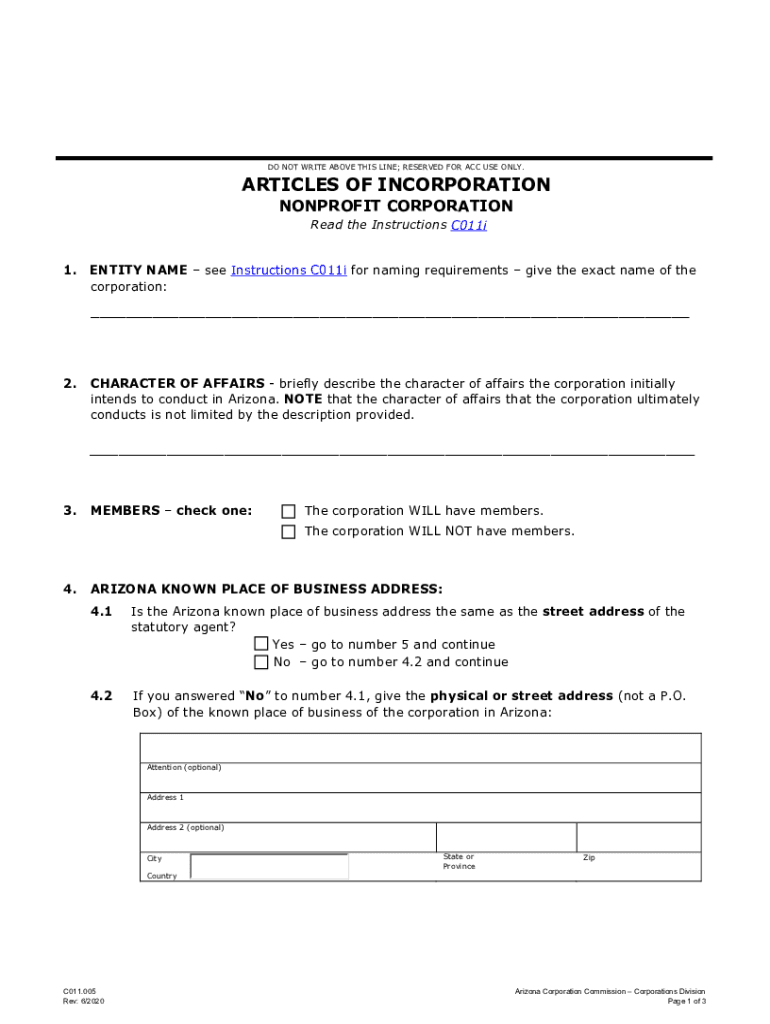
I for naming requirements give the exact name of the corporation: 2. CHARACTER OF AFFAIRS - briefly describe the character of affairs the corporation initially intends to conduct in Arizona. NOTE that the character of affairs that the corporation ultimately conducts is not limited by the description provided. 3. MEMBERS check one: The corporation WIL.
Loading

Open form follow the instructions

Easily sign the form with your finger

Send filled & signed form or save
How to fill out the AZ Form C011 online
This guide provides comprehensive instructions for filling out the AZ Form C011, which is used for filing Articles of Incorporation for a nonprofit corporation in Arizona. The step-by-step approach is designed to help users complete the form online effectively, regardless of their legal experience.
Follow the steps to fill out the AZ Form C011 accurately.
- Click 'Get Form' button to obtain the form and open it in the editor.
- Provide the exact name of the corporation in the 'Entity Name' field. Refer to the instructions for any naming requirements.
- In the 'Character of Affairs' section, briefly describe the activities the corporation intends to pursue in Arizona. Note that this description does not limit future activities.
- In the 'Members' section, check the appropriate box to indicate whether the corporation will have members or not.
- Fill out the 'Arizona Known Place of Business Address' section. If the address is the same as the statutory agent's, proceed to the next section. If not, provide the physical address of the corporation's business location.
- List the names and business addresses of all directors in the 'Directors' section. If additional space is needed, check the box and complete the Director Attachment form C082.
- In the 'Statutory Agent' section, provide the name and address of the statutory agent, ensuring it is not a P.O. Box. Remember to submit the Statutory Agent Acceptance form M002 along with this form.
- Complete the 'Certificate of Disclosure' as this must be submitted with the Articles of Incorporation to avoid rejection.
- List the names and addresses of each incorporator in the 'Incorporators' section. A signature is required, and if more space is necessary, check the box and attach form C084.
- Before submission, review the information provided. Check the box stating 'I accept' to confirm compliance with Arizona law and provide your signature and printed name along with the date.
- Finally, save your changes, download, print, or share the form as needed for submission.
Complete your AZ Form C011 online today for a smooth filing experience.
Experience a faster way to fill out and sign forms on the web. Access the most extensive library of templates available.
Related content
ENTITY NAME – see Instructions C011i for naming requirements – give the exact name of...
Sep 16, 2020 — ... form to the. BOR/Office of Research and Policy Analysis to have the...
Provides the basic information needed to understand the product. (Operating instructions...
Get answers to your most pressing questions about US Legal Forms API.
How do I check the status of my LLC in Arizona?
To check the status of your LLC in Arizona, visit the Arizona Corporation Commission's website. You will need your LLC name or the Arizona Corporation Commission's file number. This allows you to quickly verify the status and ensure that everything is in order.
How to order AZ tax forms?
Ordering AZ tax forms is straightforward, and you can obtain them directly from the Arizona Department of Revenue website. Additionally, platforms like US Legal Forms offer various templates, including tax forms, which can simplify your preparation. Always ensure you have the correct forms required for your LLC to stay compliant.
How long does it take to get an LLC approved in Arizona?
Approval times for an LLC in Arizona can vary. If you file the AZ Form C011 online, you might receive confirmation in just a few hours. Conversely, mailed applications can take several days to process. To ensure timely approval, consider submitting your application electronically through a reliable platform.
How long does it take for an LLC to take effect?
An LLC in Arizona becomes effective immediately upon approval, provided you have correctly submitted the AZ Form C011. This means you can start conducting business almost right away. However, it's wise to wait until you receive confirmation from the state before proceeding with business activities.
How fast can you get an LLC in Arizona?
The speed of forming an LLC in Arizona largely depends on the filing method you choose. If you file online, you can often receive approval within a few hours. However, if you opt for mail submission, it may take up to a week. Using the AZ Form C011 can facilitate a quicker process as the form is designed for easy online submission.
How hard is it to get an LLC in Arizona?
Forming an LLC in Arizona is relatively straightforward. You need to complete and submit the AZ Form C011, which is user-friendly and includes clear instructions. Many entrepreneurs find that utilizing platforms like US Legal Forms simplifies this process even further, providing templates and guides to ensure compliance with state laws.
What do I need to start a 501c3 in Arizona?
To start a 501c3 in Arizona, you'll need a clearly defined mission, at least three board members, and bylaws that govern your organization. Additionally, you'll have to complete and file AZ Form C011 with the Arizona Corporation Commission. It’s also crucial to gather other documents, such as your articles of incorporation and an application for federal tax exemption. This comprehensive approach lays a solid foundation for your non-profit’s success.
How do you start a non-profit in Arizona?
Starting a non-profit in Arizona involves several key steps. First, you need to choose a purpose and establish your organization as a corporation. Next, file the required documents, like the AZ Form C011, with the Arizona Corporation Commission. Finally, apply for federal and state tax exemptions to ensure your non-profit can operate effectively and fulfill its mission.
How to apply for 501c3 status in Arizona?
To apply for 501c3 status in Arizona, you first need to establish your non-profit as a legal entity. You then complete and submit the necessary forms, including the AZ Form C011, to the Arizona Corporation Commission. After establishing your organization, you must file for federal tax-exempt status with the IRS. Remember, having a clear plan enhances your application’s chance of success.
How many board members does a 501c3 need in Arizona?
In Arizona, a 501c3 organization must have a minimum of three board members. These members should not all be from the same household to ensure a diverse perspective. Increasing the number of board members can strengthen governance and enhance personal connections within the community. Using AZ Form C011 can guide you through documenting your board's setup effectively.
Use professional pre-built templates to fill in and sign documents online faster. Get access to thousands of forms.
If you believe that this page should be taken down, please follow our DMCA take down process here.