Loading
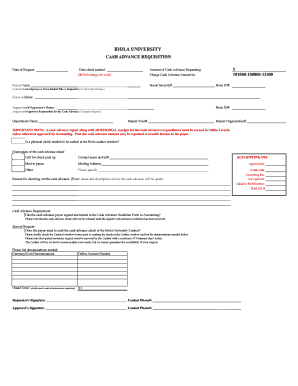
Get Date Of Request: Amount Of Cash Advance ... - Biola Forms
How it works
-

Open form follow the instructions
-

Easily sign the form with your finger
-

Send filled & signed form or save
How to fill out the Date Of Request: Amount Of Cash Advance ... - Biola Forms online
Completing the Date Of Request: Amount Of Cash Advance ... - Biola Forms online is a straightforward process designed to facilitate your cash advance requests. This guide provides step-by-step instructions to ensure you fill out the form correctly and submit your request efficiently.
Follow the steps to fill out the form accurately.
- Click 'Get Form' button to obtain the form and open it in the editor.
- Enter the date of your request in the designated field labeled 'Date of Request'. This should reflect the current date when you are submitting the form.
- Indicate the date when the check is needed by filling in the 'Date check needed' section.
- Specify the amount of cash advance you are requesting by entering it in the 'Amount of Cash Advance Requesting' field. Include any rush charge if applicable.
- Charge the cash advance amount to the designated account number listed under 'Charge Cash Advance Amount to'.
- Fill in the payee's name, social security number, and Biola ID in the respective fields. Ensure this information is accurate for proper identification.
- Provide the payee's address in the space provided. Make sure every detail is correct.
- List the supervisor's or approver's name along with their Biola ID to indicate who is approving the cash advance.
- Complete the fields for the department name and the corresponding Banner fund and organization numbers.
- Answer whether a physical check is needed at the Biola cashier window by selecting 'Yes' or 'No'.
- Indicate the disposition of the cash advance check by choosing from the options provided (call for pick up, mail to payee, etc.).
- Provide your contact name and telephone number for follow-up regarding the cash advance.
- Fill in the reason for requesting the cash advance in the designated section, providing details about the event and expenditure.
- Check if the cash advance payee has signed and submitted the Cash Advance Guideline Form to Accounting.
- Add any special requests related to the cash advance check, including the denominations needed. Make sure to provide at least three business days' notice for any special monetary requests.
- Review all entered information for accuracy before finalizing your submission.
- Once completed, users can save changes, download, print, or share the form as needed.
Complete your cash advance request online and ensure timely approval.
Industry-leading security and compliance
US Legal Forms protects your data by complying with industry-specific security standards.
-
In businnes since 199725+ years providing professional legal documents.
-
Accredited businessGuarantees that a business meets BBB accreditation standards in the US and Canada.
-
Secured by BraintreeValidated Level 1 PCI DSS compliant payment gateway that accepts most major credit and debit card brands from across the globe.