Loading
Get Canada Bc Transit H10 2006-2026
How it works
-

Open form follow the instructions
-

Easily sign the form with your finger
-

Send filled & signed form or save
How to fill out the Canada BC Transit H10 online
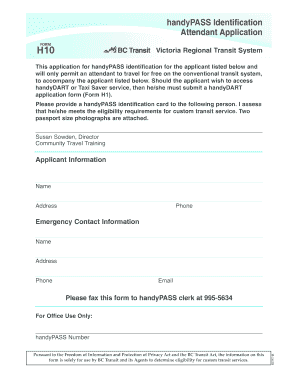
This guide provides clear and detailed instructions on how to complete the Canada BC Transit H10 application for handyPASS identification online. By following these steps, users can ensure a smooth and efficient submission process.
Follow the steps to successfully complete your application.
- Click ‘Get Form’ button to obtain the form and open it in the online editor.
- Begin by filling out the applicant information section. Provide the name, address, and phone number of the person applying for the handyPASS identification.
- Complete the emergency contact information section by entering the name, address, phone number, and email of an individual who can be contacted in case of emergencies.
- Attach two passport-sized photographs of the applicant as required. Ensure that the photographs meet the specified guidelines for submission.
- Review all entered information for accuracy and completeness. Make any necessary corrections or updates.
- Once the form is complete, save the changes, and prepare for submission. You can download the completed form, print it, or share it as needed.
- Fax the completed form to the handyPASS clerk at 995-5634 as indicated in the instructions.
Start filling out your Canada BC Transit H10 application online today to ensure you receive your handyPASS identification promptly.
The email format for Canada BC Transit H10 generally consists of their official domain followed by the appropriate department or service name. You can find specific email addresses on their website, where they outline contact options for different inquiries. This ensures that your questions reach the right team promptly.