Loading
Get Dte Energy De 963-0090 2006-2026
How it works
-

Open form follow the instructions
-

Easily sign the form with your finger
-

Send filled & signed form or save
How to fill out the DTE Energy DE 963-0090 online
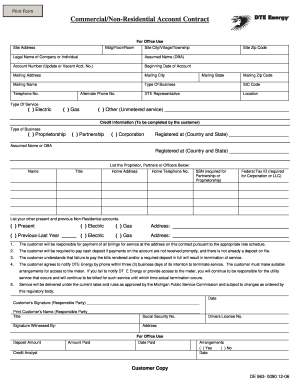
Completing the DTE Energy DE 963-0090 form online can be a straightforward process when you have clear guidance. This comprehensive guide will help you navigate each section of the form to ensure you provide all required information correctly.
Follow the steps to successfully complete your form.
- Click ‘Get Form’ button to download the DTE Energy DE 963-0090 form and open it in your preferred editor.
- Begin by entering the site address, including the building, floor, and room, followed by the city, village, or township and the zip code.
- Provide the legal name of the company or individual and any assumed name (Doing Business As). Make sure to include the appropriate account number if applicable.
- Input the beginning date of the account. This information is critical for establishing service.
- Complete the mailing address section, which includes the city, state, and zip code. Ensure that these details match your official records.
- Indicate the type of business by selecting the appropriate option, and provide the Standard Industrial Classification (SIC) code if available.
- Fill in the contact information for the DTE representative, including location, telephone number, and an alternate phone number.
- Select the type of service you require: electric, gas, or other (unmetered service). Specify details if you choose 'other'.
- For credit information, select the type of business entity: proprietorship, partnership, or corporation, and provide the necessary registered country and state.
- List all proprietors, partners, or officers with their names, titles, home addresses, home telephone numbers, Social Security Numbers (if applicable), and Federal Tax IDs (if applicable).
- Document your present and previous non-residential accounts by checking the appropriate boxes and providing the addresses.
- Review the terms and conditions outlined in the document, which detail responsibilities regarding service payments and account termination.
- Once all sections have been completed, sign and date the form. Print your name and title, and ensure the signature is witnessed where required.
- Finally, save your changes, download the completed form, and prepare to print or share it as needed.
Complete your DTE Energy DE 963-0090 form online today for a seamless setup.
Setting up the DTE Energy Bridge is a straightforward process. You can do it through the DTE Energy website or by calling their customer service for assistance. This bridge offers advanced features to help you manage your energy usage effectively and notifications regarding your account with DTE Energy DE 963-0090.