Loading
Get Check-out Form - Uw Chemical Engineering - University Of ...
How it works
-

Open form follow the instructions
-

Easily sign the form with your finger
-

Send filled & signed form or save
How to use or fill out the Check-Out Form - UW Chemical Engineering - University Of ... online
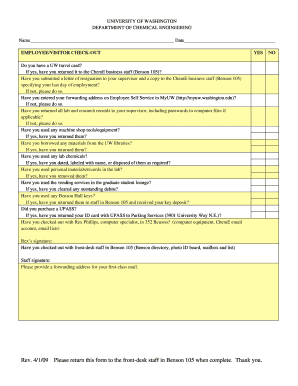
Filling out the Check-Out Form for the UW Chemical Engineering department is an important step for users exiting their position. This guide provides comprehensive, step-by-step instructions to ensure that all necessary sections are completed properly.
Follow the steps to complete the Check-Out Form efficiently.
- Click ‘Get Form’ button to obtain the form and open it in the editor.
- Begin by entering your full name and the date in the designated fields. Ensure that the information is accurate as it will be used for official records.
- Next, address questions regarding your UW travel card. If applicable, indicate whether you have returned the travel card to the ChemE business staff located in Benson 105.
- If you are leaving your position, confirm if you have submitted a letter of resignation to your supervisor as well as a copy to the ChemE business staff. It is important to specify your last day of employment.
- Make sure to enter your forwarding address in the Employee Self Service section in MyUW, as this is critical for receiving communications after departure.
- Check if you have returned all lab and research records to your supervisor, including any required passwords for computer files.
- If you have used machine shop tools or equipment, ensure that they have been returned.
- If you borrowed materials from the UW libraries, make sure to return them before finalizing the form.
- For any lab chemicals you've used, confirm that they have been dated, labeled with your name, or disposed of as required.
- Ensure that you have removed any personal materials or records from the lab.
- If you have utilized vending services in the graduate student lounge, clear any outstanding debits prior to submission.
- If keys to Benson Hall were issued to you, return them to the staff in Benson 105 to receive your key deposit.
- If you purchased a UPASS, confirm that you have returned your ID card with UPASS to Parking Services.
- Check out with the computer specialist, Rex Phillips, to ensure all computer equipment and related accounts are properly settled. You will need Rex's signature on the form.
- Finalize your check-out by confirming with the front-desk staff in Benson 105 regarding the Benson directory, photo ID board, mailbox, and other relevant items. Be sure to obtain their signature as well.
- Finally, provide a forwarding address for first-class mail at the end of the form, ensuring that all personal correspondence can reach you post-departure.
- Once all sections are completed and necessary signatures obtained, save changes and submit the form back to the front-desk staff in Benson 105.
Complete your documents online to ensure a smooth check-out process today.
Freshman. Read more about applying to the UW as a freshman, including details for programs that provide high school students with college credit (like Running Start). The primary pathway to chemical engineering is through Direct to College admission to the College of Engineering.
Industry-leading security and compliance
US Legal Forms protects your data by complying with industry-specific security standards.
-
In businnes since 199725+ years providing professional legal documents.
-
Accredited businessGuarantees that a business meets BBB accreditation standards in the US and Canada.
-
Secured by BraintreeValidated Level 1 PCI DSS compliant payment gateway that accepts most major credit and debit card brands from across the globe.