Loading
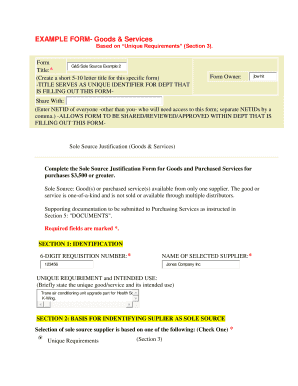
Get Example Form- Goods & Services - F2 Washington
How it works
-

Open form follow the instructions
-

Easily sign the form with your finger
-

Send filled & signed form or save
How to fill out the EXAMPLE FORM- Goods & Services - F2 Washington online
Filling out the EXAMPLE FORM- Goods & Services - F2 Washington online can seem overwhelming, but with careful guidance, you will navigate the process confidently. This guide provides detailed, step-by-step instructions to ensure you complete the form accurately and efficiently.
Follow the steps to successfully complete your form.
- Press the ‘Get Form’ button to retrieve the form and open it for editing.
- Begin with Section 1: IDENTIFICATION. Enter a unique title that serves as an identifier for the department filling out the form. Complete the fields for the 6-digit requisition number and the name of the selected supplier.
- In Section 2: BASIS FOR IDENTIFYING SUPPLIER AS SOLE SOURCE, select 'Unique Requirements' to justify the selection of the sole source supplier.
- Proceed to Section 3: UNIQUE REQUIREMENT(S). Select the unique requirement from the dropdown menu and provide an explanation where required. Include details regarding the current equipment information.
- Skip Section 4, as it is automatically determined based on your previous selection.
- In Section 5: DOCUMENTS, attach supporting documentation by clicking 'Choose File' or 'Browse.' Select the appropriate document category from the dropdown menu before clicking 'Attach' to upload the file.
- Navigate to Section 6: ADDITIONAL COMMENTS. If necessary, provide any extra information relevant to your submission.
- Fill out Section 7: SUBMITTER’S SIGNATURE. Enter your name, full email address, and phone number. Ensure the information submitted is accurate, as it is subject to audit.
- Finally, save your changes and submit the form. Remember, once submitted, the form cannot be modified.
Complete your EXAMPLE FORM- Goods & Services - F2 Washington online today for a streamlined submission process.
Industry-leading security and compliance
US Legal Forms protects your data by complying with industry-specific security standards.
-
In businnes since 199725+ years providing professional legal documents.
-
Accredited businessGuarantees that a business meets BBB accreditation standards in the US and Canada.
-
Secured by BraintreeValidated Level 1 PCI DSS compliant payment gateway that accepts most major credit and debit card brands from across the globe.