Loading
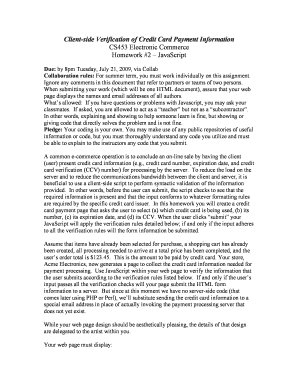
Get Cs453 Electronic Commerce
How it works
-

Open form follow the instructions
-

Easily sign the form with your finger
-

Send filled & signed form or save
How to fill out the CS453 Electronic Commerce online
This guide will provide you with a comprehensive overview of the CS453 Electronic Commerce form and detailed instructions on how to complete it successfully. Whether you are familiar with digital document management or are tackling this for the first time, this guide is designed to support you through the process.
Follow the steps to complete your CS453 Electronic Commerce form online.
- Click the 'Get Form' button to acquire the CS453 Electronic Commerce form and open it in your preferred document editor.
- Begin by entering your name and email address at the top of the form, following the specified format of listing all authors. This ensures proper authorship is recorded.
- Next, provide the name of your company, Acme Electronics, using a distinctive font as directed in the assignment details.
- Include an appropriate image or logo representative of an electronics store to enhance the visual design of your page.
- Indicate the total price of the user’s order, which is $123.45, clearly on the page to inform users about their payment amount.
- Request the user to select their credit card type (American Express, Visa, or MasterCard) and create three radio buttons for these options.
- Ask the user to enter their credit card number in a designated text box and ensure instructions clarify that only numerals are accepted.
- Request the expiration date information by providing a drop-down menu for the month (with all months from January to December) and another for the year (2009-2014).
- Ask the user for the CCV by providing a text box to input this three-digit number, reminding them of the validity requirements for this field.
- Finally, add a 'Submit' button for the user to send their information after validation, alongside a 'Reset' button that allows them to clear the form at any point.
- Ensure your JavaScript code runs the required validation checks when the user submits the form, ensuring that erroneous input does not proceed to processing. If valid, simulate data submission by emailing it to the designated address.
- Review your completed document for any errors or omissions before saving your form and submitting it by the specified deadline.
Complete your CS453 Electronic Commerce form online to ensure a smooth submission process.
Ecommerce is the electronic buying and selling of goods and services, usually via the internet. Businesses can build their own ecommerce website, set up an ecommerce storefront on an established selling site like Amazon, or do it all for a multi-channel approach.
Industry-leading security and compliance
US Legal Forms protects your data by complying with industry-specific security standards.
-
In businnes since 199725+ years providing professional legal documents.
-
Accredited businessGuarantees that a business meets BBB accreditation standards in the US and Canada.
-
Secured by BraintreeValidated Level 1 PCI DSS compliant payment gateway that accepts most major credit and debit card brands from across the globe.