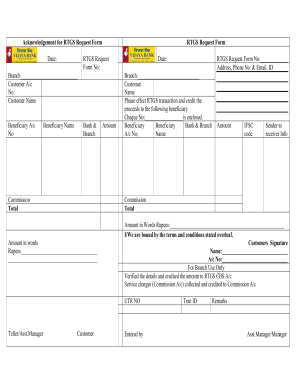
RTGS Request Form Bank & Branch Commission Total Amount in words Rupees____________________________________ __________________________________________ Amount Date: Branch:_____________________________ Customer Name Please effect RTGS transaction and credit the proceeds to the following beneficiary Cheque No:__________________is enclosed. Beneficiary Beneficiary Bank & Branch Amount A/c No; Name IFSC code Sender to r.
Open form follow the instructions
Easily sign the form with your finger
Send filled & signed form or save
How to fill out the Vijaya Bank RTGS Form online
Filling out the Vijaya Bank RTGS Form online can streamline your money transfer process, ensuring that your transactions are handled efficiently and securely. This guide will walk you through each section of the form, providing clear and concise instructions for a successful submission.
Follow the steps to complete your RTGS form online.
- Click the ‘Get Form’ button to obtain the form and open it in your editor.
- Enter the date in the designated field to indicate when you are filling out the form.
- Fill in the RTGS Request Form number in the specified area to help identify your request.
- Select your branch from the dropdown menu or fill in the branch name to inform the bank where you maintain your account.
- Provide your customer account number clearly to ensure accurate processing of your request.
- Input your full name in the section labeled 'Customer Name’ for identification purposes.
- Enter the beneficiary's account number to whom you wish to transfer funds. This ensures that the transaction is directed correctly.
- Fill in the beneficiary's name to further confirm the recipient of the transaction.
- Specify the bank and branch of the beneficiary to facilitate the transaction.
- Indicate the amount you wish to transfer in numerical form, ensuring it matches the amount stated in words.
- Provide the total amount in words for clarity, following the format specified in the form.
- Include any necessary information, such as the cheque number, if applicable.
- Fill out any sender to receiver information if required to provide additional context for the transaction.
- Review all entries for accuracy, ensuring every field is completed as per your details.
- Once all information is filled out and checked, save your changes, and choose to download, print, or share the form as necessary.
Begin your online RTGS transaction now by filling out the Vijaya Bank RTGS Form.
Experience a faster way to fill out and sign forms on the web. Access the most extensive library of templates available.
Related content
In 2005, the RBI introduced an inter-bank settlement system called the Real Time Gross...
The banks safeguards the money and valuables and provide loans, credit, and payment...
The minimum amount to be transferred through RTGS is Rs 2 lakh. Processing charges/Service...
Get answers to your most pressing questions about US Legal Forms API.
How to do RTGS full form?
The full form of RTGS is Real-Time Gross Settlement. It refers to a system that allows for the instantaneous transfer of funds on a gross basis without netting. To use this service, simply complete the Vijaya Bank RTGS Form with the required transaction details, enabling quick and effective fund movement.
What is the procedure for RTGS?
The procedure for RTGS involves filling out the Vijaya Bank RTGS Form, either online or at a branch. You must enter relevant information such as the amount, your account number, and the beneficiary’s details. After submission, your request will be reviewed and processed, allowing for immediate fund transfer.
How to fill out the RTGS form?
Filling out the RTGS form requires you to enter clear and accurate information. You'll need to provide your account details, the beneficiary’s account information, and the transfer amount on the Vijaya Bank RTGS Form. Ensuring correctness is key, as any discrepancies can delay the transaction.
How do I do a RTGS transaction?
To perform a RTGS transaction, start by accessing the Vijaya Bank website or app. Fill out the Vijaya Bank RTGS Form with your transaction and beneficiary details. After submission, the bank will process your request promptly, ensuring that the funds are transferred electronically and securely.
Can I transfer 20 lakhs through RTGS?
Yes, you can transfer 20 lakhs through RTGS as there is no upper limit for transactions under this method. Just make sure to fill out the Vijaya Bank RTGS Form correctly, including the amount and beneficiary details. This facility is ideal for high-value transactions, allowing you to securely move substantial funds.
How do I submit a RTGS form?
You can submit the RTGS form either online or at a Vijaya Bank branch. For online submissions, log into your account and complete the Vijaya Bank RTGS Form as instructed. If submitting in person, fill out the form and provide it at your nearest Vijaya Bank branch along with any required documents.
Is it possible to do RTGS online?
Yes, it is absolutely possible to do RTGS online through Vijaya Bank's secure banking portal. You can handle the entire process from your device by filling out the Vijaya Bank RTGS Form and entering necessary transaction details. This online service is not only efficient but also safe, providing you with quick access to fund transfers.
How to file RTGS online?
To file RTGS online, log into your Vijaya Bank internet banking account. Navigate to the RTGS section and complete the Vijaya Bank RTGS Form with the necessary details, such as the beneficiary’s account number and transfer amount. After verifying all the information, submit the form, and your request will be processed swiftly.
Does the post office have RTGS?
Currently, post offices do not offer RTGS services like banks do, including Vijaya Bank. If you would like to transfer funds using RTGS, you should utilize the services of a bank. Vijaya Bank provides a simple and effective way to handle RTGS transactions, so consider their platform for your transfer needs.
Can RTGS be done online?
Yes, RTGS can be done online using Vijaya Bank's internet banking platform. You need to log in to your account and locate the RTGS fund transfer option. Fill out the Vijaya Bank RTGS Form as prompted, entering all required details, and submit it for processing. This allows you to transfer funds quickly and conveniently from the comfort of your home.
Use professional pre-built templates to fill in and sign documents online faster. Get access to thousands of forms.
If you believe that this page should be taken down, please follow our DMCA take down process here.