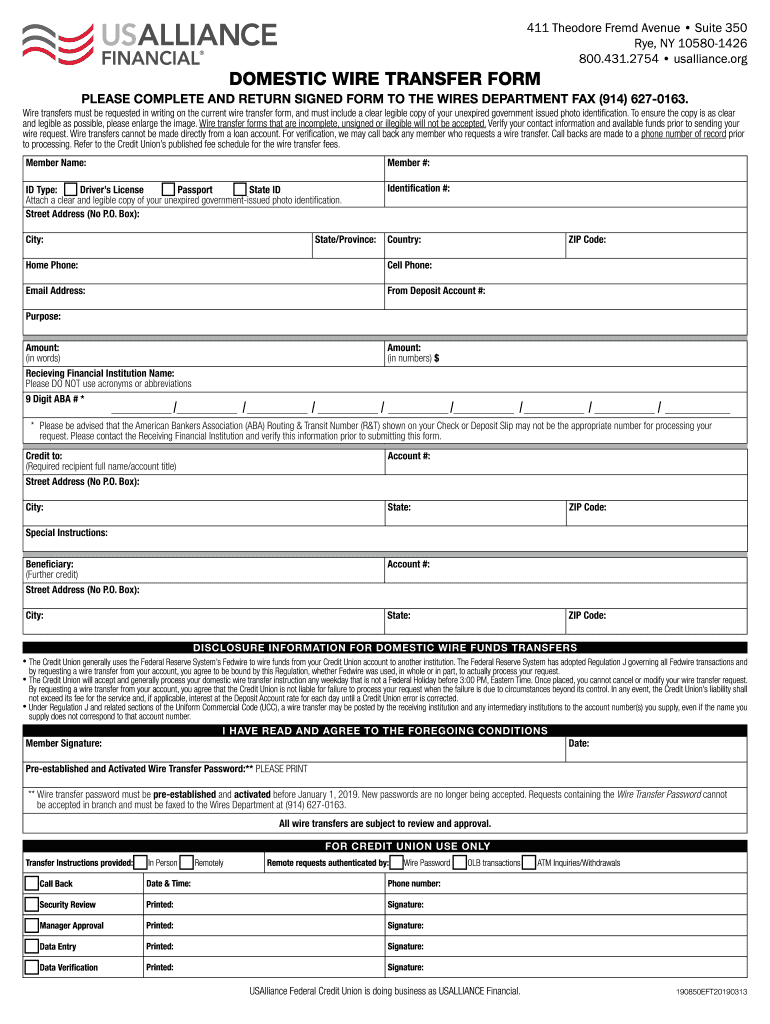
7-0163. Wire transfers must be requested in writing on the current wire transfer form, and must include a clear legible copy of your unexpired government issued photo identification. To ensure the copy is as clear and legible as possible, please enlarge the image. Wire transfer forms that are incomplete, unsigned or illegible will not be accepted. Verify your contact information and available funds prior to sending your wire request. Wire transfers cannot be made directly from a loan account. Fo.
Loading

Open form follow the instructions

Easily sign the form with your finger

Send filled & signed form or save
How to fill out the USAlliance Domestic Wire Transfer Form online
Filling out the USAlliance Domestic Wire Transfer Form online can streamline the process of transferring funds to another financial institution. This guide will walk you through each section of the form, ensuring that you provide all necessary information accurately and completely.
Follow the steps to complete your wire transfer request.
- Click ‘Get Form’ button to obtain the form and open it in the editor.
- Begin filling in your personal information by providing your full name, membership number, and current contact details, including your home and cell phone numbers and email address.
- Select your identification type from the available options (passport, state ID, driver’s license) and attach a clear and legible copy of your unexpired government-issued photo identification.
- Specify the deposit account number from which the funds will be transferred. Make sure that there are sufficient funds available in this account.
- Fill in the receiving financial institution's name and ensure that you do not use acronyms or abbreviations. Input the 9-digit ABA routing number accurately after verifying it with the receiving institution.
- Provide the recipient's full name or account title, street address, city, state, and ZIP code.
- If applicable, include any special instructions or details regarding further credit to a beneficiary, as well as their relevant information.
- Read the disclosure information for domestic wire funds transfers carefully, and sign the form where indicated. Make sure to include today's date.
- Finally, save your changes. You can download, print, or share the completed form as necessary, and return the signed form to the wires department via fax.
Complete your wire transfer request securely online today.
Experience a faster way to fill out and sign forms on the web. Access the most extensive library of templates available.
Related content
Any notice given pursuant to this Agreement must be in writing by an Authorized Person and...
Oct 25, 2024 — Information on your Sodexo benefits can be found online. That's why...
Nov 5, 2020 — 235 East 42 Street, New York, New York 10017. (Address of principal...
Get answers to your most pressing questions about US Legal Forms API.
How do I fill out an outgoing wire transfer form?
To fill out an outgoing wire transfer form like the USAlliance Domestic Wire Transfer Form, begin with your account information, including your routing and account numbers. Next, add the recipient's details, which include their name, address, and bank information. Make sure to double-check all entries for accuracy to avoid delays in sending your funds.
How long does a domestic wire transfer usually take?
A domestic wire transfer usually takes between one and two business days to process, depending on the banks involved. After you submit your USAlliance Domestic Wire Transfer Form, the transfer may be completed on the same day if submitted before the cutoff time. However, timing can vary, so it's best to check with your bank for specific details.
What do I need to receive a domestic wire transfer?
To receive a domestic wire transfer, you typically need to provide the sender with your bank name, routing number, and your account number. Additionally, you may want to share your full name and address to avoid any confusion. Using the USAlliance Domestic Wire Transfer Form can streamline this process and ensure all necessary details are accurately captured.
How do I fill out a wire transfer form?
To fill out the USAlliance Domestic Wire Transfer Form, start by entering your account details, including your account number and routing number. Next, provide the recipient's information, such as their full name, address, and the bank's details. Finally, review the entire form for accuracy before submitting it to ensure smooth processing.
Do you need a swift code for domestic wire transfer?
A swift code is not typically required for domestic wire transfers within the United States. Instead, you will mainly need the bank's routing number to process the transfer. When filling out the USAlliance Domestic Wire Transfer Form, focus on providing the correct routing number instead of a swift code for domestic transactions.
What information is needed for domestic wire transfer?
The information required for a domestic wire transfer includes your details, the recipient’s full name, account number, routing number, and the name of the recipient's bank. This complete set of information allows for a smooth transaction. By utilizing the USAlliance Domestic Wire Transfer Form, you can easily gather and organize all this necessary information.
What data do you need for a wire transfer?
For a successful wire transfer, you will need specific data including your name, contact information, and bank account details. The recipient will also require their bank's information, which includes the account number and routing number. Using the USAlliance Domestic Wire Transfer Form simplifies this process by providing a clear structure for all necessary data.
What do you need for a domestic wire transfer?
To complete a domestic wire transfer using the USAlliance Domestic Wire Transfer Form, you need the recipient's name, bank account number, bank routing number, and the financial institution's name. Additionally, you should prepare your own bank details to ensure the transfer processes smoothly. It's essential to provide accurate information to avoid any delays or issues.
Use professional pre-built templates to fill in and sign documents online faster. Get access to thousands of forms.
If you believe that this page should be taken down, please follow our DMCA take down process here.