We use cookies to improve security, personalize the user experience, enhance our marketing activities (including cooperating with our marketing partners) and for other business use.
Click "here" to read our Cookie Policy. By clicking "Accept" you agree to the use of cookies. Read less
Read more
Accept
Loading
Form preview
  • US Legal Forms
  • Form Library
  • More Forms
  • More Multi-State Forms
  • Disputed Transaction Form

Get Disputed Transaction Form

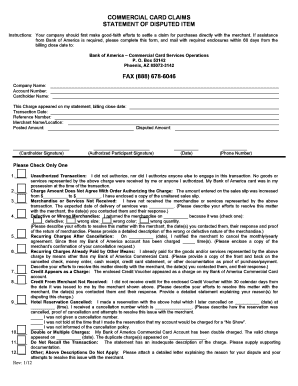
Of America is required, please complete this form, and mail with required enclosures within 60 days from the billing close date to: Bank of America Commercial Card Services Operations P. O. Box 53142 Phoenix, AZ 85072-3142 FAX (888) 678-6046 Company Name: Account Number: Cardholder Name: This Charge appeared on my statement, billing close date: Transaction Date: Reference Number: Merchant Name/Location: Posted Amount: (Cardholder Signature) Disputed Amount:.

How it works

  1. Open form

    Open form follow the instructions

  2. Easily sign form

    Easily sign the form with your finger

  3. Share form

    Send filled & signed form or save

How to fill out the Disputed Transaction Form online

Filling out the Disputed Transaction Form online can be a crucial step toward resolving any discrepancies you may have encountered with your Bank of America commercial card transactions. This guide provides you with a comprehensive walkthrough of each section of the form, ensuring you complete it accurately and effectively.

Follow the steps to successfully complete your Disputed Transaction Form.

  1. Click the ‘Get Form’ button to access the Disputed Transaction Form. This will allow you to open the document and begin filling it out.
  2. Provide your company name and account number at the top of the form. Ensure this information is accurate, as it assists in the efficient processing of your dispute.
  3. Enter the cardholder's name as it appears on the commercial card. Correct spelling is essential for verification purposes.
  4. Fill in the date the charge appeared on your statement along with the billing close date. This information is important for identifying the specific transaction in question.
  5. Document the transaction date and reference number, which can usually be found on your statement. This will help to precisely pinpoint the disputed charge.
  6. List the merchant's name and location as recorded on your statement to ensure clarity about where the transaction took place.
  7. Indicate the posted amount for the disputed transaction, ensuring that you include cents if applicable.
  8. Sign and date the form where indicated, including your phone number. This can facilitate any necessary follow-up regarding your dispute.
  9. Select the reason for your dispute by checking the appropriate box. Each option provides a specific context for your claim, so choose the one that best describes your situation. Include any necessary descriptions or documentation as required.
  10. After you have completed all sections of the form, review your entries for accuracy before proceeding to submit it.
  11. Save your changes to the form. You can then choose to download, print, or share the form as needed.

Complete your Disputed Transaction Form online for prompt assistance with your claims.

Get form

Experience a faster way to fill out and sign forms on the web. Access the most extensive library of templates available.
Get form

Related content

Sample Letter for Disputing Credit and Debit Card...
Send a Dispute Letter to Your Card Company · your name and account number · the dollar...
Learn more
Disputed Transaction Form - UT System Policies
Disputed Transaction Form. disputed-transactionDownload. Related Policies: FI0530 –...
Learn more
View or Dispute Transactions
You can raise a transaction dispute quickly and easily in the ANZ App. Time limits apply...
Learn more

Related links form

Matheran Map Guide Pdf Levnadsintyg Life Certificate Lebensbescheinigung Certificado ... Bni One To One Form KARATE ASSOCIATION OF INDIA

Questions & Answers

Get answers to your most pressing questions about US Legal Forms API.

Contact support

If you see an unauthorized charge or billing mistake on your credit card statement, or if you didn't receive satisfactory goods or services from a merchant, you generally have the right to dispute the charge under the Fair Credit Billing Act (FCBA).

Consider calling the merchant first, as they may resolve your claim faster (we may also require information from the merchant to process a claim, so contacting them directly may save you time). Only posted transactions can be disputed (pending charges are temporary and may change).

As per the network guidelines, in case of a dispute, the cardholder is required to provide a duly filled in Transaction Dispute Form (TDF) mentioning the details of the disputed transaction to enable / authorize the bank to investigate with the respective merchant / member bank, as appropriate.

You need to contact your credit card provider and tell them you want to make a claim to get your money back. Your card provider will decide the best route for your claim - either chargeback or Section 75, and this will depend on the details of your claim.

I am writing to dispute a charge of [$______] to my [credit or debit card] account on [date of the charge]. The charge is in error because [explain the problem briefly. For example, “the items weren't delivered,” “I was overcharged,” “I returned the items,” “I did not buy the items,” etc.].

How to report a dispute? Provide Your 10 digital Mobile No. Input the OTP. Select Product Type (Eg Debit /Credit / Prepaid Card) Enter last 4 digit of the Card No. Select Merchant/Beneficiary Name. Select Disputed transaction date (last 60 days) Enter the dispute reason and details in the text box. Enter Submit.

Clearly state the dispute, detailing reasons for the disagreement. Request a resolution, such as a corrected invoice or further documentation. Close politely, asking for prompt attention, and provide your contact information for follow-up.

Send your dispute to your credit card company in writing. You can also call to dispute a charge, but to get your legal protections, you must send a letter within 60 days of the issuance date of the first bill that shows the disputed charge.

Get This Form Now!

Use professional pre-built templates to fill in and sign documents online faster. Get access to thousands of forms.
Get form
If you believe that this page should be taken down, please follow our DMCA take down processhere.

Industry-leading security and compliance

US Legal Forms protects your data by complying with industry-specific security standards.
  • In businnes since 1997
    25+ years providing professional legal documents.
  • Accredited business
    Guarantees that a business meets BBB accreditation standards in the US and Canada.
  • Secured by Braintree
    Validated Level 1 PCI DSS compliant payment gateway that accepts most major credit and debit card brands from across the globe.
Get Disputed Transaction Form
Get form
Form Packages
Adoption
Bankruptcy
Contractors
Divorce
Home Sales
Employment
Identity Theft
Incorporation
Landlord Tenant
Living Trust
Name Change
Personal Planning
Small Business
Wills & Estates
Packages A-Z
Form Categories
Affidavits
Bankruptcy
Bill of Sale
Corporate - LLC
Divorce
Employment
Identity Theft
Internet Technology
Landlord Tenant
Living Wills
Name Change
Power of Attorney
Real Estate
Small Estates
Wills
All Forms
Forms A-Z
Form Library
Customer Service
Terms of Service
Privacy Notice
Legal Hub
Content Takedown Policy
Bug Bounty Program
About Us
Help Portal
Legal Resources
Blog
Affiliates
Contact Us
Delete My Account
Site Map
Industries
Forms in Spanish
Localized Forms
State-specific Forms
Forms Kit
Legal Guides
Real Estate Handbook
All Guides
Prepared for You
Notarize
Incorporation services
Our Customers
For Consumers
For Small Business
For Attorneys
Our Sites
US Legal Forms
USLegal
FormsPass
pdfFiller
signNow
airSlate WorkFlow
DocHub
Instapage
Social Media
Call us now toll free:
+1 833 426 79 33
As seen in:
  • USA Today logo picture
  • CBC News logo picture
  • LA Times logo picture
  • The Washington Post logo picture
  • AP logo picture
  • Forbes logo picture
© Copyright 1997-2025
airSlate Legal Forms, Inc.
3720 Flowood Dr, Flowood, Mississippi 39232
Form Packages
Adoption
Bankruptcy
Contractors
Divorce
Home Sales
Employment
Identity Theft
Incorporation
Landlord Tenant
Living Trust
Name Change
Personal Planning
Small Business
Wills & Estates
Packages A-Z
Form Categories
Affidavits
Bankruptcy
Bill of Sale
Corporate - LLC
Divorce
Employment
Identity Theft
Internet Technology
Landlord Tenant
Living Wills
Name Change
Power of Attorney
Real Estate
Small Estates
Wills
All Forms
Forms A-Z
Form Library
Customer Service
Terms of Service
Privacy Notice
Legal Hub
Content Takedown Policy
Bug Bounty Program
About Us
Help Portal
Legal Resources
Blog
Affiliates
Contact Us
Delete My Account
Site Map
Industries
Forms in Spanish
Localized Forms
State-specific Forms
Forms Kit
Legal Guides
Real Estate Handbook
All Guides
Prepared for You
Notarize
Incorporation services
Our Customers
For Consumers
For Small Business
For Attorneys
Our Sites
US Legal Forms
USLegal
FormsPass
pdfFiller
signNow
airSlate WorkFlow
DocHub
Instapage
Social Media
Call us now toll free:
+1 833 426 79 33
As seen in:
  • USA Today logo picture
  • CBC News logo picture
  • LA Times logo picture
  • The Washington Post logo picture
  • AP logo picture
  • Forbes logo picture
© Copyright 1997-2025
airSlate Legal Forms, Inc.
3720 Flowood Dr, Flowood, Mississippi 39232