Loading
Form preview
  • US Legal Forms
  • Other Templates
  • Industry Forms
  • Industry Bank & Financial Forms
  • Union Bank Form 03371 2012

Get Union Bank Form 03371 2012-2026

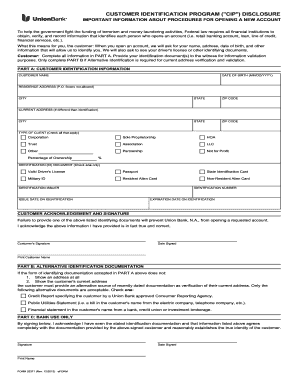
S, Federal law requires all financial institutions to obtain, verify, and record information that identifies each person who opens an account (i.e. retail banking account, loan, line of credit, financial services, etc.). What this means for you, the customer: When you open an account, we will ask for your name, address, date of birth, and other information that will allow us to identify you. We will also ask to see your driver's license or other identifying documents. Customer: Complete all info.

How it works

  1. Open form

    Open form follow the instructions

  2. Easily sign form

    Easily sign the form with your finger

  3. Share form

    Send filled & signed form or save

How to fill out the Union Bank Form 03371 online

Filling out the Union Bank Form 03371 online is an essential step in opening a new account. This guide provides clear, step-by-step instructions to help you navigate the form efficiently and accurately.

Follow the steps to complete the form successfully.

  1. Press the ‘Get Form’ button to access the form and initiate the online filling process.
  2. In PART A, enter your full name, date of birth, and residence address. Ensure that you do not include a P.O. Box, as it is not allowed.
  3. Fill in the city, state, and ZIP code corresponding to your residence address.
  4. If your current address is different from your identification address, provide that information in the designated fields. Fill in the current city, state, and ZIP code.
  5. Indicate the type of client you are by checking all applicable options, such as Corporation, Sole Proprietorship, or Partnership.
  6. Select the type of identification document you will be providing by checking one option from the list, including options like Driver's License and Passport.
  7. Fill in the issuer, issue date, identification number, and expiration date of your identification document.
  8. Review the acknowledgment and signature section. Confirm that the information you provided is accurate, and provide your signature along with the date signed.
  9. If necessary, complete PART B by providing alternative identification documentation. Check the applicable option if the primary identification does not show your address.
  10. Finally, review all entered information for accuracy. After ensuring everything is correct, you can save changes, download, or share your completed form.

Complete your documents online effortlessly and ensure a smooth account opening process.

Get form

Experience a faster way to fill out and sign forms on the web. Access the most extensive library of templates available.
Get form

Related content

02/28/2025 Public Inspection Issue
Feb 28, 2025 — The following documents are on file at the Office of the Federal Register...
Learn more
COMP/38710 - European Commission
Oct 3, 2007 — the form of an announcement by the company, for instance, that it would...
Learn more

Related links form

Tacpa Preference Form Donna Farrow INDIAN PREFERENCE BUSINESS APPLICATION Confederated ... - Cskt Online Syracuse Housing Application Submission Form

Questions & Answers

Get answers to your most pressing questions about US Legal Forms API.

Contact support

Writing a DD application form involves requesting a Demand Draft formally. Begin by addressing the bank, using the Union Bank Form 03371 for this purpose. State the amount you wish to draft, include the recipient's details, and provide your account information. This clear and organized approach helps ensure your request is processed without delay.

To fill out the Union Bank account opening form online, visit the official Union Bank website and navigate to the account opening section. Follow the prompts to access the digital version of the Union Bank Form 03371, filling it out with your personal details accurately. Ensure you have scanned copies of necessary documents ready for upload to complete your application smoothly.

Writing the Union Bank DD form requires careful attention to detail. Start with the recipient's information, including their name and location. Use the Union Bank Form 03371 to fill in the amount in both numbers and words, ensuring everything is correct before signing. This form acts as an official request, making accuracy vital.

When writing DD details, begin with your account number, followed by the amount you wish to issue. Include the payee's name clearly, ensuring there are no spelling mistakes. Utilize the Union Bank Form 03371, keeping it clean and legible, as this ensures timely processing and avoids any confusion.

Filling out a DD draft requires you to start with the Union Bank Form 03371. Begin by entering the date, then specify the amount in both numeric and written forms. Next, provide the payee's name and your signature at the designated area. Be sure to double-check all information for accuracy before submission.

To create a Demand Draft (DD) in Union Bank, you first need to visit your nearest branch. Once there, ask for the Union Bank Form 03371, which you will use to initiate the request. Fill out the form with the required details, such as the amount, payee information, and your account details. Finally, submit the form along with the necessary fees at the counter.

To download your Union Bank statement, log in to your online banking profile and navigate to the statements section. Select the desired statement period and look for the download option. You may find options to save the Union Bank Form 03371 and other statements in different formats, including PDF.

To download your bank statement as a PDF, log into your online banking account and go to the statements page. From there, you can select the specific statement you want and choose the PDF download option. This process also applies to downloading the Union Bank Form 03371, ensuring you have all necessary documents saved securely.

Downloading your Union Bank statement in PDF format is straightforward. After logging into your online account, navigate to the statement section and select the PDF option for your desired statement period. Make sure to save the Union Bank Form 03371 to your device for easy access in the future.

To download your statement of account using the Union Bank app, first, log into the app securely. Then, locate the accounts section and select the statement you wish to download. You can typically find your Union Bank Form 03371 statement here, and choose to download it in a PDF format for your records.

Get This Form Now!

Use professional pre-built templates to fill in and sign documents online faster. Get access to thousands of forms.
Get form
If you believe that this page should be taken down, please follow our DMCA take down processhere.
Get Union Bank Form 03371
Get form
  • Adoption
  • Bankruptcy
  • Contractors
  • Divorce
  • Home Sales
  • Employment
  • Identity Theft
  • Incorporation
  • Landlord Tenant
  • Living Trust
  • Name Change
  • Personal Planning
  • Small Business
  • Wills & Estates
  • Packages A-Z
  • Affidavits
  • Bankruptcy
  • Bill of Sale
  • Corporate - LLC
  • Divorce
  • Employment
  • Identity Theft
  • Internet Technology
  • Landlord Tenant
  • Living Wills
  • Name Change
  • Power of Attorney
  • Real Estate
  • Small Estates
  • Wills
  • All Forms
  • Forms A-Z
  • Other Templates
  • Legal Hub
  • About Us
  • Help Portal
  • Legal Resources
  • Blog
  • Affiliates
  • Contact Us
  • Delete My Account
  • Site Map
  • Industries
  • Forms in Spanish
  • Localized Forms
  • State-specific Forms
  • Forms Kit
  • Real Estate Handbook
  • All Guides
  • Notarize
  • Incorporation services
  • For Consumers
  • For Small Business
  • For Attorneys
  • USLegal
  • FormsPass
  • pdfFiller
  • signNow
  • altaFlow
  • DocHub
  • Instapage
Form Packages
  • Adoption
  • Bankruptcy
  • Contractors
  • Divorce
  • Home Sales
  • Employment
  • Identity Theft
  • Incorporation
  • Landlord Tenant
  • Living Trust
  • Name Change
  • Personal Planning
  • Small Business
  • Wills & Estates
  • Packages A-Z
Form Categories
  • Affidavits
  • Bankruptcy
  • Bill of Sale
  • Corporate - LLC
  • Divorce
  • Employment
  • Identity Theft
  • Internet Technology
  • Landlord Tenant
  • Living Wills
  • Name Change
  • Power of Attorney
  • Real Estate
  • Small Estates
  • Wills
  • All Forms
  • Forms A-Z
  • Other Templates
Customer Service
  • Legal Hub
  • About Us
  • Help Portal
  • Legal Resources
  • Blog
  • Affiliates
  • Contact Us
  • Delete My Account
  • Site Map
  • Industries
  • Forms in Spanish
  • Localized Forms
  • State-specific Forms
  • Forms Kit
Legal Guides
  • Real Estate Handbook
  • All Guides
Prepared for you
  • Notarize
  • Incorporation services
Our Customers
  • For Consumers
  • For Small Business
  • For Attorneys
Our Sites
  • USLegal
  • FormsPass
  • pdfFiller
  • signNow
  • altaFlow
  • DocHub
  • Instapage
Social Media
Call us now toll free:
+1 833 426 79 33
As seen in:
© Copyright 1999-2026 airSlate Legal Forms, Inc. 17 Station Street, Suite 303, Brookline, MA 02445
  • Your Privacy Choices
  • Terms of Service
  • Privacy Notice
  • Content Takedown Policy
  • Bug Bounty Program