Loading
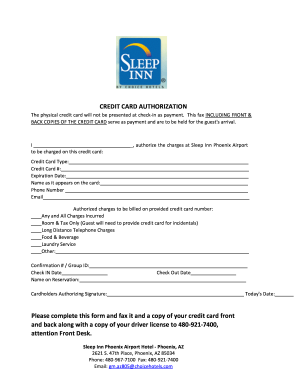
Get Sleep Inn Credit Card Authorization
How it works
-

Open form follow the instructions
-

Easily sign the form with your finger
-

Send filled & signed form or save
How to fill out the Sleep Inn Credit Card Authorization online
Filling out the Sleep Inn Credit Card Authorization form online is a crucial step for ensuring your reservation is secured. This guide will walk you through each section of the form, providing clear instructions to make the process seamless.
Follow the steps to complete the form accurately.
- Click ‘Get Form’ button to access the credit card authorization document and open it for editing.
- Enter the credit card type. Select from options such as Visa, MasterCard, American Express, or Discover.
- Fill in your credit card number. Ensure that you input the complete and correct number as it appears on the card, excluding spaces or special characters.
- Provide the expiration date of the credit card. Input the month and year in the indicated format.
- Enter your name as it appears on the credit card. It is important to match the spelling exactly, as any discrepancies could lead to issues during the charging process.
- Write your phone number in the required field. This information may be used for any clarifications needed regarding your authorization.
- Indicate your email address. This is helpful for confirmation and communication related to your authorization.
- Select the types of authorized charges to be billed on the provided credit card. You can choose options such as all charges incurred, room and tax only, long-distance calls, food and beverage, laundry service, or any other applicable charges.
- Fill in your confirmation number or group ID if applicable. This will help associate the credit card authorization with your specific reservation.
- Indicate your check-in and check-out dates to clarify the duration of your stay.
- Provide your signature as the cardholder authorizing these charges. Make sure to sign once all necessary fields have been filled.
- After completing the form, save the changes. You may then print the document or download it for your records.
- Fax the completed form along with copies of the front and back of your credit card, as well as a copy of your driver's license, to 480-921-7400, attention Front Desk.
Complete your Sleep Inn Credit Card Authorization online today to ensure your reservation is secured.
Credit card authorization for a hotel is a mechanism used to validate and secure your booking. For Sleep Inn, this includes checking your card's validity and reserving funds for your stay and extra services. This process not only simplifies checkout but also enhances your overall experience, ensuring that all transactions are smooth and efficient.