Get Nvr Mortgage Financial Information Sheet 2009-2026
How it works
-

Open form follow the instructions
-

Easily sign the form with your finger
-

Send filled & signed form or save
How to fill out the NVR Mortgage Financial Information Sheet online
Completing the NVR Mortgage Financial Information Sheet online is a straightforward process that allows you to provide key information for your mortgage application. This guide will walk you through each section to ensure the form is filled out correctly and efficiently.
Follow the steps to complete the form accurately.
- Click ‘Get Form’ button to obtain the document and open it in the editor.
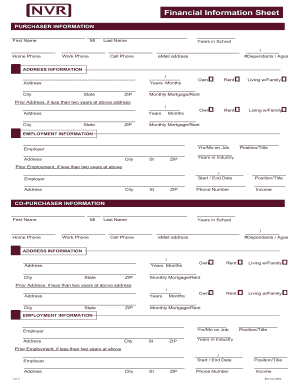
- Begin with the Purchaser Information section. Fill in the first name, middle initial, and last name of the primary applicant. Provide the years in school, home phone number, work phone number, cell phone number, and email address.
- Move on to the Address Information section. Enter the current address, including the number of years at this address, the city, state, and zip code. If there has been a prior address in the last two years, include that information as well.
- Fill out the Employment Information section. Include the employer's name, address, city, state, zip code, position or title, industry, and years employed. If applicable, also input the prior employer's information.
- Repeat steps 2-4 for any Co-Purchasers, ensuring to include all details accurately.
- Next, provide Income information for both Purchaser and Co-Purchaser. Include all sources of income, such as salary, commission, bonuses, and any child support.
- Complete the Assets section by listing your current assets and their respective account balances. Specify the source of the funds and if applicable, the institution or account details.
- In the Real Estate Owned section, provide details about any additional real estate owned, including address, city, state, and zip.
- Proceed to the Additional Information section. Answer questions regarding the intention to sell a home and whether you will be obtaining a home equity loan.
- Finally, go to the Certification & Authorization section. Confirm all information is true and complete, then add the names and dates for both borrower and co-borrower.
- After completing all sections, save changes, download, print, or share the completed form as necessary.
Start completing the NVR Mortgage Financial Information Sheet online today to streamline your mortgage application process.
Ryan Homes primarily uses NVR Mortgage to provide financing options to its homebuyers. As a subsidiary of NVR, Inc., they offer tailored mortgage solutions that facilitate the homebuying process. By utilizing NVR Mortgage, Ryan Homes ensures that their customers have access to a variety of mortgage products to suit their needs. To learn about these options, check the NVR Mortgage Financial Information Sheet for further details.