Loading
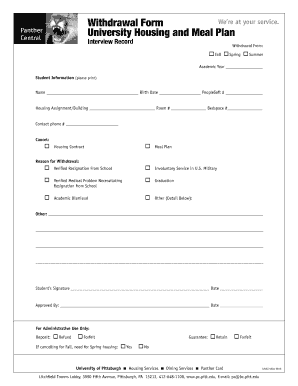
Get Withdrawal Form University Housing And Meal Plan - Pc Pitt
How it works
-

Open form follow the instructions
-

Easily sign the form with your finger
-

Send filled & signed form or save
How to fill out the Withdrawal Form University Housing And Meal Plan - Pc Pitt online
Completing the Withdrawal Form for University Housing and Meal Plan at Pc Pitt is a straightforward process that allows users to formally withdraw their housing and meal plan services. This guide provides clear, step-by-step instructions to help you navigate the process with ease.
Follow the steps to successfully complete the withdrawal form.
- Click 'Get Form' button to acquire the withdrawal form and open it for editing.
- Indicate your withdrawal semester by checking the box that corresponds to your choice — Fall, Spring, or Summer. Enter the relevant academic year in the provided space.
- Complete the student information section by clearly printing your name, birth date, and PeopleSoft number. Ensure that this information is accurate, as it will be used for processing.
- In the housing assignment section, provide details like your housing assignment or building name, room number, and bed space number. This information is crucial for identifying your specific housing contract.
- Fill in your contact phone number to ensure the housing services can reach you if necessary.
- Select the options to cancel your housing contract and/or meal plan by checking the appropriate boxes.
- Select your reason for withdrawal by checking the relevant box. If you select 'Other,' please provide specific details in the given space provided below.
- Sign and date the form in the designated signature area. This confirms your request for withdrawal and your understanding of the consequences.
- Ensure that an authorized representative reviews and approves your withdrawal request by signing and dating the approval section.
- For administrative purposes, indicate whether you will be requesting a refund of your deposit or if you will forfeit it by checking the appropriate box.
- If you are cancelling for Fall, indicate your interest in Spring housing by selecting 'Yes' or 'No' as applicable.
- Once you have completed all sections, review your responses for accuracy and completeness. When satisfied, save your changes, download, print, or share the completed form as necessary.
Complete your forms online to ensure a smooth withdrawal process.
Contact Information Call 412-624-HELP (4357) Submit a Help Ticket (Be sure to sign-in for the best experience!) Chat with an Expert. Email helpdesk@pitt.edu.
Industry-leading security and compliance
US Legal Forms protects your data by complying with industry-specific security standards.
-
In businnes since 199725+ years providing professional legal documents.
-
Accredited businessGuarantees that a business meets BBB accreditation standards in the US and Canada.
-
Secured by BraintreeValidated Level 1 PCI DSS compliant payment gateway that accepts most major credit and debit card brands from across the globe.