Loading
Form preview
  • US Legal Forms
  • Other Templates
  • Industry Forms
  • Industry Bank & Financial Forms
  • Lloyds Bank 11527-1114

Get Lloyds Bank 11527-1114

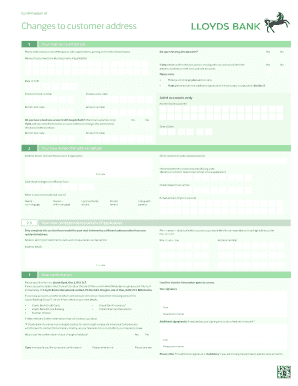
Nternational/WorldWide Service account Advise PLSC If processed by branch send form to Andover For Wholesale use only Customer file, cust & a/c level Cardnet Advise LloydsLink/Key banking Standing orders Currency Accounts Charged securities Plastic cards Open credits Cheque books Appointed executor/income tax Marketing records Mortgages: Change of borrowers status Articles deposited Treasury: Advise Lloyds Bank Treasury if Treasury account held Inland bills of exchange Country .

How it works

  1. Open form

    Open form follow the instructions

  2. Easily sign form

    Easily sign the form with your finger

  3. Share form

    Send filled & signed form or save

How to fill out the Lloyds Bank 11527-1114 online

This guide provides a step-by-step approach to completing the Lloyds Bank 11527-1114 form online. Whether you're updating your address or managing joint accounts, this guide will help you navigate through the process with ease.

Follow the steps to complete the form correctly

  1. Press the ‘Get Form’ button to obtain the form and open it in the editor.
  2. Begin by filling in your main account details. Indicate whether you hold any joint accounts by selecting 'Yes' or 'No'. If 'Yes', confirm if the joint party is moving with you and if you would like their address updated on both joint and sole accounts.
  3. Clearly enter the names of the customer(s) or business name in the designated space. Make sure to write in capital letters and place an 'X' in the relevant boxes.
  4. Provide your previous address details, including house number, postcode, branch sort code, and account number.
  5. If you indicated a joint account, ensure to fill in the name of the joint customer and provide any additional signatures required in section 3.
  6. Next, fill in your new residential address details, including any house name if applicable, and specify your residential status from the options provided.
  7. Input your home and mobile telephone numbers along with your email address if applicable.
  8. If you would like correspondence sent to a different address, complete that section with the required details including mailing address, branch sort code, and account number.
  9. Confirm the information you provided is correct by signing the form and printing your name in the designated section.
  10. Finally, save your changes, and you can choose to download, print, or share the completed form as needed.

Complete your address change with Lloyds Bank efficiently by filling out the form online today.

Get form

Experience a faster way to fill out and sign forms on the web. Access the most extensive library of templates available.
Get form

Related content

Library Resources - Alba Graduate Business School
... all areas of business – including management, marketing, accounting, finance...
Learn more

Related links form

Marriage And Family Therapist Experience Verification Form 1800 37a 301 Lpcc Weekly Verification Form Pdf Certificate Of Attest Experience - Public Accounting - California ... - Dca Ca Georgia Form1010

Questions & Answers

Get answers to your most pressing questions about US Legal Forms API.

Contact support

The bank code is a series of numbers that uniquely identifies a financial institution. This code, such as Lloyds Bank 11527-1114, is essential for online transactions and ensures funds are directed to the correct bank. It also helps in simplifying international transfers. Make sure to provide the correct code to avoid mistakes.

Lloyds Bank primarily operates in the UK and does not have branches in the US. However, they provide services to international customers, which may include U.S. residents. If you have a Lloyds Bank account, remember to use the bank code 11527-1114 for any international transactions. This information is crucial for accurate transactions.

To know your bank code, check your bank statement or your online banking portal. You may also want to call your bank’s customer service for direct assistance. If you’re with Lloyds Bank, for example, their bank code is 11527-1114. Having this information readily available can streamline your banking processes.

To contact Lloyds Bank from outside the UK, you need to dial their international phone number. Be sure to include the country code for the UK, which is +44, followed by the bank's contact number. This way, you can get help regarding your account, including inquiries about Lloyds Bank 11527-1114. They offer various support options to assist international customers.

You can usually find your bank's code on the bank statement or by logging into your online banking account. Additionally, contacting customer service can provide you with the correct code, such as Lloyds Bank 11527-1114. If you're using a platform like US Legal Forms, it can assist you in ensuring you have accurate information for your banking needs.

The bank code of Lloyds Bank is a unique identifier that differentiates it from other banks. The specific code you're looking for is Lloyds Bank 11527-1114. This code is essential for processing transactions, especially when transferring funds or setting up payments. Make sure to use this code accurately to avoid delays.

The bank code of a bank account is a set of numbers that identifies your specific bank and branch. It helps ensure that transactions are processed correctly. For instance, Lloyds Bank 11527-1114 is a specific code that can help you identify and access your Lloyds Bank account. Always keep this information secure to avoid potential fraud.

Filling out a cheque form requires you to start with the date, followed by the payee's name. Next, indicate the amount clearly in both figures and words. Always remember to sign the cheque at the bottom. Make sure to use clean handwriting and avoid any discrepancies to ensure it is processed without issues.

To write to Lloyds Bank, you can use their customer service address listed on their official website. Make sure to include your account number and any relevant details regarding your inquiry. This ensures your message reaches the appropriate department to address your needs effectively.

To fill out a cheque correctly, begin with the date and then write the recipient's name. Clearly indicate the amount both in numbers and words, which helps to prevent errors. Finally, sign the cheque with the signature you have on file with Lloyds Bank, ensuring it is legible.

Get This Form Now!

Use professional pre-built templates to fill in and sign documents online faster. Get access to thousands of forms.
Get form
If you believe that this page should be taken down, please follow our DMCA take down processhere.
Get Lloyds Bank 11527-1114
Get form
  • Adoption
  • Bankruptcy
  • Contractors
  • Divorce
  • Home Sales
  • Employment
  • Identity Theft
  • Incorporation
  • Landlord Tenant
  • Living Trust
  • Name Change
  • Personal Planning
  • Small Business
  • Wills & Estates
  • Packages A-Z
  • Affidavits
  • Bankruptcy
  • Bill of Sale
  • Corporate - LLC
  • Divorce
  • Employment
  • Identity Theft
  • Internet Technology
  • Landlord Tenant
  • Living Wills
  • Name Change
  • Power of Attorney
  • Real Estate
  • Small Estates
  • Wills
  • All Forms
  • Forms A-Z
  • Other Templates
  • Legal Hub
  • About Us
  • Help Portal
  • Legal Resources
  • Blog
  • Affiliates
  • Contact Us
  • Delete My Account
  • Site Map
  • Industries
  • Forms in Spanish
  • Localized Forms
  • State-specific Forms
  • Forms Kit
  • Real Estate Handbook
  • All Guides
  • Notarize
  • Incorporation services
  • For Consumers
  • For Small Business
  • For Attorneys
  • USLegal
  • FormsPass
  • pdfFiller
  • signNow
  • altaFlow
  • DocHub
  • Instapage
Form Packages
  • Adoption
  • Bankruptcy
  • Contractors
  • Divorce
  • Home Sales
  • Employment
  • Identity Theft
  • Incorporation
  • Landlord Tenant
  • Living Trust
  • Name Change
  • Personal Planning
  • Small Business
  • Wills & Estates
  • Packages A-Z
Form Categories
  • Affidavits
  • Bankruptcy
  • Bill of Sale
  • Corporate - LLC
  • Divorce
  • Employment
  • Identity Theft
  • Internet Technology
  • Landlord Tenant
  • Living Wills
  • Name Change
  • Power of Attorney
  • Real Estate
  • Small Estates
  • Wills
  • All Forms
  • Forms A-Z
  • Other Templates
Customer Service
  • Legal Hub
  • About Us
  • Help Portal
  • Legal Resources
  • Blog
  • Affiliates
  • Contact Us
  • Delete My Account
  • Site Map
  • Industries
  • Forms in Spanish
  • Localized Forms
  • State-specific Forms
  • Forms Kit
Legal Guides
  • Real Estate Handbook
  • All Guides
Prepared for you
  • Notarize
  • Incorporation services
Our Customers
  • For Consumers
  • For Small Business
  • For Attorneys
Our Sites
  • USLegal
  • FormsPass
  • pdfFiller
  • signNow
  • altaFlow
  • DocHub
  • Instapage
Social Media
Call us now toll free:
+1 833 426 79 33
As seen in:
© Copyright 1999-2026 airSlate Legal Forms, Inc. 17 Station Street, Ste. 203, Brookline, MA 02445
  • Your Privacy Choices
  • Terms of Service
  • Privacy Notice
  • Content Takedown Policy
  • Bug Bounty Program