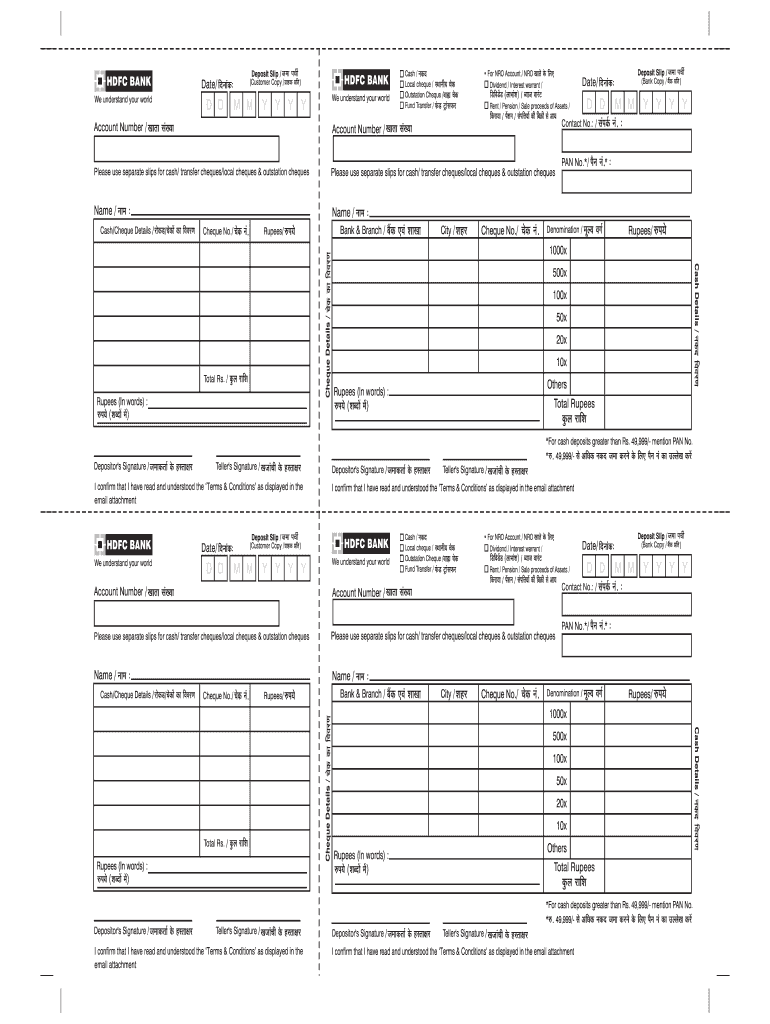
HDFC BANK Deposit Slip / V We understand your world D D S HDFC BANK (Customer Copy / O E i ) Date/ n x E : M M Y Y Y Y We understand your world Cash / x E n Local cheque / l x S E Outstation Cheque.

Open form follow the instructions

Easily sign the form with your finger

Send filled & signed form or save
How to fill out the HDFC Bank Deposit Slip online
Filling out the HDFC Bank Deposit Slip online is a straightforward process that allows users to deposit cash or cheques conveniently. This guide provides clear, step-by-step instructions on how to accurately complete each section of the deposit slip to ensure a smooth banking experience.
Follow the steps to complete the deposit slip effectively.
- Press the ‘Get Form’ button to access the HDFC Bank Deposit Slip that you need to fill out.
- Enter the date of the transaction in the designated field, following the format of day, month, and year.
- Indicate the type of deposit by selecting from the options: cash, local cheque, outstation cheque, or fund transfer.
- For non-resident ordinary (NRO) accounts, specify that the deposit is for an NRO account.
- Fill in the account number for which the deposit is being made.
- Provide the name of the depositor in the corresponding field.
- Input the cheque number if you are depositing a cheque, along with the bank and branch information.
- State the amount being deposited in numerals and in words, ensuring accuracy.
- Include the total number of notes being deposited in the cash details section if applicable.
- Sign the deposit slip as the depositor for verification purposes.
- Save your changes, and once satisfied with the information provided, download, print, or share the completed deposit slip.
Complete your HDFC Bank Deposit Slip online today for an efficient banking experience.
Experience a faster way to fill out and sign forms on the web. Access the most extensive library of templates available.
Related content
HDFC Bank Limited is offering equity shares in the form of American Depositary Shares or...
This article provides a comprehensive guide on creating, using, and optimizing HDFC Bank...
Nov 26, 2020 — ... HDFC Bank against fixed deposits, all existing and future fixed and...
Get answers to your most pressing questions about US Legal Forms API.
How do I fill out a bank transfer slip?
To fill out a bank transfer slip effectively, start with entering the date at the top. Next, input your account number alongside the beneficiary's account number. Clearly mention the amount to be transferred, and ensure that all entries are legible. After verifying the information, submit the slip for processing.
How do you fill out a bank slip?
Filling out a bank slip involves providing essential information, such as the date, your name, and account number. For an HDFC Bank Deposit Slip, specifically, add the amount being deposited and check for any additional information the bank requires. Take your time to review everything to minimize errors.
What is the proper way to fill out a deposit slip?
Filling out an HDFC Bank Deposit Slip correctly is crucial for ensuring your deposit is processed without issues. Begin by writing the date, followed by your account number. Clearly indicate the amount you are depositing, and provide any other relevant information requested. Always double-check your entries for accuracy.
What details do I need to give someone for a bank transfer?
When providing details for a bank transfer, make sure to include your name, account number, and the HDFC Bank branch code if applicable. Additionally, you may need to share the transfer amount and any reference information that might be useful. Having these details organized can help ensure a smooth transfer process.
How to deposit DD in HDFC Bank?
To deposit a Demand Draft (DD) in HDFC Bank, visit the bank branch and present the DD along with your HDFC Bank Deposit Slip. Fill in the required details on the deposit slip, including your account number and the amount. Hand over both the DD and the slip to the bank teller. They will process the deposit and provide you with a receipt.
Can I print my own bank deposit slips?
Yes, printing your own bank deposit slips is possible with HDFC Bank. After downloading your HDFC Bank Deposit Slip from NetBanking, you can easily print it for your records. This option provides flexibility and convenience, especially if you need physical copies for transactions.
How to download FD receipt from HDFC NetBanking?
Downloading your FD receipt from HDFC NetBanking is straightforward. First, log in to your account and navigate to the 'Fixed Deposits' section. There, select the FD you want a receipt for, and click on the download option. This receipt serves as confirmation of your fixed deposit and is important for your records.
How to download deposit slip from HDFC NetBanking?
To download a deposit slip from HDFC NetBanking, sign in to your account. Once logged in, go to the 'Deposits' section. Here, you will have the option to download your HDFC Bank Deposit Slip directly, which you can save for your records or print for future use.
Can you get a bank deposit slip online?
Yes, you can obtain a bank deposit slip online through HDFC NetBanking. After logging in, navigate to the section for deposits, and you will find the option to generate and download your HDFC Bank Deposit Slip. This feature simplifies the process, allowing you to access your deposit information promptly.
How can I download my salary slip from HDFC Bank?
To download your salary slip from HDFC Bank, log in to HDFC NetBanking. Go to the 'Accounts' tab and select 'Salary Account'. There, you will find an option to view and download your salary slip. This slip is crucial for financial planning and requiring it is common for various purposes.
Use professional pre-built templates to fill in and sign documents online faster. Get access to thousands of forms.
If you believe that this page should be taken down, please follow our DMCA take down process here.