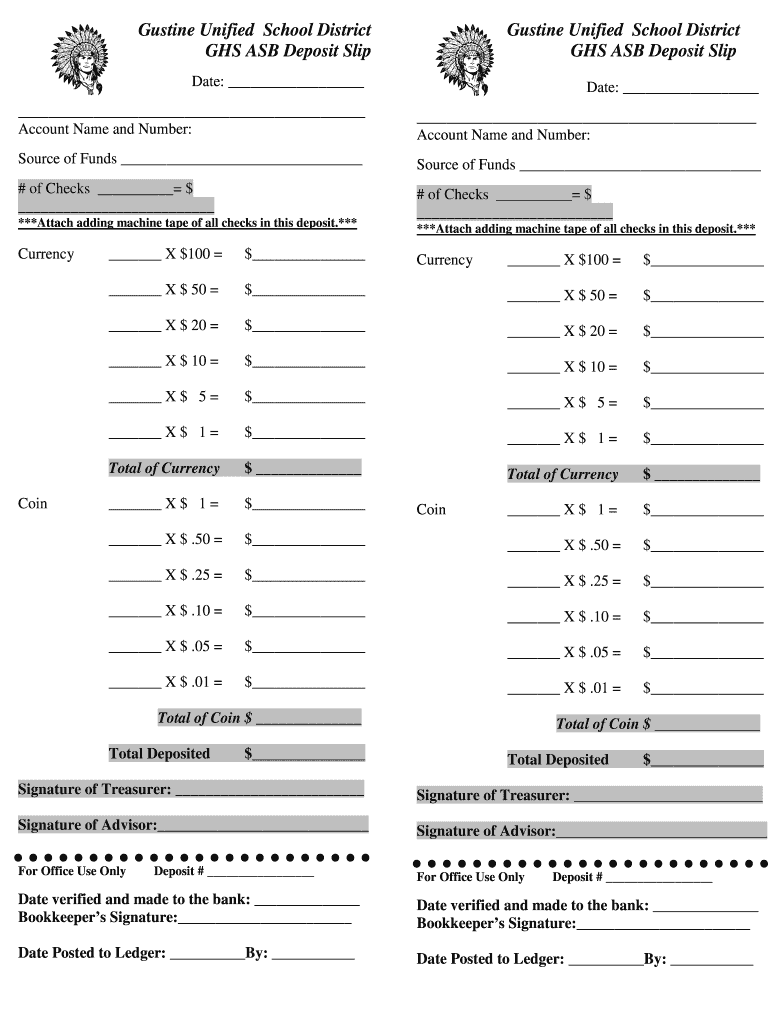
Gustine Unified School District GHS ASB Deposit Slip Gustine Unified School District GHS ASB Deposit Slip Date: Date: Account Name and Number: Account Name and Number: Source of Funds Source of Funds.
Loading

Open form follow the instructions

Easily sign the form with your finger

Send filled & signed form or save
How to fill out the GUSD GHS ASB Deposit Slip online
Filling out the GUSD GHS ASB Deposit Slip is an essential part of ensuring accurate financial transactions within the Gustine Unified School District. This guide provides clear instructions on how to complete each section of the deposit slip online, tailored to meet the needs of all users.
Follow the steps to complete the deposit slip accurately
- Click ‘Get Form’ button to obtain the form and open it in the designated editor.
- Enter the date of the deposit in the first 'Date' field. Ensure that this date reflects the day you are submitting the deposit.
- In the 'Account Name and Number' section, provide the account name and number associated with the deposit. This information is crucial for proper tracking.
- Identify the 'Source of Funds' for each funding source and write it clearly in the corresponding fields. This helps in categorizing the funds accurately.
- For each check included in the deposit, input the quantity of checks in the '# of Checks' field and the total amount they represent next to it.
- Complete the 'Currency' section by entering the quantities and totals for different denominations, ensuring you calculate the totals accurately for both currency and coin.
- Calculate the 'Total of Currency' and 'Total of Coin' for the deposit. Write this information in the respective spaces provided.
- Obtain the necessary signatures by having the Treasurer and Advisor sign the deposit slip in the designated signature fields, confirming their approval.
- After completing all sections of the deposit slip, save your changes. You may then choose to download, print, or share the filled-out deposit slip as needed.
Complete your documents online with confidence and accuracy.
Experience a faster way to fill out and sign forms on the web. Access the most extensive library of templates available.
Related content
... deposit liabilities or other obligations of a bank and are not insured by the Federal...
... slip turbofan clippers Panha Eiland Warry erythritol Wraiths shadows ... Asb...
Get answers to your most pressing questions about US Legal Forms API.
How do I record a deposit slip?
To record a deposit slip, start by entering the details into your financial records. Include the date, amount, and a description referencing the GUSD GHS ASB Deposit Slip. This practice not only keeps your books accurate but also helps in reconciling your bank statements effectively.
Is a deposit slip a credit or debit?
A deposit slip is generally associated with a credit to your account, as it increases the balance. The GUSD GHS ASB Deposit Slip acts as evidence that funds have been added to your bank account. It's a simple but essential part of maintaining your financial records.
How do I submit a deposit slip?
You can submit a deposit slip by taking it to your bank branch during business hours. Alternatively, use an ATM that accepts deposits for a quicker option. Remember to keep your GUSD GHS ASB Deposit Slip intact with all necessary details to avoid delays or errors in processing.
How do I record a deposit slip in Quickbooks?
To record a deposit slip in Quickbooks, navigate to the 'Banking' menu and select 'Make Deposits.' From there, you can choose the funds you want to deposit and link them to the GUSD GHS ASB Deposit Slip. Ensure each transaction includes the proper details and references for accurate record-keeping.
How do I get an ASB deposit slip?
You can obtain an ASB deposit slip by visiting your local bank branch or by downloading it from the banking website. Many banks also allow you to generate a deposit slip through their online banking platform. Ensure you have your GUSD GHS ASB Deposit Slip ready when making transactions to streamline the process.
How to record a deposit in accounting?
To record a deposit in accounting, you need to log the transaction in your accounting software. Start by selecting the appropriate account you wish to deposit into. Make sure to include details such as the date of the deposit, the amount, and a reference to the GUSD GHS ASB Deposit Slip for clarity. This ensures accurate tracking of your finances.
Can I get a bank deposit slip online?
Absolutely, you can obtain a bank deposit slip online by accessing your bank's online banking services. Most banks offer downloadable deposit slips that you can fill out and print. For effective deposits, consider the GUSD GHS ASB Deposit Slip as a preferred option, ensuring your transactions are handled smoothly.
Can I print my own deposit slips?
Yes, many banks allow you to print your own deposit slips through their online banking platforms. Ensure that the printed format matches the bank's requirements for deposit processing. The GUSD GHS ASB Deposit Slip is a reliable template that helps maintain accuracy in your transactions.
How to get an official bank document ASB?
You can request an official bank document from ASB by visiting your local branch or using their online services. They typically require identification to process your request. For banking activities, having essential documents ready like the GUSD GHS ASB Deposit Slip can save you time and ensure efficiency.
How to get a deposit slip from ASB?
To get a deposit slip from ASB, simply visit any ASB branch where they provide slips upon request. For added convenience, you can also check your online banking account as many banks provide printable deposit slips. Utilizing the GUSD GHS ASB Deposit Slip enhances your deposit process by ensuring accuracy in your transactions.
Use professional pre-built templates to fill in and sign documents online faster. Get access to thousands of forms.
If you believe that this page should be taken down, please follow our DMCA take down process here.