Loading
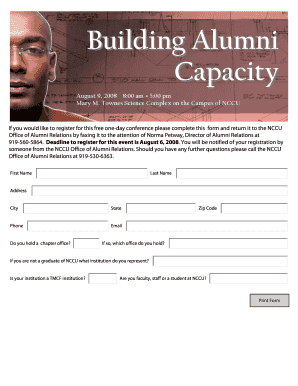
Get Deadline To Register For This Event Is August 6, 2008
How it works
-

Open form follow the instructions
-

Easily sign the form with your finger
-

Send filled & signed form or save
How to fill out the Deadline To Register For This Event Is August 6, 2008 online
This guide provides clear instructions on filling out the Deadline To Register For This Event Is August 6, 2008 form online. Follow the steps below to ensure your registration for the event is completed accurately and submitted on time.
Follow the steps to complete the registration form online
- Press the ‘Get Form’ button to access the registration form and open it in an appropriate editing interface.
- Begin by entering your first name in the designated field. Ensure that the spelling is correct and matches your legal documents.
- Next, fill in your last name in the corresponding section, paying attention to detail to avoid any errors.
- In the address field, provide your complete mailing address, including street name and number.
- Continue by entering your city and state of residence in the specified fields.
- Input your zip code to ensure your registration is processed accurately.
- Fill in your phone number, ensuring that it is a number where you can be reached.
- Provide your email address for communication regarding your registration status.
- Indicate whether you hold a chapter office by selecting 'yes' or 'no' in the appropriate section.
- If you answered 'yes' to the previous question, specify the office you hold in the section that follows.
- If you are not a graduate of NCCU, enter the name of the institution you represent.
- State whether your institution is a TMCF institution by answering the corresponding question.
- Indicate if you are faculty, staff, or a student at NCCU by selecting the appropriate option.
- Once all fields are completed, review the form for accuracy, then proceed to save changes or download a copy for your records.
- Finally, you can print or share the completed form as necessary before faxing it to the NCCU Office of Alumni Relations.
Complete your registration online today to secure your spot at the event!
Industry-leading security and compliance
US Legal Forms protects your data by complying with industry-specific security standards.
-
In businnes since 199725+ years providing professional legal documents.
-
Accredited businessGuarantees that a business meets BBB accreditation standards in the US and Canada.
-
Secured by BraintreeValidated Level 1 PCI DSS compliant payment gateway that accepts most major credit and debit card brands from across the globe.