Loading
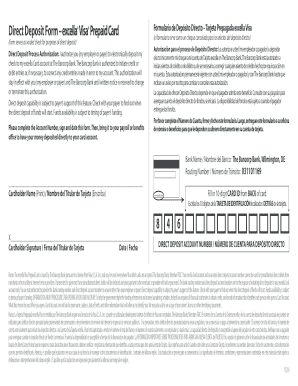
Get Excella Visa Prepaid Card Direct Deposit 2016-2026
How it works
-

Open form follow the instructions
-

Easily sign the form with your finger
-

Send filled & signed form or save
How to fill out the excella Visa Prepaid Card Direct Deposit online
This guide provides you with clear, step-by-step instructions on how to fill out the excella Visa Prepaid Card Direct Deposit form online. By following these instructions, you can ensure that your direct deposit is set up correctly and efficiently.
Follow the steps to fill out the excella Visa Prepaid Card Direct Deposit form online.
- Click 'Get Form' button to obtain the form and open it in the editor.
- Fill in the section for 'Cardholder Name' by printing your name clearly as it appears on your card.
- Locate the 'Card ID' on the back of your card and enter the 10-digit number in the specified field.
- In the 'Direct Deposit Account Number' field, enter your designated account number for direct deposits.
- Provide the bank's routing number, which is 031101169 for The Bancorp Bank, in the appropriate section.
- Sign the form in the 'Cardholder Signature' field to authorize the direct deposit.
- Date the form in the designated field.
- Once all sections are completed, save your changes, and print the form for submission.
- Deliver the completed form to your payroll or benefits office to finalize your direct deposit setup.
Complete your excella Visa Prepaid Card Direct Deposit form online today to ensure timely payments.
Yes, you can use a prepaid Visa for direct deposit. The excella Visa Prepaid Card Direct Deposit allows you to receive your paycheck or benefits directly onto your card. This process is easy and convenient, as it eliminates the need for paper checks. You just need to provide your card details to your employer or benefits provider.