Loading
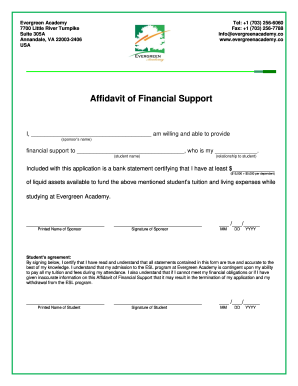
Get Evergreen Academy Affidavit Of Financial Support
How it works
-

Open form follow the instructions
-

Easily sign the form with your finger
-

Send filled & signed form or save
How to fill out the Evergreen Academy Affidavit of Financial Support online
Filling out the Evergreen Academy Affidavit of Financial Support is an essential step for students seeking admission. This guide will provide you with clear instructions and helpful tips to successfully complete the form online.
Follow the steps to complete the affidavit efficiently.
- Click ‘Get Form’ button to access the affidavit of financial support and open it in your preferred editor.
- Enter the sponsor's name in the first blank line where it asks for the sponsor’s name.
- Fill in the student’s name in the designated space provided for the student name.
- Indicate the relationship between the sponsor and the student in the relationship field.
- Next, provide the total amount of liquid assets available, ensuring it meets the minimum required ($15,000 plus $5,000 for each dependent). As stated in the form, include this figure in the appropriate line.
- The sponsor should print their name in the specified area and proceed to sign the form.
- Date the form by entering the month, day, and year in the MM/DD/YYYY format.
- The student must sign the agreement section at the bottom of the form, affirming that all information provided is accurate.
- The student should also print their name below the signature area.
- Finally, save any changes, and select the option to download, print, or share the completed affidavit.
Complete your form online today to ensure your financial support affidavit is ready for submission.
Related links form
To write an affidavit of financial support, start by outlining your personal and financial information clearly. Include details like income, assets, and liabilities, while ensuring you align with the requirements of the Evergreen Academy Affidavit of Financial Support. For step-by-step guidance, consider using uslegalforms, which provides templates and detailed instructions to streamline the process.