Loading
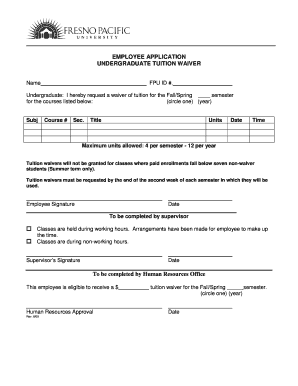
Get Employee Application Undergraduate Tuition Waiver
How it works
-

Open form follow the instructions
-

Easily sign the form with your finger
-

Send filled & signed form or save
How to fill out the EMPLOYEE APPLICATION UNDERGRADUATE TUITION WAIVER online
This guide provides clear and comprehensive instructions for users on how to successfully complete the EMPLOYEE APPLICATION UNDERGRADUATE TUITION WAIVER online. By following these steps, you will ensure that your application is filled out correctly and submitted for processing.
Follow the steps to complete the application form.
- Click ‘Get Form’ button to access the application form and open it in your editing platform.
- Fill in your name in the designated field and include your FPU ID number. Ensure that the information is accurate to avoid any processing delays.
- Select the semester for which you are requesting the tuition waiver by circling either 'Fall' or 'Spring' and providing the corresponding year.
- In the course section, list each course for which you are requesting the tuition waiver by entering the subject, course number, section, title, units, date, and time. Remember that you can request a maximum of 4 units per semester or 12 units per year.
- Sign and date the form in the employee signature section to confirm your request for the waiver.
- Move to the supervisor section and indicate whether the classes are during working hours or non-working hours. If classes are during working hours, ensure that you have noted any arrangements made to make up the time.
- The supervisor must sign and date the form to validate that they acknowledge the request.
- Finally, the Human Resources Office will complete the last section, indicating whether you are approved for the tuition waiver along with the corresponding monetary amount and date.
- After filling out all necessary fields, review the information for accuracy. You can then save changes, download, print, or share the completed form as needed.
Start completing your EMPLOYEE APPLICATION UNDERGRADUATE TUITION WAIVER online today for a smooth submission process.
Tuition remission includes tuition waivers and tuition payments. For students receiving tuition remission, the net effect is the same—the university pays a part of or all of your tuition. Tuition Remission covers tuition fees only.
Industry-leading security and compliance
US Legal Forms protects your data by complying with industry-specific security standards.
-
In businnes since 199725+ years providing professional legal documents.
-
Accredited businessGuarantees that a business meets BBB accreditation standards in the US and Canada.
-
Secured by BraintreeValidated Level 1 PCI DSS compliant payment gateway that accepts most major credit and debit card brands from across the globe.