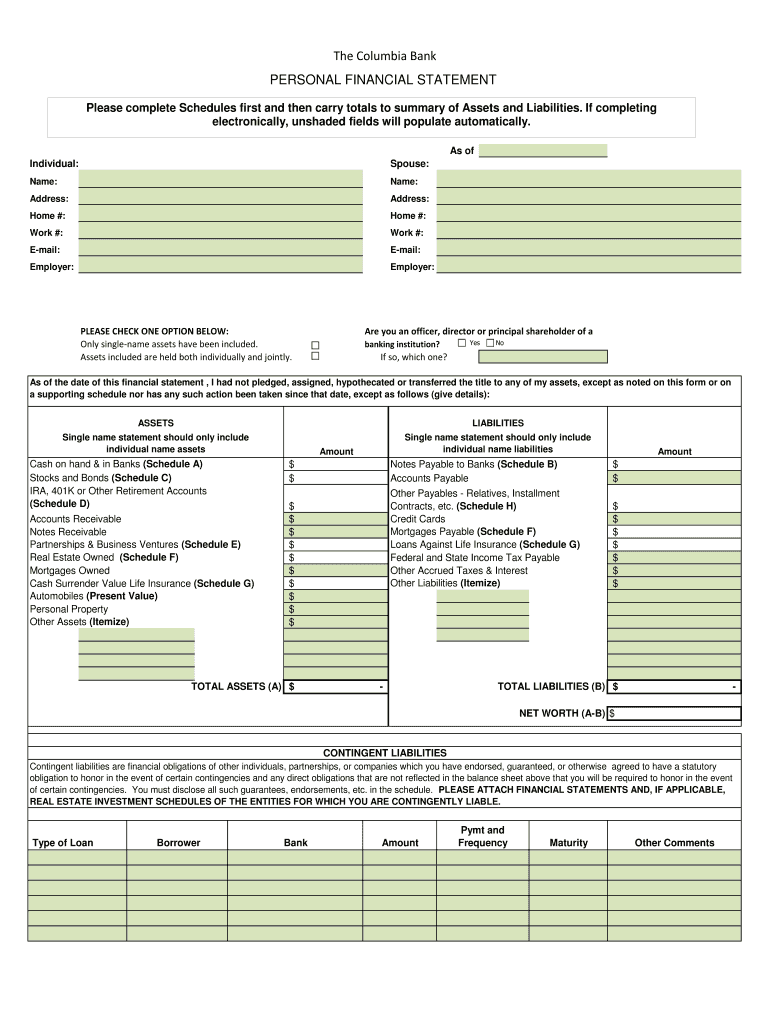
automatically. As of Individual: Spouse: Name: Name: Address: Address: Home #: Home #: Work #: Work #: E-mail: E-mail: Employer: Employer: PLEASE CHECK ONE OPTION BELOW: Only single-name assets have been included. Assets included are held both individually and jointly. Are you an officer, director or principal shareholder of a banking institution? Yes No If so, which one? As of the date of this financial statement , I had not pledged, assigned, hypothecated or transferred the.
Loading

Open form follow the instructions

Easily sign the form with your finger

Send filled & signed form or save
How to fill out the Columbia Bank Personal Financial Statement online
The Columbia Bank Personal Financial Statement is an important document for assessing your financial condition. Understanding how to accurately complete this form online can simplify the process and ensure that you present the most accurate information.
Follow the steps to successfully complete your financial statement online.
- Press the ‘Get Form’ button to access the form and view it in your preferred editor.
- Begin by entering your personal information at the top of the form. This includes your name, address, home phone number, work phone number, email address, and employer.
- Select the appropriate option regarding the ownership of the assets included by checking the corresponding box.
- Indicate if you are an officer, director, or principal shareholder of a banking institution by selecting 'Yes' or 'No'. If 'Yes', please specify which institution.
- Complete the 'Assets' section by listing each category, such as cash balances, stocks, retirement accounts, and real estate. Fill in the amounts accurately.
- Proceed to the 'Liabilities' section where you will detail your financial obligations, including loans, credit card debt, and any other payables. Again, ensure the amounts are correct.
- Calculate the total assets and total liabilities, then determine your net worth by subtracting total liabilities from total assets.
- In the contingent liabilities section, disclose any obligations you may have endorsed or guaranteed.
- Fill out the income information by providing details on your employment income, additional income, and any rental income.
- Complete the legal information section by indicating your citizenship status and any legal issues that may affect your financial standing.
- Finally, review the document carefully for accuracy and completeness. Once verified, you can save your changes, download or print the form, or share it as needed.
Start filling out the Columbia Bank Personal Financial Statement online now to ensure your financial details are updated and precise.
Experience a faster way to fill out and sign forms on the web. Access the most extensive library of templates available.
Related content
Feb 13, 2025 — This form is used to assess repayment ability and creditworthiness of...
My Personal Funds. Readily available money in your bank account. Your bank letter or bank...
Today, it has grown to $4.1 billion in total assets, with nearly 1,300 dedicated...
Get answers to your most pressing questions about US Legal Forms API.
What is the difference between a personal financial statement and a balance sheet?
The main difference between a personal financial statement and a balance sheet lies in their scope. A balance sheet exclusively lists assets and liabilities, while a personal financial statement provides a comprehensive overview of all financial activities, including income and expenses. To create a detailed Columbia Bank Personal Financial Statement, it's vital to understand both components.
How do I create my personal financial statement?
To create your personal financial statement, start by gathering all financial information, such as income sources, debts, and assets. Next, organize this data into categories like liabilities and assets. Using tools like the Columbia Bank Personal Financial Statement template on the UsLegalForms platform can streamline this process, making it easier for you to compile accurate information.
What is the difference between a balance sheet and a PL?
A balance sheet provides a snapshot of an individual's or entity's financial position at a specific point in time, detailing assets, liabilities, and equity. In contrast, a profit and loss statement (PL) summarizes revenues and expenses over a particular period, revealing the total income or loss. Understanding these differences is crucial when you compile your Columbia Bank Personal Financial Statement, as it showcases your overall financial health.
What bank did Columbia Bank merge with?
Columbia Bank has undergone various mergers in its history to expand its services. When looking for historical context, it’s essential to research specific mergers. Regardless, the focus remains on providing quality financial products, including those related to your Columbia Bank Personal Financial Statement.
Does Columbia Bank have online banking?
Yes, Columbia Bank offers online banking services. Customers can easily set up and manage their accounts through the bank’s user-friendly platform. This feature allows for efficient management of your Columbia Bank Personal Financial Statement from the comfort of your home.
What bank does current online banking use?
Current online banking is a separate financial service and does not belong to one specific bank. If you are looking for banking services, consider Columbia Bank. They provide comprehensive online banking solutions, including tools for managing your Columbia Bank Personal Financial Statement.
Is Columbia Bank the same as Columbia State Bank?
No, Columbia Bank is not the same as Columbia State Bank, although they share similar names. Each bank operates independently and serves its own customer base. It’s important to refer to the correct institution when managing your Columbia Bank Personal Financial Statement.
Does Columbia Bank have mobile banking?
Yes, Columbia Bank offers a robust mobile banking option. You can download their mobile app to access your accounts wherever you are. This feature simplifies the management of your Columbia Bank Personal Financial Statement, allowing you to check balances and perform transactions easily.
Is Columbia a good bank?
Columbia Bank is often regarded as a trustworthy financial institution. With a commitment to customer service, you can expect personalized assistance for your banking needs. Plus, they offer a range of products, including tools to manage your Columbia Bank Personal Financial Statement efficiently.
How do I get to my online banking?
To access your online banking, visit the Columbia Bank website and locate the 'Login' button. Enter your username and password. If you don’t have an account, you can easily register for online banking to manage your Columbia Bank Personal Financial Statement conveniently.
Use professional pre-built templates to fill in and sign documents online faster. Get access to thousands of forms.
If you believe that this page should be taken down, please follow our DMCA take down process here.