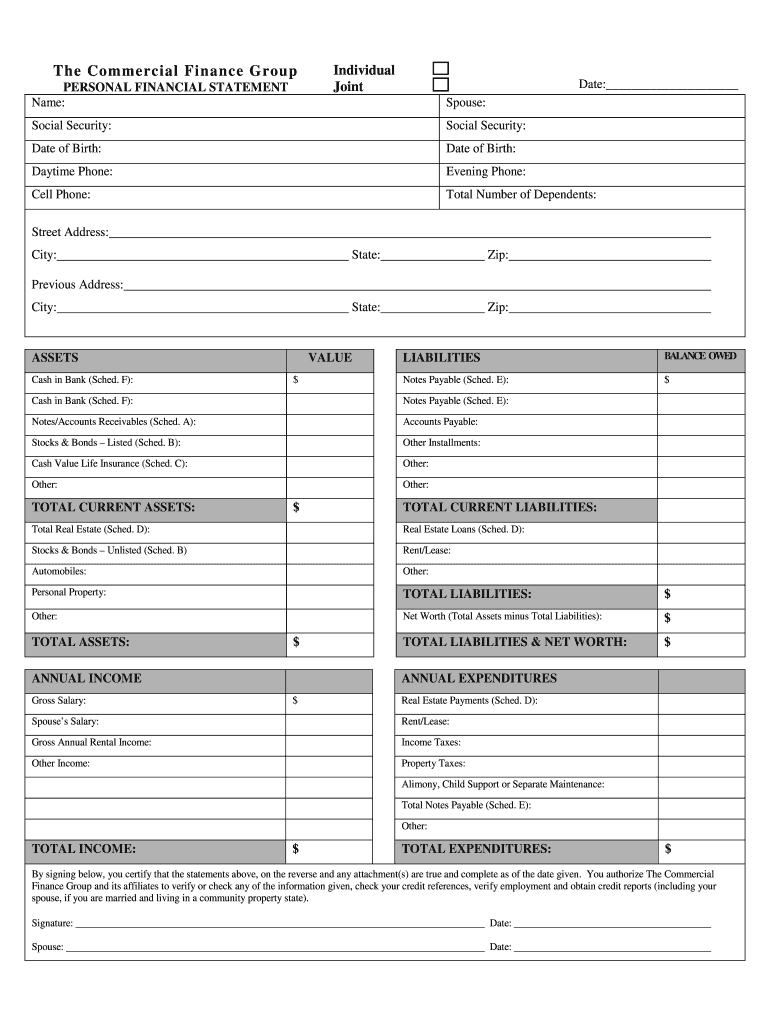
: Evening Phone: Cell Phone: Total Number of Dependents: Street Address: City: State: Zip: State: Zip: Previous Address: City: ASSETS Cash in Bank (Sched. F): VALUE $ LIABILITIES BALANCE OWED Notes Payable (Sched. E): $ Cash in Bank (Sched. F): Notes Payable (Sched. E): Notes/Accounts Receivables (Sched. A): Accounts Payable: Stocks & Bonds – Listed (Sched. B): Other Installments: Cash Value Life Insurance (Sched. C): Other: Other: Other: TOTAL CURRENT ASSETS: $ TOT.
Loading

Open form follow the instructions

Easily sign the form with your finger

Send filled & signed form or save
How to fill out the CFG Personal Financial Statement online
Completing the CFG Personal Financial Statement online is a straightforward process that allows users to provide crucial financial information efficiently. This guide will walk you through each section of the statement, ensuring that you understand what information to include and how to navigate the form.
Follow the steps to complete your personal financial statement seamlessly.
- Press the ‘Get Form’ button to access the CFG Personal Financial Statement and open it in your chosen editor.
- Begin by filling in your personal information such as name, social security number, date of birth, and contact details. Indicate whether you are completing the form as an individual or jointly with a partner.
- List your total number of dependents in the designated field. This information is essential for understanding your financial obligations.
- In the assets section, detail your cash in the bank by referring to schedule F. Enter the respective amounts accurately.
- Proceed to the liabilities section and list any notes payable as found in schedule E, as well as other outstanding debts like accounts payable.
- Fill in the total current assets and total current liabilities, ensuring all calculations are correct to determine your net worth.
- Next, provide information regarding your annual income, including gross salary and any additional sources of income.
- In the annual expenditures section, account for all outgoing finances, such as rent, mortgage payments, taxes, and other expenditures.
- Review all entries for accuracy. Make sure your financial statements reflect your current financial situation truthfully.
- Once you have completed the form, you can save your changes, download the document, print it for your records, or share it as necessary.
Begin working on your CFG Personal Financial Statement online today for a streamlined financial overview.
Experience a faster way to fill out and sign forms on the web. Access the most extensive library of templates available.
Related content
Consumer Banking serves retail customers and small businesses with annual revenues of up...
CFG's Financial Wellbeing programme provides students with training in essential financial...
Aug 10, 2017 — As of January 31, 2020, 187.4 million shares of Common Stock of Moody's...
Get answers to your most pressing questions about US Legal Forms API.
How do you write a personal financial statement?
Writing a personal financial statement involves summarizing your financial position through detailed accounts of your assets and liabilities. Start with clear headings for each section, and make sure all figures are accurate. Using the CFG Personal Financial Statement format can help you create a polished document that communicates your financial state effectively.
How do I file a financial statement in XBRL format?
To file a financial statement in XBRL format, you need to convert your financial data into the eXtensible Business Reporting Language framework. This involves tagging your financial information for accurate representation. While the CFG Personal Financial Statement may not directly support XBRL, it can help organize your data before conversion.
What are the 5 main components of personal finance?
The five main components of personal finance include budgeting, saving, investing, spending, and protecting your finances through insurance. Understanding these elements allows you to manage your financial health effectively. By utilizing the CFG Personal Financial Statement, you can assess how these components interrelate and impact your overall financial strategy.
How to fill a personal financial statement?
Filling out a personal financial statement involves entering your income, expenses, assets, and liabilities in the provided categories. Make sure to provide accurate figures and clear descriptions to reflect your financial status. The CFG Personal Financial Statement can guide you step by step, ensuring you don’t miss any critical details.
What is a financial personal statement?
A financial personal statement is a summary of an individual's financial condition. It highlights assets, liabilities, incomes, and expenses, aimed at providing a snapshot of your financial health. With the CFG Personal Financial Statement, you can create a comprehensive financial personal statement that meets industry standards.
What is a PFS template?
A PFS template, or personal financial statement template, serves as a convenient guide to compile your financial details. It helps organize important information such as your income, debts, and net worth in an easy-to-read format. Utilizing the CFG Personal Financial Statement as your PFS template can facilitate accurate financial presentations for various purposes.
What is a personal financial statement template?
A personal financial statement template is a structured document that helps individuals outline their financial situation. This template typically includes sections for assets, liabilities, income, and expenses. By using a recognized format like the CFG Personal Financial Statement template, you can easily present your financial data to lenders or for personal use.
How to complete an SBA personal financial statement?
To complete an SBA personal financial statement, gather your financial documents, including bank statements, investment records, and income details. Then, accurately list your assets and liabilities to present a clear picture of your financial status. Using the CFG Personal Financial Statement, you can streamline this process and ensure that all necessary details are included.
How do you fill out a personal financial statement?
Filling out a personal financial statement involves systematically documenting your financial status and obligations. Start by assessing your assets, then list your liabilities to get a complete picture. The CFG Personal Financial Statement can guide you through this in a user-friendly manner. This organized structure allows you to make informed financial decisions.
How do I fill out a personal financial statement?
To fill out a personal financial statement, you'll need to compile financial data, including income, expenses, and asset details. Work through each section carefully, ensuring accuracy and completeness. Our CFG Personal Financial Statement resources offer templates and examples to guide you through this process. This approach can save you time and reduce errors.
Use professional pre-built templates to fill in and sign documents online faster. Get access to thousands of forms.
If you believe that this page should be taken down, please follow our DMCA take down process here.