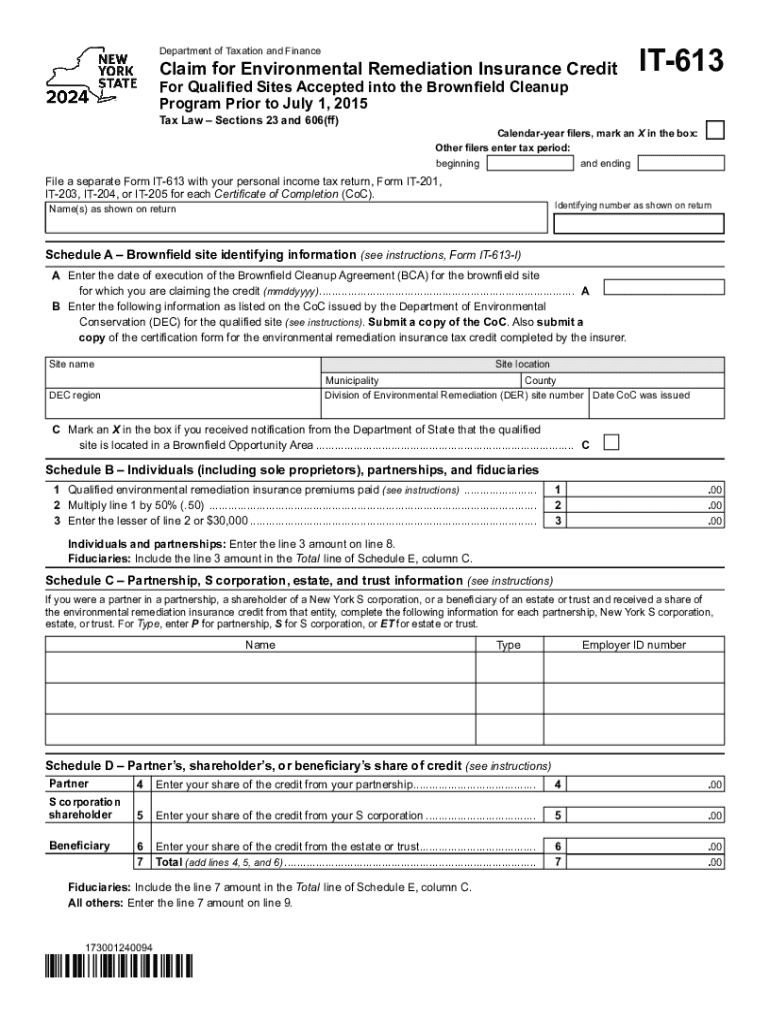
S 23 and 606(ff) IT-613 Calendar-year filers, mark an X in the box: Other filers enter tax period: beginning and ending File a separate Form IT-613 with your personal income tax return, Form IT-201, IT-203, IT-204, or IT-205 for each Certificate of Completion (CoC). Identifying number as shown on return Name(s) as shown on return Schedule A Brownfield site identifying information (see instructions, Form IT-613-I) A Enter the date of execution of the Brownfield Cleanup Agreement (BCA).
Loading

Open form follow the instructions

Easily sign the form with your finger

Send filled & signed form or save
How to fill out the NY IT-613 online
Filling out the NY IT-613 is an essential process for individuals and entities seeking the environmental remediation insurance credit associated with qualified brownfield sites. This guide provides clear, step-by-step instructions to assist users in completing the form accurately and efficiently.
Follow the steps to complete the NY IT-613 online.
- Click the ‘Get Form’ button to access the NY IT-613 form and open it in your preferred online document editor.
- Indicate your filing status by marking an X in the box for calendar-year filers. If you are an other filer, enter the tax period by filling in the beginning and ending dates.
- In the identifying number section, enter the number as shown on your income tax return.
- For the name field, enter the names as they appear on your tax return.
- Proceed to Schedule A and input the date of execution of the Brownfield Cleanup Agreement (BCA) for the site, using the format mmddyyyy.
- Enter the specific information about the qualified site as shown on the Certificate of Completion (CoC) issued by the Department of Environmental Conservation (DEC). Ensure to attach a copy of the CoC and the certification form for the environmental remediation insurance credit.
- If you received notification from the Department of State indicating the site is in a Brownfield Opportunity Area, mark the corresponding box in Schedule A.
- In Schedule B, record the amount of qualified environmental remediation insurance premiums paid in line 1.
- Calculate the amount for line 2 by multiplying line 1 by 50% and write it down.
- Enter the lesser of line 2 or $30,000 in line 3.
- If you are an individual or partnership, transfer the amount from line 3 to line 8. If you are a fiduciary, include it in the Total line of Schedule E, column C.
- Proceed to Schedule C if applicable, and provide information for each partnership, S corporation, estate, or trust as needed.
- In Schedule D, input your share of the credit from your partnership, S corporation, or estate. Sum these figures and include the total in the appropriate lines.
- Complete Schedule E to summarize beneficiaries and fiduciaries share of credit, ensuring all identifying numbers and figures are correctly filled.
- In Schedule F, compute the total environmental remediation insurance credit by summing amounts from the previous sections, following the provided instructions.
- In Schedule G, summarize any recaptured credits, entering the appropriate amounts and ensuring all sums are accurate.
- After filling out all sections of the form, review for accuracy. Then save changes, download, print, or share the completed form as required.
Complete your NY IT-613 form online today to ensure you receive the credit you deserve.
Experience a faster way to fill out and sign forms on the web. Access the most extensive library of templates available.
Related content
File a separate Form IT-613 with your personal income tax return, Form IT-201,. IT-203...
(Form IT-613, Claim for Environmental Remediation Insurance. Credit ), then include the...
Aug 6, 2020 — Interrogation is a form of COLLECTION privacy harm under the Solove...
Use professional pre-built templates to fill in and sign documents online faster. Get access to thousands of forms.
If you believe that this page should be taken down, please follow our DMCA take down process here.