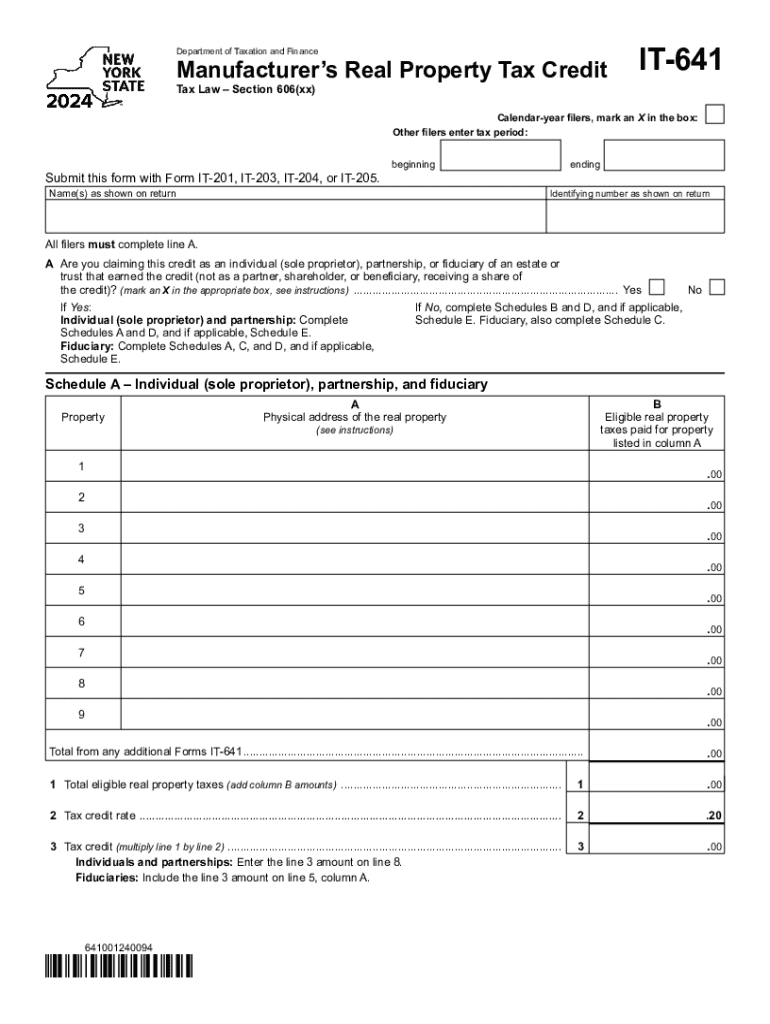
This form with Form IT 201, IT 203, IT 204, or IT 205. beginning Name(s) as shown on return ending Identifying number as shown on return All filers must complete line A. A Are you claiming this credit as an individual (sole proprietor), partnership, or fiduciary of an estate or trust that earned the credit (not as a partner, shareholder, or beneficiary, receiving a share of the credit)? (mark an X in the appropriate box, see instructions) .

Open form follow the instructions

Easily sign the form with your finger

Send filled & signed form or save
How to fill out the NY IT-641 online
The NY IT-641 form is essential for claiming the manufacturer’s real property tax credit in New York. This guide will provide comprehensive, step-by-step instructions on how to fill out this form online, ensuring you understand each section and can complete it accurately.
Follow the steps to complete the NY IT-641 form online.
- Press the ‘Get Form’ button to access the NY IT-641 form and open it in your preferred digital editor.
- Identify if you are a calendar-year filer by marking an X in the appropriate box. If you are not a calendar-year filer, enter your specific tax period.
- Complete Section A by indicating whether you are claiming this credit as an individual, partnership, or fiduciary of an estate or trust. Mark an X in the corresponding box.
- Depending on your answer in Section A, complete the required schedules: If yes, fill out Schedules A and D (and Schedule E if applicable). If no, complete Schedules B and D (and Schedule E if applicable).
- For Schedule A, enter the physical address of the real property in Column A and the eligible real property taxes paid in Column B. Repeat this for all relevant properties.
- Add the amounts in Column B to calculate the total eligible real property taxes. Input this total in line 1 of Schedule A.
- In line 2 of Schedule A, indicate the tax credit rate, which is typically 0.20. Calculate your tax credit by multiplying the total from line 1 by the rate in line 2 and record this amount in line 3.
- Proceed to Schedule B to report the shares of credit received if you are a partner, shareholder, or beneficiary. Enter the relevant details in Columns A through E.
- Complete Schedule C if applicable, following the instructions to report details about the fiduciary's and beneficiary's shares of credit.
- For Schedule D, enter the amounts collected in the prior schedules and add them where instructed, recording your total credit in line 11.
- Finish with Schedule E, if required, calculating any credit recaptures. Enter the necessary details and totals as directed.
- Once you have filled out all required sections, save your completed form. You can also download, print, or share the form as needed.
Start filling out your NY IT-641 form online now to ensure you claim your tax credit correctly.
Experience a faster way to fill out and sign forms on the web. Access the most extensive library of templates available.
Related content
All filers must complete line A. A Are you claiming this credit as an individual (sole...
To access it, type www.cs.ny.gov/employee-benefits in your web browser. This web page...
Dec 12, 2024 — For tax years beginning on or after January 1, 2014, eligible taxpayers...
Get answers to your most pressing questions about US Legal Forms API.
What is NY state withholding?
Calculating taxes in New York is a little trickier than in other states. The state as a whole has a progressive income tax that ranges from 4. % to 10.9%, depending on an employee's income level. There is also a supplemental withholding rate of 11.70% for bonuses and commissions.
Who gets NYS property tax relief check?
The property tax rebate is for homeowners whose New York City property is their primary residence and whose combined income is $250,000 or less. Most recipients of the School Tax Relief (STAR) exemption or credit will automatically qualify and will not need to take any action in order to receive the rebate.
Why am I being audited by New York State?
Some of the reasons we select a taxpayer for audit include: Failure to file a return. Failure to report income or sales. Excessive credits or exclusions claimed on a return.
How do you qualify for the NYS real property tax credit?
You are entitled to this refundable credit if: your household gross income is $18,000 or less; you occupied the same New York residence for six months or more; you were a New York State resident for the entire tax year; you could not be claimed as a dependent on another taxpayer's federal income tax return;
At what age do seniors stop paying property taxes in New York?
To qualify for an exemption that begins on July 1, you must be 65 or older by the following December 31.
Who is eligible for NYS property tax rebate 2024?
If the owners are spouses or siblings, only one must be 65 or older. The total household income of all owners (residents and non-residents) and any owner's spouse living on the property must be: for tax year 2024/2025 $98,700 or less.
Who is eligible for the NYS property tax relief credit?
To qualify for the real property tax credit, you must meet all of these conditions for tax year 2024: Your household gross income was $18,000 or less. You occupied the same New York residence for six months or more. You were a New York State resident for all of 2024.
Who qualifies for the NYS household credit?
You are entitled to this nonrefundable credit if you: Filing statusFederal adjusted gross income Single $28,000 or less Married filing jointly Qualifying surviving spouse Head of household with qualifying person $32,000 or less Married filing Separately See the Instructions for Form IT-201 or Instructions for Form IT-203 Apr 17, 2024
Use professional pre-built templates to fill in and sign documents online faster. Get access to thousands of forms.
If you believe that this page should be taken down, please follow our DMCA take down process here.