
Open form follow the instructions

Easily sign the form with your finger

Send filled & signed form or save
How to fill out the CA FTB 3533-B online
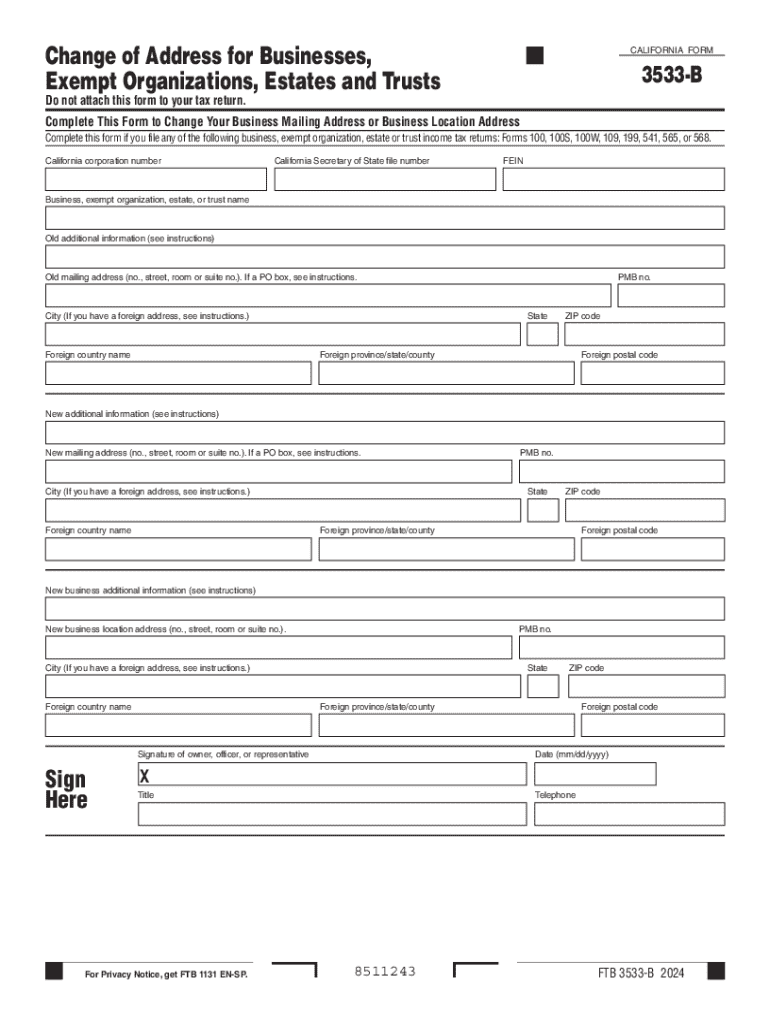
Filling out the CA FTB 3533-B form online can streamline the process of changing your business mailing address or business location. This guide will provide you with clear, step-by-step instructions to ensure your form is completed accurately and efficiently.
Follow the steps to complete the CA FTB 3533-B form online.
- Click ‘Get Form’ button to obtain the form and open it in the editor.
- Enter your California corporation number in the designated field to accurately identify your business.
- In the next field, input your California Secretary of State file number to provide further identification.
- Fill in your Federal Employer Identification Number (FEIN) as required for tax purposes.
- Provide the legal name of your business, exempt organization, estate, or trust in the appropriate section.
- For the current mailing address, include the complete old mailing address including number, street, city, state, and ZIP code.
- If applicable, fill out the foreign address fields with necessary details, such as foreign country and postal code.
- Complete the new mailing address section with your new mailing address details.
- Ensure to include any additional information related to the new mailing address if required.
- If your business has a new location, fill in the new business location address with similar details required for the mailing address.
- Obtain a signature in the designated area from the owner, officer, or authorized representative to validate the form.
- Add the date of signing in the required mm/dd/yyyy format.
- Finally, review all entered information for accuracy, then you can save changes, download, print, or share the form as necessary.
Complete your CA FTB 3533-B form online today for a seamless address change process.
Experience a faster way to fill out and sign forms on the web. Access the most extensive library of templates available.
Related content
Complete this form if you file any of the following business, exempt organization, estate...
Jul 1, 2005 — The California Franchise Tax Board 2006 Annual Report is a summary of the...
Use form FTB 3533-B, Change of Address for Businesses, Exempt Organizations, Estates and...
Get answers to your most pressing questions about US Legal Forms API.
What is form 3533?
CA Form 3533, also known as the Change of Mailing Address, is used to report changes to the mailing address on file for a California property.
Where do I send my ca Form 3533 B?
Individuals Complete Change of Address for Individuals (Form 3533) Mail your form. Franchise Tax Board PO Box 942840. Sacramento CA 94240-0002.
How to avoid California tax underpayment penalty?
As long as you've paid up your estimated tax payments to equal either 90% of the tax you owe for the current year ~or~ 100% of your tax bill from last year (whichever is less), you're in the clear.
What is an amended tax return form?
IRS amended return definition An amended return captures all the original information when you first filed but includes anything you needed to change. To get those new details to the Internal Revenue Service (IRS), you'll use Form 1040-X, Amended U.S. Individual Income Tax Return, and follow the instructions.
How do I remove a California Franchise Tax Board lien?
The quickest way we will release a Notice of State Tax Lien is for you to pay your liened tax debt in full (including interest, penalties, and fees). We will begin the lien release process once the payment is posted. If you pay in full using: Bank account (Web Pay) : Make separate payments for each tax year.
What is the IRS form for penalty removal?
Use Form 843 to claim a refund or request an abatement of certain taxes, penalties, additions to tax, interest, and fees.
What is the IRS refund reissue form?
Form 3911 is completed by the taxpayer to provide the Service with information needed to trace the nonreceipt or loss of the already issued refund check.
How do I submit the USPS form 3533?
How to Apply. Online: You can apply for a refund with a free USPS.com account. At a Post Office: You can also go to any Post Office and fill out Part I of Form 3533 (in duplicate) and submit it along with your original customer copy of Label 11.
Use professional pre-built templates to fill in and sign documents online faster. Get access to thousands of forms.
If you believe that this page should be taken down, please follow our DMCA take down process here.