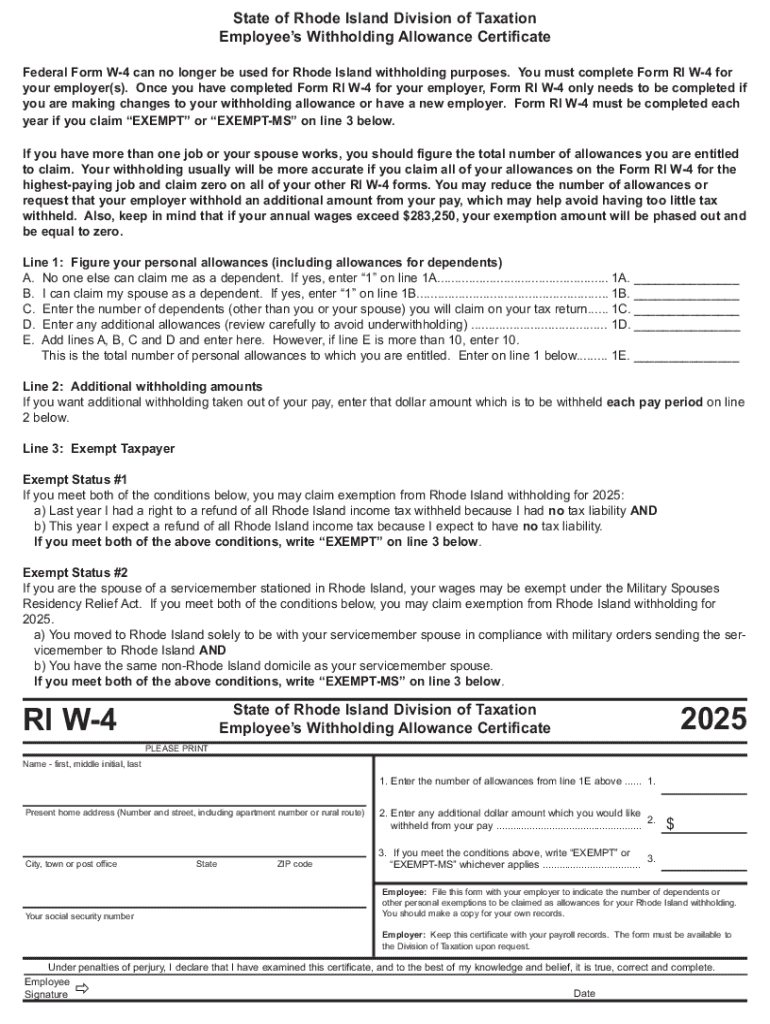
Your employer(s). Once you have completed Form RI W-4 for your employer, Form RI W-4 only needs to be completed if you are making changes to your withholding allowance or have a new employer. Form RI W-4 must be completed each year if you claim EXEMPT or EXEMPT-MS on line 3 below. If you have more than one job or your spouse works, you should figure the total number of allowances you are entitled to claim. Your withholding usually will be more accurate if you claim all of your allow.
Loading

Open form follow the instructions

Easily sign the form with your finger

Send filled & signed form or save
How to fill out the RI RI W-4 online
Filling out the RI RI W-4 is essential for employees in Rhode Island to ensure the correct amount of tax is withheld from their paychecks. This guide will provide you with clear, step-by-step instructions for completing the form online, making the process straightforward and accessible.
Follow the steps to complete your RI RI W-4 online.
- Click ‘Get Form’ button to obtain the form and open it in the editor.
- Begin by entering your full name, including your first name, middle initial, and last name, in the designated field.
- Provide your present home address, including the number and street, apartment number if applicable, city, town, state, and ZIP code.
- Input your social security number in the specified area to ensure proper identification for withholding purposes.
- Refer to line 1E of the form. Calculate your total personal allowances, including those for your dependents and any additional allowances. Enter this total on line 1.
- If you wish to have additional withholding taken from your pay, specify that dollar amount in the field for line 2.
- Evaluate your eligibility for exemption. If you meet the conditions provided in the form, write 'EXEMPT' or 'EXEMPT-MS' on line 3, as applicable.
- Review all filled-out information carefully to avoid mistakes. Make corrections if necessary.
- Once you are satisfied with the information entered, save the changes. You may also choose to download, print, or share the completed form as required.
Complete your RI RI W-4 online today to ensure accurate tax withholding!
Experience a faster way to fill out and sign forms on the web. Access the most extensive library of templates available.
Related content
Federal Form W-4 can no longer be used for Rhode Island withholding purposes. You must...
Federal Form W-4 can no longer be used for Rhode Island withholding purposes. You must...
Oct 12, 2020 — To ensure accurate withholding, many states now require taxpayers to...
Get answers to your most pressing questions about US Legal Forms API.
How to fill out RI W4?
How to fill out the Rhode Island Employee Withholding Certificate RI W-4? Determine your personal allowances including dependents. Calculate any additional withholding amounts you would like. Check if you qualify for exempt status and indicate it if applicable. Fill in your personal information accurately on the form.
What does RI withholding mean?
Rhode Island – like the federal government and many states – has a pay-as-you-earn income tax system. Under that system, employers are required to withhold a portion of their employees' wages and to periodically turn over those withheld funds to the RI Division of Taxation.
Where can I find the W-4 form?
You can download and print a Form W-4, order multiple copies, or call 800-TAX-FORM (800-829-3676). You may also use a substitute Form W-4 you developed instead of the official Form W-4, if you also provide the tables, instructions, and worksheets contained in the Form W-4 in effect at that time.
Does Rhode Island have a W4 form?
Federal Form W-4 can no longer be used for Rhode Island withholding purposes. You must complete Form RI W-4 for your employer(s). Once you have completed Form RI W-4 for your employer, Form RI W-4 only needs to be completed if you are making changes to your withholding allowance or have a new employer.
What percentage should I withhold on W4?
Marginal tax brackets for tax year 2024 Taxable incomeTaxes owed $0 to $23,200 10% of the taxable income $23,201 to $94,300 $2,320 Plus 12% of the amount over $23,200 $94,301 to $201,050 $10,852 Plus 22% of amount over $94,300 $201,051 to $383,900 $34,337 Plus 24% of amount over $201,0503 more rows • Feb 7, 2024
Do all states have w4?
Alaska, Florida, Nevada, New Hampshire, South Dakota, Tennessee, Texas, Washington, and Wyoming do not have state income tax. Most other states require employees to complete the W-4 for state taxes, unless the state imposes a flat income tax rate.
Does Rhode Island have state withholding tax?
Rhode Island – like the federal government and many states – has a pay-as-you-earn income tax system. Under that system, employers are required to withhold a portion of their employees' wages and to periodically turn over those withheld funds to the RI Division of Taxation.
How do I correctly fill out my W4?
How to fill out a W-4 form: Step-by-step Step 1: Enter your personal information. ... Step 2: Account for all jobs you and your spouse have. ... Step 3: Claim your children and other dependents. ... Step 4: Make other adjustments. ... Step 5: Sign and date your form.
Use professional pre-built templates to fill in and sign documents online faster. Get access to thousands of forms.
If you believe that this page should be taken down, please follow our DMCA take down process here.