Loading
Get Lesson Plan: (title) - Cfwv.com
How it works
-

Open form follow the instructions
-

Easily sign the form with your finger
-

Send filled & signed form or save
How to fill out the Lesson Plan: Lifelong Portfolio 10 - CFWV.com online
This guide provides clear and detailed instructions on how to successfully fill out the Lesson Plan: Lifelong Portfolio 10 online. Designed for educators and students alike, this guide ensures that users can navigate the form with ease and confidence.
Follow the steps to effectively complete your lesson plan online.
- Click the ‘Get Form’ button to obtain the Lesson Plan: Lifelong Portfolio 10 document and access it in your chosen editor.
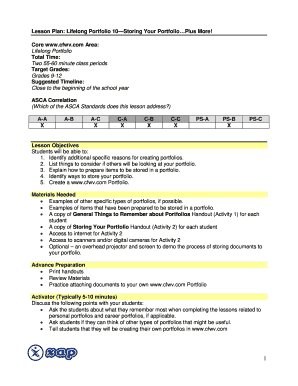
- Begin filling out the title section by entering the specific title of your lesson plan, ensuring that it clearly reflects the focus of the content.
- In the core area section, specify the core topic under which your lesson falls, such as 'Lifelong Portfolio', to categorize your lesson appropriately.
- Indicate the total time required for the lesson by entering 'Two 55-60 minute class periods' in the designated field.
- Enter the target grades by specifying 'Grades 9-12' to inform users of the appropriate grade level for the lesson.
- In the suggested timeline section, note that this lesson is best integrated close to the beginning of the school year, helping teachers plan accordingly.
- Fill in the ASCA correlation by marking the appropriate ASCA Standards that are addressed in this lesson, ensuring that each relevant standard is selected.
- Outline the lesson objectives clearly, listing each objective that students should achieve by the end of the lesson, to provide clarity on expected outcomes.
- In the materials needed section, list all resources required for the lesson, such as handouts, digital cameras, and access to the internet, ensuring all necessary items are included.
- Complete the advance preparation section, detailing any activities or preparations that need to occur before the lesson starts.
- Proceed to fill in the core learning strategies and lesson activities section, describing the main actions students will take during the session.
- After completing all sections, review the document to ensure accuracy and completeness. Users can then save changes, download, print, or share the completed lesson plan.
Complete your Lesson Plan: Lifelong Portfolio 10 now to enhance your educational experience online.
Industry-leading security and compliance
US Legal Forms protects your data by complying with industry-specific security standards.
-
In businnes since 199725+ years providing professional legal documents.
-
Accredited businessGuarantees that a business meets BBB accreditation standards in the US and Canada.
-
Secured by BraintreeValidated Level 1 PCI DSS compliant payment gateway that accepts most major credit and debit card brands from across the globe.