Loading
Get Community Arts Final Report - West Virginia Division Of Culture And ...
How it works
-

Open form follow the instructions
-

Easily sign the form with your finger
-

Send filled & signed form or save
How to fill out the Community Arts Final Report - West Virginia Division Of Culture And ... online
This guide offers a clear and supportive approach to completing the Community Arts Final Report associated with project support grants from the West Virginia Division of Culture and History. By following each step outlined here, users can confidently fill out the report online, ensuring all necessary information is accurately documented.
Follow the steps to complete your Community Arts Final Report accurately.
- Press the ‘Get Form’ button to access the Community Arts Final Report and open it in your editor.
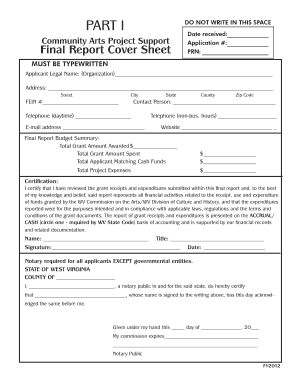
- Begin with Part I, the Final Report Cover Sheet. Type the legal name and address of the applicant organization, as recognized by the IRS and the West Virginia Secretary of State. Include the organization’s Federal Employee Identification Number and provide contact information for the individual to reach regarding questions.
- Complete the Final Report Budget Summary by entering the grant amount awarded, the actual amount spent, and the total matching cash funds contributed by your organization. Ensure these figures accurately reflect your project expenses.
- Sign and date the cover sheet in blue ink, and circle the accounting method utilized by your organization. Note that notarization is required, except for governmental entities.
- Proceed to Part II, the Final Report Project & Budget Summary. Fill in the applicant name, total number of individuals benefiting from all projects, number of youth served, and the percentage of the community at or below the poverty level. This section requires a summary of total expenses and income for all projects.
- In Part III, complete an Individual Project Final Report Form for each project funded under the grant. Include the location, dates, number of beneficiaries, and other relevant details as indicated. Evaluate the success of the project in a separate written statement.
- Finally, fill out Part IV, the Final Report Individual Project Budget. Record expenses and income specific to each project, ensuring totals align with the requirements outlined in previous sections.
- Review all entries for accuracy and completeness. Once satisfied, you can save your changes, download, print, or share the completed form as needed.
Take the next step in completing your Community Arts Final Report and ensure all required details are accurately filled out online.
Industry-leading security and compliance
US Legal Forms protects your data by complying with industry-specific security standards.
-
In businnes since 199725+ years providing professional legal documents.
-
Accredited businessGuarantees that a business meets BBB accreditation standards in the US and Canada.
-
Secured by BraintreeValidated Level 1 PCI DSS compliant payment gateway that accepts most major credit and debit card brands from across the globe.