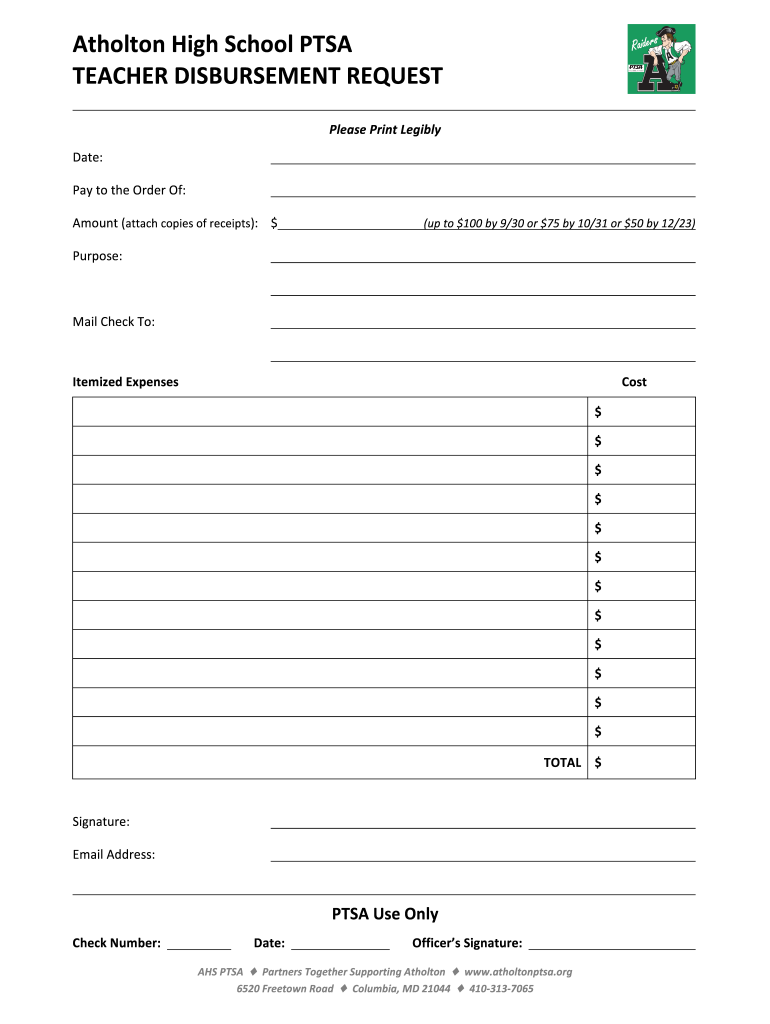
Atholton High School PTSA TEACHER DISBURSEMENT REQUEST Please Print Legibly Date: Pay to the Order Of: Amount (attach copies of receipts): $ (up to $100 by 9/30 or $75 by 10/31 or $50 by 12/23) Purpose:.
Loading

Open form follow the instructions

Easily sign the form with your finger

Send filled & signed form or save
How to fill out the Atholton High School PTSA Teacher Disbursement Request online
This guide provides clear and thorough instructions on how to complete the Atholton High School PTSA Teacher Disbursement Request form online. Whether you are a seasoned user or new to digital form submission, this step-by-step approach will help ensure a smooth process.
Follow the steps to successfully complete your disbursement request.
- Click ‘Get Form’ button to obtain the form and open it in the editor.
- Enter the current date in the designated field. This helps track when the request is submitted.
- In the 'Pay to the order of' section, clearly print the name of the individual or entity that should receive the payment.
- Specify the amount you are requesting in the designated field. Remember to attach copies of relevant receipts with your request.
- Provide the purpose of the disbursement in the 'Purpose' section. Be concise and clear to ensure proper understanding.
- Indicate the mailing address where the check should be sent in the 'Mail check to' field.
- In the 'Itemized expenses' section, list each individual expense along with its cost. Ensure that the total matches the requested amount.
- Sign the form in the 'Signature' field to authorize the request.
- Provide your email address in the 'Email address' field to receive updates or confirmations regarding your disbursement.
- Once all sections are completed, review your entries for accuracy before finalizing the form.
- Finally, save your changes, download a copy for your records, and consider printing the form or sharing it as needed.
Complete your Atholton High School PTSA Teacher Disbursement Request online today!
Experience a faster way to fill out and sign forms on the web. Access the most extensive library of templates available.
Related content
Apr 13, 2012 — Baltimore Area: (410-946-5400) Washington Area: (301-970-5400). Other...
Use professional pre-built templates to fill in and sign documents online faster. Get access to thousands of forms.
If you believe that this page should be taken down, please follow our DMCA take down process here.