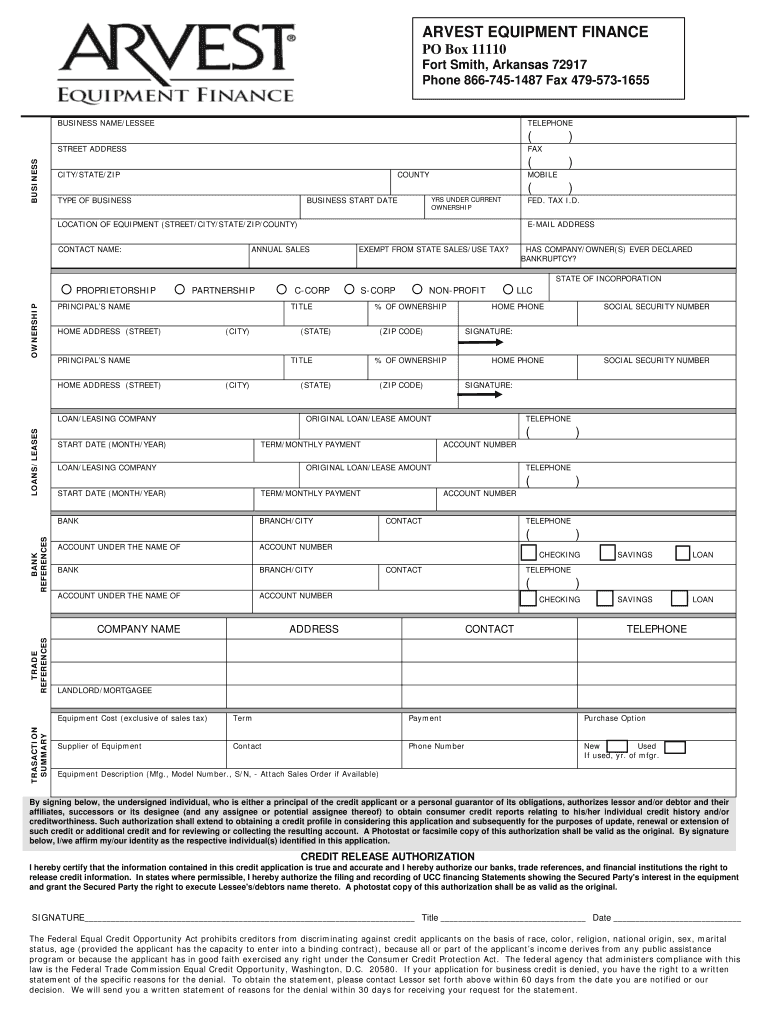
BILE ( TYPE OF BUSINESS YRS UNDER CURRENT OWNERSHIP BUSINESS START DATE LOCATION OF EQUIPMENT (STREET/CITY/STATE/ZIP/COUNTY) CONTACT NAME: ) FED. TAX I.D. E-MAIL ADDRESS ANNUAL SALES EXEMPT FROM STATE SALES/USE TAX? HAS COMPANY/OWNER(S) EVER DECLARED BANKRUPTCY? STATE OF INCORPORATION OWNERSHIP PROPRIETORSHIP PARTNERSHIP C-CORP PRINCIPAL’S NAME HOME ADDRESS (STREET) TITLE (CITY) TITLE (CITY) LOANS/LEASES BANK REFERENCES LLC HOME PHONE % OF OWNERSHIP (ZIP CODE) HOME PHONE T.
Loading

Open form follow the instructions

Easily sign the form with your finger

Send filled & signed form or save
How to fill out the Arvest Equipment Finance Adverse Action Form online
Completing the Arvest Equipment Finance Adverse Action Form online is an essential step for users looking to understand their financing options. This guide will provide you with clear, step-by-step instructions to help you navigate the form effectively.
Follow the steps to complete the form accurately
- Click 'Get Form' button to obtain the form and open it in your preferred editor.
- Enter your business name and telephone number accurately. Ensure that all contact information is correct, including your street address, city, state, and ZIP code.
- Provide the County and type of business. Specify the years under current ownership and the business start date.
- Fill in the location of the equipment, including street, city, state, ZIP, and county. Include the name of the contact person, their email address, and their phone number.
- Complete the federal tax identification number and indicate if your business is exempt from state sales/use tax.
- Answer whether the company or owner(s) have ever declared bankruptcy, and provide the state of incorporation and type of ownership (e.g., proprietorship, partnership, C-Corp, LLC, S-Corp).
- List the principal's name, home address, title, and percentage of ownership. Provide banking references, including bank names, account numbers, and contact details.
- Indicate any existing loans or leases by filling in loan amount, terms, and associated companies.
- For transaction summary, detail the equipment cost (excluding sales tax), term, payment, purchase option, supplier, and equipment description.
- Authorize credit release by signing and dating the form. Ensure all information provided is true and accurate.
- After completing the form, you can save changes, download a copy, print it for future reference, or share it as needed.
Complete your Arvest Equipment Finance Adverse Action Form online today for a seamless process.
Experience a faster way to fill out and sign forms on the web. Access the most extensive library of templates available.
Related content
Apr 3, 2023 — NOTE: This document is an evaluation of this institution's record of...
by P Iren · 2010 · Cited by 1 — When information on securitization and credit...
The Minor League Baseball (MILB) refers to the remaining American professional baseball...
Get answers to your most pressing questions about US Legal Forms API.
Which is required to be included in a written adverse action notice?
A written adverse action notice must include specific information to inform you of the decision. This typically encompasses the reasons for the adverse action, your right to request further details, and contact information for the creditor. Familiarizing yourself with the Arvest Equipment Finance Adverse Action Form can help ensure that you receive all the required information and understand your rights effectively.
How to get tax documents from Arvest?
To get your tax documents from Arvest, you can log into your online banking account where tax documents are usually available. Alternatively, you may request these documents directly from Arvest customer service. Having your tax documents ready can be beneficial when you are working on the Arvest Equipment Finance Adverse Action Form.
How do I file a dispute with Arvest?
Filing a dispute with Arvest is straightforward. You can contact customer service directly or submit a dispute form through your online banking portal. Remember to collect all relevant details for your records, especially if you're filling out the Arvest Equipment Finance Adverse Action Form.
How do I get my bank statement online?
To get your bank statement online, visit the Arvest website and log into your banking account. Once inside, locate the 'Statements' tab to view or download the needed documents. This online access is convenient and helps when completing the Arvest Equipment Finance Adverse Action Form.
How do I get my statement?
You can get your statement by accessing your Arvest online banking account. Simply sign in, select 'Accounts', and then choose 'Statements'. This gives you direct access to your information, which can aid when you need to fill out the Arvest Equipment Finance Adverse Action Form.
How to get bank statement Arvest?
To obtain your Arvest bank statement, you can log into your online banking account. Once logged in, navigate to the 'Statements' section where you can view and download your statements. This process is helpful for tracking your finances and supports documentation for the Arvest Equipment Finance Adverse Action Form.
How to get tax documents from Arvest Bank?
To obtain tax documents from Arvest Bank, you can start by accessing your online account or contacting customer service directly. They can guide you on how to access your documents efficiently. If you have any questions related to the Arvest Equipment Finance Adverse Action Form during this process, their knowledgeable staff will be ready to assist you.
What is the legal name of Flagstar Bank?
Flagstar Bank's legal name is Flagstar Bank, FSB. This institution is known for its comprehensive banking services, including mortgage, commercial, and investment offerings. If you're seeking assistance or documentation related to the Arvest Equipment Finance Adverse Action Form, consider reaching out to Flagstar Bank for further information.
What is the legal name of b1BANK?
The legal name of b1BANK is Business First Bank. As it operates in Louisiana, this bank provides various financial products and services including asset-based lending. If you are looking for alternatives or additional options related to the Arvest Equipment Finance Adverse Action Form, b1BANK may have solutions tailored to your needs.
What is the full name of the bank?
The full name of the bank is Arvest Bank. This institution serves customers across multiple segments, including personal, commercial, and equipment financing. If you require assistance with the Arvest Equipment Finance Adverse Action Form, its representatives are available to guide you through the necessary steps.
Use professional pre-built templates to fill in and sign documents online faster. Get access to thousands of forms.
If you believe that this page should be taken down, please follow our DMCA take down process here.