Loading
Get Anthem W-9 2008-2026
How it works
-

Open form follow the instructions
-

Easily sign the form with your finger
-

Send filled & signed form or save
How to fill out the Anthem W-9 online
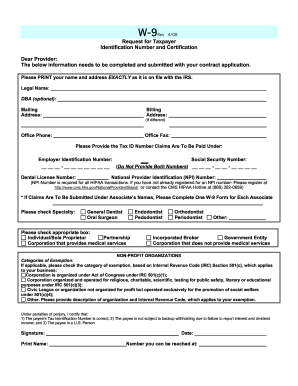
The Anthem W-9 form is essential for providing your taxpayer identification information to Anthem for contract applications. This guide will walk you through each section of the form, ensuring you complete it accurately and efficiently online.
Follow the steps to fill out the Anthem W-9 correctly online.
- Click ‘Get Form’ button to obtain the Anthem W-9 form and open it in your editor.
- Begin by printing your legal name and address exactly as it appears on file with the IRS. Enter this information in the appropriate fields labeled 'Legal Name' and 'Mailing Address'.
- If your billing address is different from your mailing address, fill out the 'Billing Address' section accordingly.
- Provide your office phone number in the 'Office Phone' field and your office fax number in the 'Office Fax' field, if available.
- Indicate the taxpayer identification number under which claims will be paid. You can either provide your Employer Identification Number (EIN) or your Social Security Number (SSN) — do not provide both.
- If you have a Dental License Number, enter it in the designated field.
- Fill in your National Provider Identification (NPI) Number, which is required for HIPAA transactions. If you have not registered for an NPI number, make sure to do so with the provided registration link.
- If claims are to be submitted under an associate's name, complete a separate W-9 form for each associate.
- Check the box next to your specialty (e.g., General Dentist, Oral Surgeon, etc.) to categorize your practice.
- Select the appropriate classification for your business by checking the corresponding box for Individual/Sole Proprietor, Partnership, Corporation that provides medical services, or other types.
- If applicable, check the category of exemption based on the Internal Revenue Code (IRC) Section 501(c) for non-profit organizations and provide a description if necessary.
- Certify under penalties of perjury that the taxpayer identification number provided is correct, confirm that you are not subject to backup withholding, and verify that you are a U.S. person by signing the form.
- Print your name, write the date, and provide a contact number where you can be reached.
- Once all fields are completed, save your changes, download, print, or share the form as needed.
Complete your W-9 form online today to streamline your documentation process.
The credentialing process with Anthem usually takes about 60 to 90 days, depending on various factors. This timeframe varies based on the complexity of your application and the completeness of your submission. If you stay proactive and provide all information upfront, it can help expedite the process.