Get American Express Change Of Bank Account 2007-2025
How it works
-

Open form follow the instructions
-

Easily sign the form with your finger
-

Send filled & signed form or save
How to fill out the American Express Change of Bank Account online
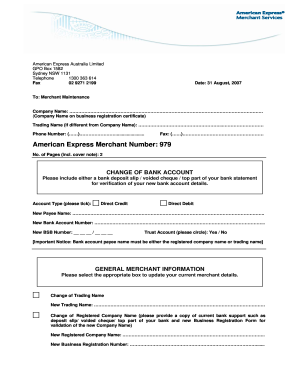
This guide provides step-by-step instructions on how to complete the American Express Change of Bank Account form online. Whether you are updating your bank account or making changes to your merchant details, this comprehensive guide will assist you in filling out the necessary information accurately and efficiently.
Follow the steps to complete your bank account change request.
- Click ‘Get Form’ button to obtain the form and open it in the editor.
- Enter your company name exactly as it appears on your business registration certificate in the 'Company Name' field.
- If applicable, enter your trading name in the 'Trading Name' field. This is only necessary if it differs from your company name.
- Provide your phone number in the designated 'Phone Number' field, ensuring it is formatted correctly.
- If you have a fax number, enter it in the 'Fax' field. If not, this can be left blank.
- Input your American Express Merchant Number in the relevant field; it is vital for identifying your account.
- In the ‘CHANGE OF BANK ACCOUNT’ section, include a bank deposit slip, voided cheque, or the top part of your bank statement to verify your new bank account details.
- Choose your preferred account type by ticking either 'Direct Credit' or 'Direct Debit' as appropriate.
- Fill in the 'New Payee Name' with either the registered company name or trading name to comply with the requirements.
- Enter your new bank account number in the 'New Bank Account Number' field.
- Provide your new BSB number in the designated 'New BSB Number' fields, ensuring each segment is accurate.
- Indicate if this account is a trust account by circling 'Yes' or 'No' in the designated spot.
- In the 'GENERAL MERCHANT INFORMATION' section, select the appropriate box(es) for any other changes to your merchant details, such as trading name, registered company name, or addresses.
- If making changes to your trading or registered company name, ensure to provide valid supporting documents as outlined in the instructions.
- For new authorized signatories, fill in their names, business titles, driver’s license numbers, and signatures under the 'To add New Authorised Signatories' section.
- If replacing an existing authorized signatory, ensure to list their names in the designated section below.
- Carefully read the declaration section, then have the appropriate signatories provide their signatures in the designated 'Please sign here' area.
- Once all sections are complete, review your form for accuracy before proceeding to save the changes, download, print, or share the form as needed.
Easily complete your American Express Change of Bank Account form online today.
You can easily transfer funds from your bank account to another by initiating a transfer through your online banking portal. Ensure you have all required information, including the recipient's account details. If you wish to change your bank account linked to American Express, make sure to update your payment settings for a smooth American Express change of bank account.
Industry-leading security and compliance
-
In businnes since 199725+ years providing professional legal documents.
-
Accredited businessGuarantees that a business meets BBB accreditation standards in the US and Canada.
-
Secured by BraintreeValidated Level 1 PCI DSS compliant payment gateway that accepts most major credit and debit card brands from across the globe.