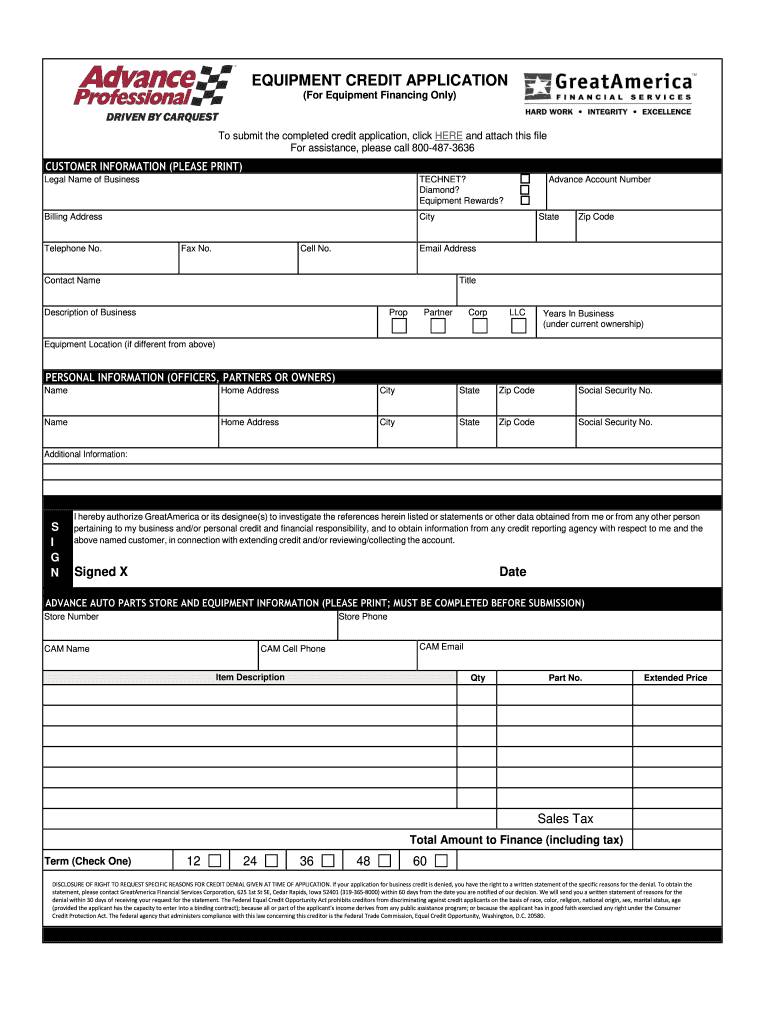
EQUIPMENT CREDIT APPLICATION (For Equipment Financing Only)To submit the completed credit application, click HERE and attach this file For assistance, please call 8004873636CUSTOMER INFORMATION (PLEASE.
Loading

Open form follow the instructions

Easily sign the form with your finger

Send filled & signed form or save
How to fill out the Advance Professional Equipment Credit Application online
Filling out the Advance Professional Equipment Credit Application online can streamline your equipment financing process. This guide provides step-by-step instructions to ensure that you complete the form accurately and efficiently.
Follow the steps to complete your credit application.
- Press the ‘Get Form’ button to access the application and open it in your preferred editor.
- Begin with the customer information section. Enter the legal name of your business, along with details such as billing address, telephone number, email address, and contact name. Make sure to select your business type, whether it is a corporation, LLC, or partnership.
- In the personal information section, include the names, home addresses, and social security numbers of all officers, partners, or owners of the business. Make sure all information is accurate.
- Fill out the advance auto parts store and equipment information. Include the store number, store phone, CAM name, and CAM email. Detail the items you wish to finance by providing descriptions, quantities, part numbers, and total amounts including sales tax.
- Once all sections are completed, carefully review the form for any errors. You can now save your changes, download the completed application, print it, or share it as needed.
Complete your Advance Professional Equipment Credit Application online today!
Experience a faster way to fill out and sign forms on the web. Access the most extensive library of templates available.
Related content
The 48C credit is a tax credit for investments in advanced energy projects, as defined in...
Aug 27, 2025 — To borrow equipment, you must make advance reservations through our...
AppleCare+ is an insurance policy covering the risk of damage to your Apple Watch...
Get answers to your most pressing questions about US Legal Forms API.
When taking a credit application, what question is appropriate?
When evaluating a credit application, an appropriate question includes asking about the reason for seeking credit. Understanding the applicant's intent helps lenders offer tailored financing solutions. This is particularly relevant for the Advance Professional Equipment Credit Application, as it enables a more personalized approach to the applicant's financial needs.
How to fill out the credit authorization form?
Filling out the credit authorization form involves providing accurate personal information and signing to authorize a credit check. This form is part of the Advance Professional Equipment Credit Application process and highlights your consent for lenders to review your credit history. Take your time to ensure all details are correct, as this can affect your credit approval.
What information do you need to apply for credit?
To apply for credit, particularly through the Advance Professional Equipment Credit Application, you will need essential personal and financial information. This includes your identification details, income, employment information, and any existing debts. Gathering this information beforehand can streamline the application process and enhance your chances of approval.
What is the 2/3/4 rule for credit cards?
The 2/3/4 rule for credit cards suggests keeping your utilization ratio below 30% of your total credit limit. This rule helps protect your credit score while optimizing your chances of getting approved for an Advance Professional Equipment Credit Application. By adhering to this guideline, you demonstrate responsible credit use to potential lenders.
What information is requested on a credit application?
The Advance Professional Equipment Credit Application typically requests detailed personal and financial information. You will need to disclose your income, existing debts, and credit history. This data allows lenders to evaluate your creditworthiness and make informed financing decisions.
What information is asked for on a credit application?
When completing the Advance Professional Equipment Credit Application, you will encounter several key information requests. Expect to provide personal identification details, financial information, employment status, and the purpose of the credit application. This information helps lenders assess your ability to repay the credit extended.
Who fills out the credit application form?
The credit application form is typically filled out by individuals or businesses seeking financing. Both the applicant and any business partners or co-applicants need to provide their information. This process ensures that the credit application is complete and accurately reflects the financial status of all involved parties.
What is the minimum credit score for equipment financing?
The minimum credit score for equipment financing usually starts at around 600, but this can depend on the lender’s policies. Scores below this threshold may limit your options, but not eliminate them entirely. When you fill out the Advance Professional Equipment Credit Application, the lender will assess your overall financial situation, providing insight into available financing options.
What credit score is needed for equipment?
Typically, a credit score of 650 or higher is preferable when seeking equipment financing. However, some lenders may consider applicants with lower scores, depending on other financial factors. It’s wise to discuss options with lenders after submitting your Advance Professional Equipment Credit Application to explore your eligibility.
What is an advance professional?
An advance professional refers to someone who specializes in providing professional services and may require specific equipment to perform their work. This includes various fields, such as construction and automotive services. Utilizing the Advance Professional Equipment Credit Application can help these professionals obtain the necessary tools to excel in their industry.
Use professional pre-built templates to fill in and sign documents online faster. Get access to thousands of forms.
If you believe that this page should be taken down, please follow our DMCA take down process here.