Loading
Get Ny It-2658-nys 2025-2026
How it works
-

Open form follow the instructions
-

Easily sign the form with your finger
-

Send filled & signed form or save
How to fill out the NY IT-2658-NYS online
The NY IT-2658-NYS form is an essential document for reporting estimated personal income tax for nonresident individuals. This guide will provide you with comprehensive, step-by-step instructions to assist you in filling out the form accurately and efficiently.
Follow the steps to complete your NY IT-2658-NYS online
- Click ‘Get Form’ button to obtain the form and open it in the digital editor.
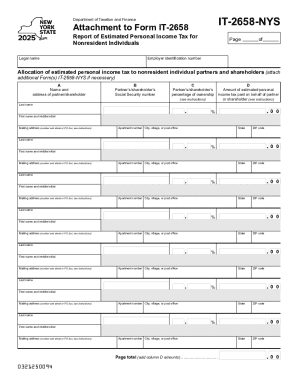
- Begin by entering your legal name at the top of the form. Make sure to provide your full name as it appears on your legal documentation.
- Next, input your employer identification number (EIN) in the designated field. This is crucial for identification purposes.
- In section A, list the name and address of the partner or shareholder. Ensure that you provide the complete mailing address, including city, state, and ZIP code.
- In section B, include the partner's or shareholder's Social Security number accurately to avoid any processing delays.
- Under section C, indicate the partner's or shareholder's percentage of ownership. This percentage should reflect their ownership interest accurately.
- In section D, enter the amount of estimated personal income tax paid on behalf of each partner or shareholder. Be sure to review the instructions to ensure the accurate calculation of this amount.
- If there are additional partners or shareholders, repeat steps 4 through 7 for each one, attaching more forms as necessary.
- At the end of the document, verify the totals in the page total section by summing all the amounts from column D.
- Once you have completed all sections, review the form for any errors. After confirming all information is correct, you can save changes, download, print, or share the completed form as needed.
Start completing your NY IT-2658-NYS online today for a hassle-free filing experience.