Loading
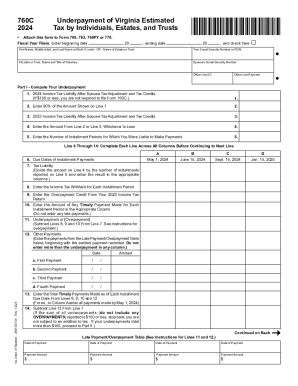
Get Va 760c 2024-2026
How it works
-

Open form follow the instructions
-

Easily sign the form with your finger
-

Send filled & signed form or save
How to fill out the VA 760C online
The VA 760C form is essential for individuals, estates, and trusts to report underpayment of estimated tax in Virginia. This guide provides clear, step-by-step instructions on how to complete the form online, ensuring you fulfill your tax obligations accurately and efficiently.
Follow the steps to fill out the VA 760C with ease.
- Click the ‘Get Form’ button to obtain the VA 760C and open it in your editor.
- Enter the beginning and ending dates for the fiscal year. This is crucial for accurate reporting.
- Provide your first name, middle initial, and last name. If you are filing jointly, include your partner's information as well.
- Enter your Social Security Number or Federal Employer Identification Number. If applicable, provide the name and title of the fiduciary.
- Input your partner's Social Security Number if filing jointly.
- In Part I, compute your underpayment starting with your 2024 income tax liability after any spouse tax adjustment and tax credits.
- Enter 90% of the amount shown on Line 1. This amount is essential for determining if you've made adequate payments.
- Include your 2023 income tax liability after spouse tax adjustment and tax credits.
- Select the lesser of the amounts from Line 2 or Line 3 and enter it.
- Indicate the number of installment periods for which you were liable to make payments.
- For Lines 6 through 14, ensure each line is completed across all columns before moving to the next one.
- Input due dates of installment payments and calculate your tax liability based on the number of installments.
- Complete entries for tax withheld for each installment period and any overpayment credit from your 2023 income tax return.
- Enter any timely payments made for each installment period and calculate underpayments or overpayments as needed.
- After concluding Part I, determine if you meet any exceptions listed in Part II to void the addition to tax.
- Complete Part III to compute the addition to tax if an exception has not been met.
- Once all sections are filled, review your entries for accuracy.
- Finally, save any changes, download, print, or share the completed form as necessary.
Ensure you complete your VA 760C online efficiently — start filling out your form now!