Loading
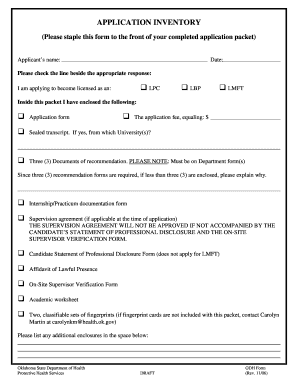
Get Application Inventory - State Of Oklahoma Web Site
How it works
-

Open form follow the instructions
-

Easily sign the form with your finger
-

Send filled & signed form or save
How to fill out the Application Inventory - State Of Oklahoma Web Site online
This guide provides comprehensive instructions for completing the Application Inventory - State Of Oklahoma Web Site. By following these steps, users can ensure that their application packet is complete and properly submitted.
Follow the steps to successfully complete your application inventory.
- Click the ‘Get Form’ button to access the Application Inventory. This will open the document in your browser for online completion.
- Begin by entering your name in the 'Applicant's name' field. Ensure your name is entered accurately, as it is vital for identification purposes.
- Input the date of application in the provided space. Keep this date updated as it reflects when you are submitting your application.
- Indicate your desired licensure by checking the appropriate box: LPC, LBP, or LMFT. Be clear on which credential you are applying for.
- List the documents you have enclosed within your application packet. Utilize the provided checkboxes to identify each document, including the application form, sealed transcript, recommendation documents, and any other required forms.
- If you have less than three recommendation documents enclosed, provide a brief explanation in the designated space about why this is the case.
- If applicable, complete the internship/practicum documentation form and the supervision agreement. Note that the supervision agreement must be accompanied by your candidate’s statement of professional disclosure and the on-site supervisor verification form.
- Include the affidavit of lawful presence and academic worksheet as part of your application if required.
- Add two classifiable sets of fingerprints if necessary. If you do not have the fingerprint cards, reach out to the provided contact for assistance.
- Lastly, in the designated area, list any additional enclosures you are submitting with your application. Be thorough to avoid any omissions.
- Once you have completed all sections of the form, review your entries to ensure accuracy. You can then save the changes, download the form for your records, print a hard copy, or share the completed form as needed.
Complete your Application Inventory online today to ensure a smooth application process.
Industry-leading security and compliance
US Legal Forms protects your data by complying with industry-specific security standards.
-
In businnes since 199725+ years providing professional legal documents.
-
Accredited businessGuarantees that a business meets BBB accreditation standards in the US and Canada.
-
Secured by BraintreeValidated Level 1 PCI DSS compliant payment gateway that accepts most major credit and debit card brands from across the globe.