Loading
Get State Of Rhode Island Ri State Labor Relations Board Petition For Unit ...
How it works
-

Open form follow the instructions
-

Easily sign the form with your finger
-

Send filled & signed form or save
How to fill out the State Of Rhode Island Ri State Labor Relations Board Petition For Unit online
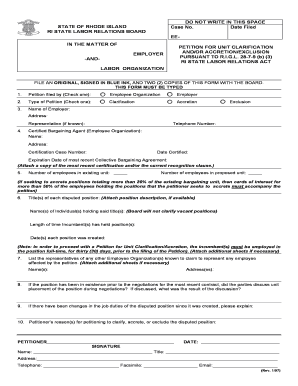
Filling out the State Of Rhode Island Ri State Labor Relations Board Petition For Unit is crucial for users seeking to clarify, accrete, or exclude employee positions. This guide will help you navigate the form step-by-step, ensuring a smooth online filing process.
Follow the steps to successfully complete your petition online.
- Click ‘Get Form’ button to access the petition form and open it in your preferred editor.
- Indicate who is filing the petition by checking either ‘Employee Organization’ or ‘Employer’ in the designated section.
- Select the type of petition you are submitting by checking one of the options: 'Clarification', 'Accretion', or 'Exclusion'.
- Fill in the name and address of the employer; if applicable, include the representative's name.
- Enter the telephone number associated with the petitioning organization or employer.
- Provide the details of the certified bargaining agent, including their name, address, certification case number, date certified, and expiration date of the most recent collective bargaining agreement.
- Specify the number of employees in the existing bargaining unit and the proposed unit. Attach cards of interest if the new positions exceed 20%.
- List the titles of any disputed positions, the names of individuals currently holding those positions, and include any position descriptions if available.
- If applicable, document any representatives from other employee organizations that might claim representation over the affected employees.
- Detail any discussions regarding the placement of the position during previous negotiations, including the results of those discussions.
- If there have been changes in job duties since the position's creation, provide an explanation.
- Articulate the reasons for filing a petition for clarification, accretion, or exclusion of the disputed position.
- Complete the petitioner section by providing your name, title, address, telephone number, facsimile, and email. Sign the form in blue ink and ensure that you maintain one original and two copies.
- Once the form is thoroughly completed, save your changes, download, print, or share the completed form as necessary for submission.
Complete your petition online today to ensure a seamless filing process.
Industry-leading security and compliance
US Legal Forms protects your data by complying with industry-specific security standards.
-
In businnes since 199725+ years providing professional legal documents.
-
Accredited businessGuarantees that a business meets BBB accreditation standards in the US and Canada.
-
Secured by BraintreeValidated Level 1 PCI DSS compliant payment gateway that accepts most major credit and debit card brands from across the globe.