Loading
Get Ky 740-np-r 2024-2026
How it works
-

Open form follow the instructions
-

Easily sign the form with your finger
-

Send filled & signed form or save
How to fill out the KY 740-NP-R online
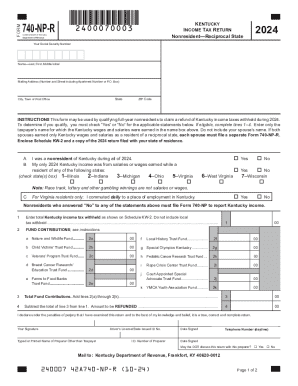
The KY 740-NP-R form is designed for qualifying full-year nonresidents to reclaim withheld Kentucky income taxes. This guide will provide you with step-by-step instructions on how to accurately complete the form online.
Follow the steps to fill out the KY 740-NP-R efficiently.
- Click the ‘Get Form’ button to access the KY 740-NP-R and open it in your online editor.
- Enter your Social Security number in the designated field at the top of the form. Ensure that this number is accurate to avoid processing delays.
- Fill in your name, including your last name, first name, and middle initial in the respective fields.
- Provide your mailing address, including the number and street, apartment number (if applicable), and P.O. Box, along with your city, state, and ZIP code.
- Respond to the qualifying questions A through C by checking 'Yes' or 'No'. This helps determine your eligibility to file the form.
- Record the total Kentucky income tax withheld as displayed on your Schedule KW-2 in line 1. Do not include any local tax withheld.
- Complete lines 2(a) through 2(k) with your fund contributions, ensuring to fill in any applicable contributions to specified funds.
- Calculate the total of your fund contributions and enter this amount on line 3.
- Subtract the total of line 3 from line 1 and write the resulting amount on line 4, which represents the amount to be refunded.
- Sign and date the form, entering your driver’s license or state-issued ID number, along with your typed or printed name if someone other than yourself prepared it.
- Provide the preparer's ID number and daytime telephone number if applicable and indicate whether you authorize the Department of Revenue to discuss this return with the preparer.
- Review all provided information for accuracy, then save your changes, download the completed form, and print or share as needed.
Complete your KY 740-NP-R form online today and ensure your refund is processed efficiently.