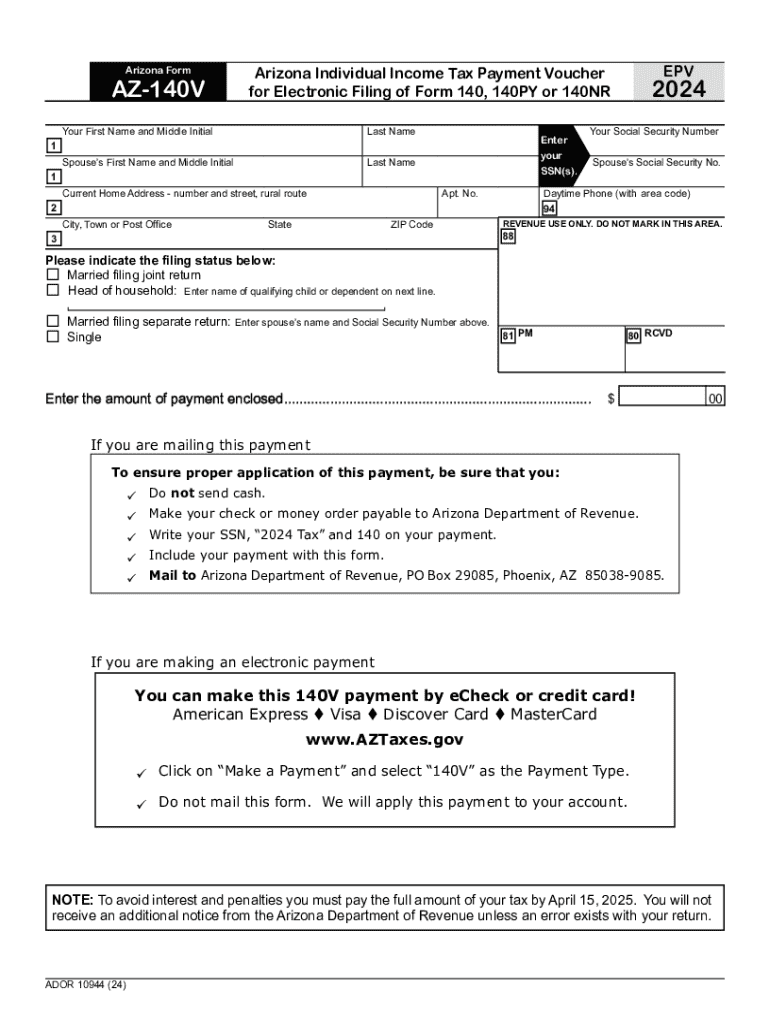
Arizona Form AZ-140V EPV Arizona Individual Income Tax Payment Voucher for Electronic Filing of Form 140, 140PY or 140NR Your First Name and Middle Initial Last Name Spouse s First Name and Middle.

Open form follow the instructions

Easily sign the form with your finger

Send filled & signed form or save
How to fill out the Arizona Form AZ-140V online
Completing the Arizona Form AZ-140V is an essential step for individuals making a payment related to their income tax. This guide provides a clear and user-friendly approach to help you fill out the form accurately online.
Follow the steps to complete the Arizona Form AZ-140V online.
- Use the ‘Get Form’ button to access the Arizona Form AZ-140V and open it in your preferred online editor.
- Enter your first name and middle initial, followed by your last name. If applicable, include your spouse’s first name, middle initial, and last name in the designated fields.
- Provide both your Social Security Number and your spouse’s Social Security Number in the appropriate boxes.
- Fill in your current home address, including the number and street, apartment number (if applicable), city or town, state, and ZIP code.
- Select your filing status by checking the appropriate box for married filing jointly, head of household, married filing separately, or single. If you choose head of household, be sure to enter the name of your qualifying child or dependent.
- Enter the total amount of payment you are enclosing in the designated field.
- Review the instructions for mailing your payment, ensuring that you do not send cash, make your check or money order payable to the Arizona Department of Revenue, and include pertinent payment details.
- If you are opting for electronic payment, follow the instructions provided to make your payment via eCheck or credit card and ensure that you do not mail the form.
- After filling out the form, save your changes, then you may choose to download, print, or share the completed form as needed.
Start filling out the Arizona Form AZ-140V online today to ensure timely processing of your tax payment.
Experience a faster way to fill out and sign forms on the web. Access the most extensive library of templates available.
Get answers to your most pressing questions about US Legal Forms API.
What is a payment voucher for taxes?
Form 1040-V is a statement you send with your check or money order for any balance due on the “Amount you owe” line of your Form 1040 or 1040-NR.
What is Arizona form 140V?
The AZ-140V is only used for paying a balance due for an electronically filed return, not a paper return (the Arizona Resident Personal Income Tax Booklet states that if taxpayers choose to pay by check or money order, they should include their payment with the return - no additional form is necessary).
Who must file an Arizona return?
Who must file a Arizona tax return? You must file an Arizona tax return if: Single AND gross income is more than $13,850. MFJ AND gross income is more than $27,700.
What is 140V?
Arizona Individual Income Tax. Payment Voucher for Electronic Filing.
Where can I pick up Arizona tax forms?
If you need forms, here are four easy ways: On our website. You can access forms on the website anytime here. In our lobbies. In each of our three lobbies, you will find tax booklets for your convenience to take home and use. Free Tax Return Preparation Services. ... In Your Community.
What is AZ 140V?
Arizona Individual Income Tax Payment Voucher. for Electronic Filing of Form 140, 140PY or 140NR.
Where to file Arizona form 140?
Include the payment with Form 140. If you are expecting a refund or owe no tax, or owe tax but are not sending a payment, mail to Arizona Department of Revenue, PO Box 52138, Phoenix, AZ 85072-2138.
Use professional pre-built templates to fill in and sign documents online faster. Get access to thousands of forms.
If you believe that this page should be taken down, please follow our DMCA take down process here.