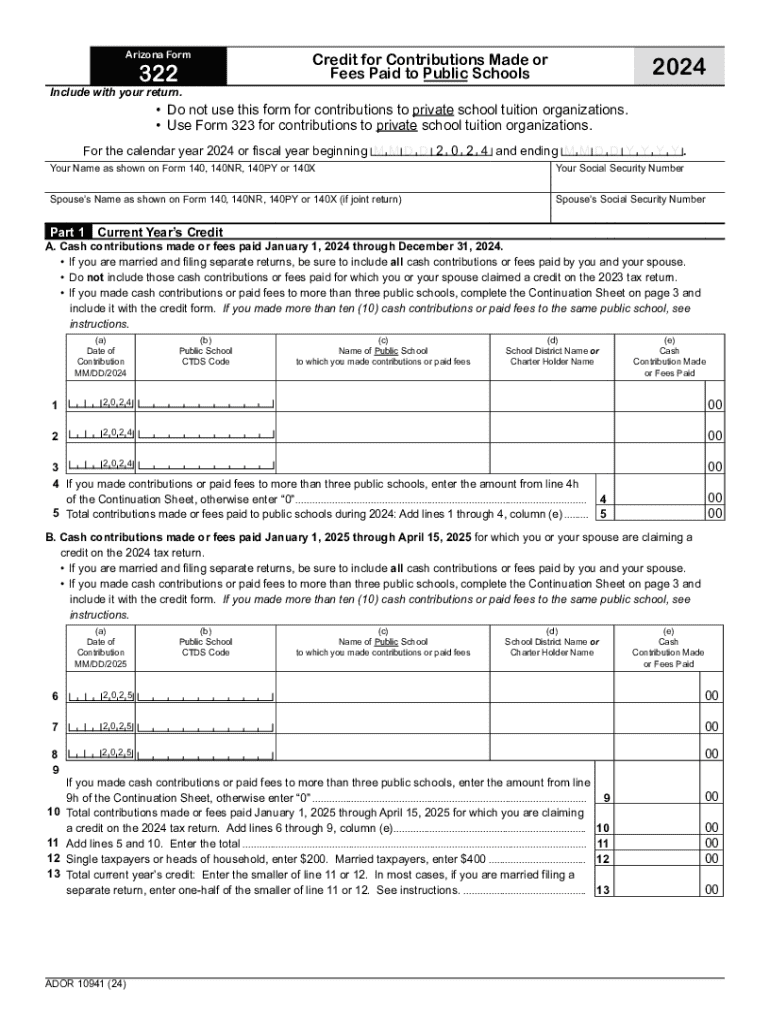
Arizona Form 322 Credit for Contributions Made or Fees Paid to Public Schools 2024 Include with your return. Do not use this form for contributions to private school tuition organizations.
Loading

Open form follow the instructions

Easily sign the form with your finger

Send filled & signed form or save
How to fill out the Arizona Form 322 online
Filling out the Arizona Form 322 is a crucial step for individuals seeking to claim credits for contributions made to public schools. This guide provides clear, step-by-step instructions aimed at users with varying levels of experience in completing tax-related forms online.
Follow the steps to successfully complete Arizona Form 322 online.
- Press the ‘Get Form’ button to access the Arizona Form 322 and open it in your preferred online editor.
- In the first section, provide your name as shown on your tax return forms, along with your Social Security number. If this is a joint return, include your partner's name and Social Security number as well.
- In Part 1, begin by indicating the cash contributions made or fees paid between January 1, 2024 and December 31, 2024. Ensure to list each contribution with the date, public school's CTDS code, name of the school, school district or charter holder name, and the amount contributed or paid.
- If contributions were made to more than three public schools, complete the Continuation Sheet on page 3 and attach it to your submission. For more than ten contributions to a single public school, refer to the additional instructions.
- After entering all contributions for the current year, calculate the total by adding the amounts from the specified lines. Ensure accuracy in your totals.
- In Part 2, report any available credit carryover from previous years by entering the taxable years, original credit amounts, and previously used amounts for the years from 2019 through 2023.
- Proceed to Part 3 and summarize your credits by entering the current year's credit and available credit carryover. Add these amounts to find the total available credit.
- Once all sections are completed, review your entries for accuracy. You can then save your changes, download the completed form, print it, or share it according to your needs.
Take action now by completing your Arizona Form 322 online to ensure your contributions to public schools are correctly credited.
Experience a faster way to fill out and sign forms on the web. Access the most extensive library of templates available.
Get answers to your most pressing questions about US Legal Forms API.
Who must file Arizona nonresident return?
Nonresidents are subject to Arizona tax on any income earned from Arizona sources. Nonresidents may also exclude income Arizona law does not tax. Individuals subject to tax by both Arizona and another state on the same income may also be eligible for a tax credit.
How do I claim an Arizona charitable tax credit?
Maintain a receipt of your gift from the charity to provide a copy with your tax return. Complete the relevant tax form to claim one or more credits for your gift(s): Arizona Form 321 for gifts to QCOs, and/or Arizona Form 352 for gifts to QFCOs.
Who must file an Arizona non-resident tax return?
Nonresidents are subject to Arizona tax on any income earned from Arizona sources. Nonresidents may also exclude income Arizona law does not tax. Individuals subject to tax by both Arizona and another state on the same income may also be eligible for a tax credit.
Is a non-resident required to file an income tax return?
You must file Form 1040-NR, U.S. Nonresident Alien Income Tax Return only if you have income that is subject to tax, such as wages, tips, scholarship and fellowship grants, dividends, etc. Refer to Foreign Students and Scholars for more information.
How much can I donate to a public school in AZ?
Taxpayers Making Contributions or Paying Fees The public school tax credit is claimed by the individual taxpayer on Form 322. The maximum credit allowed is $400 for married filing joint filers and $200 for single, heads of household and married filing separate filers.
Who is exempt from AZ state income tax?
Arizona also allows exemptions for the following: The taxpayer or their spouse is blind. The taxpayer or their spouse is 65 years old or older.
Who is required to file an Arizona state tax return?
Income Tax Filing Requirements In the state of Arizona, full-year resident or part-year resident individuals must file a tax return if they are: Single or married filing separately and gross income (GI) is greater than $13,850; Head of household and GI is greater than $20,800; or.
What is AZ form 322?
For the purpose of claiming Arizona's tax credit for contributions made or certain fees paid to a qualifying public school, you must provide this code on the tax credit form, in column (a), for each qualifying school you or your spouse made cash contributions or paid certain fees.
Use professional pre-built templates to fill in and sign documents online faster. Get access to thousands of forms.
If you believe that this page should be taken down, please follow our DMCA take down process here.