Loading
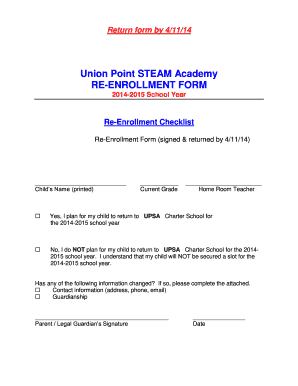
Get Union Point Steam Academy Re-enrollment Checklist 2014-2026
How it works
-

Open form follow the instructions
-

Easily sign the form with your finger
-

Send filled & signed form or save
How to fill out the Union Point Steam Academy Re-Enrollment Checklist online
This guide provides clear instructions on how to complete the Union Point Steam Academy Re-Enrollment Checklist online. Ensure that all required information is accurately filled out to facilitate a smooth re-enrollment process for your child.
Follow the steps to complete the re-enrollment checklist with ease.
- Press the ‘Get Form’ button to obtain the Union Point Steam Academy Re-Enrollment Checklist and open it in your preferred editor.
- Begin by entering your child's name in the designated field. Make sure to print the name clearly, including the first, middle, and last names.
- Indicate your child's current grade in the relevant section.
- Next, provide the name of your child's home room teacher.
- Select one of the options regarding your child's return for the 2014-2015 school year, either affirming that they plan to return or indicating that they will not.
- If there have been changes to your contact information or guardianship, check the appropriate box and fill out the attached information.
- Sign the form where indicated, providing your signature as the parent or legal guardian alongside the date.
- Complete the student information section with the student’s full name, home phone number, alternative phone number, and the residence address, ensuring that no P.O. boxes are used.
- If the student's mailing address differs from their residence address, fill in the mailing address details; otherwise, check the box indicating it is the same.
- In the parent/guardian information section, enter the details for both parents or guardians as applicable, including name, address, employer, and contact information.
- Indicate the living situation of the student by selecting the appropriate option regarding guardianship.
- Review the proof of residency requirements, ensuring you have the necessary documentation to certify your address, although this page does not need to be submitted with the form.
- Complete the affidavit of resident section by signing and dating the acknowledgment of residence and the conditions outlined.
- Once you have filled out all sections of the checklist, save your changes, download the completed form, or print it for submission.
Complete your Union Point Steam Academy Re-Enrollment Checklist online today to ensure your child's placement for the upcoming school year.