Loading
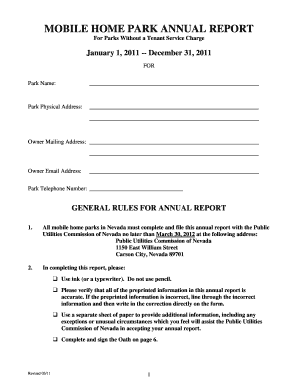
Get Mobile Home Park Annual Report - Pucweb1 State Nv
How it works
-

Open form follow the instructions
-

Easily sign the form with your finger
-

Send filled & signed form or save
How to fill out the Mobile Home Park Annual Report - Pucweb1 State Nv online
Filing the Mobile Home Park Annual Report - Pucweb1 State Nv is essential for all mobile home parks in Nevada. This guide provides clear, step-by-step instructions to help you complete the form accurately and efficiently online.
Follow the steps to successfully complete the Mobile Home Park Annual Report.
- Click ‘Get Form’ button to obtain the form and open it in the editor.
- Begin by filling in the park name in the designated field at the top of the form. Ensure that you have accurate details to avoid issues later.
- Next, provide the park's physical address. Include the complete street address, city, state, and zip code.
- Fill out the owner's mailing address in the specified section. This is where all correspondence will be directed.
- Enter the owner's email address. Make sure that it is valid and accessible to facilitate communication.
- In the next section, provide the mobile home park's contact number. This is important for any inquiries regarding the report.
- Complete the general information section by filling out the owner's name, address, and phone number for both the beginning and end of the year.
- Identify the park manager by entering their name, address, and phone number in the appropriate fields.
- Indicate the total number of mobile home park spaces available and how many were occupied as of December 31, 2011.
- Provide details about the utility services, including the name and address of providers for natural gas/propane, electric, and water, and answer the related yes/no questions about billing practices.
- If applicable, detail the tenant service charge and any relevant charges or fees associated with utility services.
- Complete Schedule I by reconciling utility charges and collections for the specified services within the reporting year.
- Sign the Oath section at the bottom of the form. Ensure it is signed by the rightful person with their printed name, title, and the date of signing.
- Finally, review the entire report for accuracy. Once confirmed, save changes, download a copy, or share the completed form as required.
Ready to file? Complete your Mobile Home Park Annual Report online today!
Industry-leading security and compliance
US Legal Forms protects your data by complying with industry-specific security standards.
-
In businnes since 199725+ years providing professional legal documents.
-
Accredited businessGuarantees that a business meets BBB accreditation standards in the US and Canada.
-
Secured by BraintreeValidated Level 1 PCI DSS compliant payment gateway that accepts most major credit and debit card brands from across the globe.