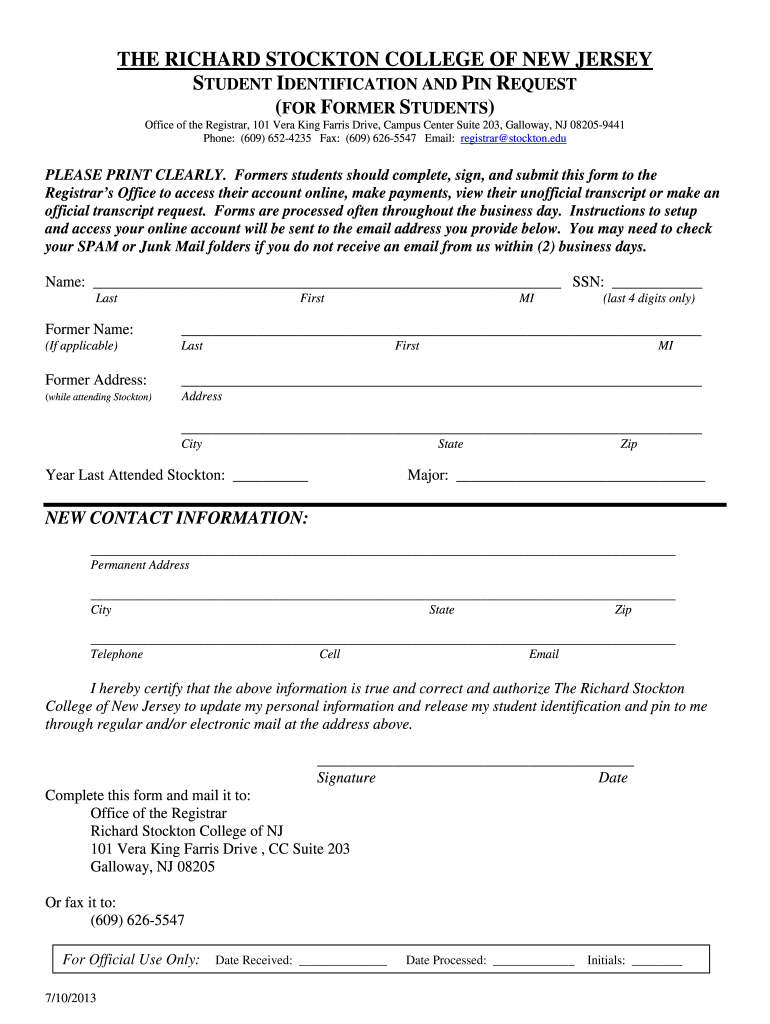
Phone: (609) 652-4235 Fax: (609) 626-5547 Email: registrar@stockton.edu PLEASE PRINT CLEARLY. Formers students should complete, sign, and submit this form to the Registrar’s Office to access their account online, make payments, view their unofficial transcript or make an official transcript request. Forms are processed often throughout the business day. Instructions to setup and access your online account will be sent to the email address you provide below. You may need to check your SPAM or.
Loading

Open form follow the instructions

Easily sign the form with your finger

Send filled & signed form or save
How to fill out the Stockton University Student Identification and Pin Request online
This guide provides clear and detailed instructions for filling out the Stockton University Student Identification and Pin Request form online. Completing this form is essential for former students to access their accounts and obtain important academic information.
Follow the steps to successfully complete your request
- Press the ‘Get Form’ button to obtain the form and open it in your preferred document editor.
- Begin by entering your name in the designated fields. Fill in your last name, first name, and middle initial. Ensure that you provide your information clearly.
- Provide the last four digits of your Social Security Number (SSN) in the specified area. This number is used for identification purposes within the university.
- Indicate the year you last attended Stockton University. This helps the university confirm your records.
- Provide your updated contact information, including your permanent address, city, state, and zip code. Additionally, fill in your phone number, cell number, and email address to ensure the university can reach you.
- Certify that the information you provided is true and correct by signing the form and dating it in the designated area. This is an important step for authorization.
Complete your Stockton University Student Identification and Pin Request online today for easier access to your academic records.
Experience a faster way to fill out and sign forms on the web. Access the most extensive library of templates available.
Related content
Nov 17, 2021 — ... Identification Request (W-9). 20 COVID ... Stockton University Terms...
A Go Stockton Portal account is needed for online resources. Password resets require photo...
Mar 8, 2012 — Indicate by check mark whether the registrant has submitted electronically...
Get answers to your most pressing questions about US Legal Forms API.
How do I contact Stockton admissions?
Contacting Stockton admissions is easy. You can call them directly or email your inquiries through the contact details listed on their website. If your questions are related to your pending Student Identification and Pin Request, providing clear information will allow the admissions team to assist you more efficiently.
How do I contact Stockton University admissions?
You can get in touch with Stockton University admissions by visiting their official website, where you'll find contact information for the admissions office. They offer both phone and email options to assist you with your inquiries. Whether you have questions about your Student Identification and Pin Request or general admission procedures, the admissions staff is there to help.
How do I reset my password for Stockton University?
To reset your password for Stockton University, navigate to the university's login portal and select the 'Forgot Password?' option. Follow the prompted instructions to verify your identity and create a new password. Completing this step is crucial for accessing your Student Identification and Pin Request details securely.
How do I contact my admissions officer?
To contact your admissions officer at Stockton University, visit the admissions website, where you will find a directory of admissions staff. Locate your assigned officer based on your application area and reach out directly via email or phone. This connection can provide you with personalized guidance regarding your Student Identification and Pin Request.
What is the college code for Stockton University?
The college code for Stockton University is 3093. This code is important for submitting your Student Identification and Pin Request as well as other documents necessary for your application process. Be sure to use this code when filling out financial aid forms to ensure prompt processing.
How long does it take to hear back from Stockton University?
Typically, you can expect to receive a response from Stockton University regarding your Student Identification and Pin Request within a week. However, processing times may vary during peak admission periods. If you have not received a response after this period, we recommend checking your email or contacting the admissions office directly for an update.
How do I reset my Rwjbh password?
To reset your RWJBH password, navigate to the RWJBH login page and click on the 'Forgot Password' link. Follow the prompts to verify your identity and create a new password. This will help ensure you can access your accounts, including any necessary information for your Stockton University Student Identification and Pin Request.
What did Stockton University used to be called?
Stockton University was originally known as Richard Stockton College of New Jersey. Over the years, it has evolved into a comprehensive university, offering a wide range of programs. This transition has allowed for expanded services and resources, making it easier for students to effectively manage their Student Identification and Pin Requests.
Is Stockton University a good university?
Stockton University is widely recognized for its commitment to student success and innovative academic programs. With a supportive community, diverse programs, and numerous resources, it provides a conducive learning environment. Many students praise its focus on experiential learning, making it a solid choice for your educational journey and any requirements regarding Student Identification and Pin Requests.
How do I reset my Myasu password?
To reset your Myasu password, navigate to the Myasu login page. Click on 'Forgot Password' and enter the necessary details to initiate the reset process. By following these simple steps, you will quickly regain access to your account and proceed with your Stockton University Student Identification and Pin Request.
Use professional pre-built templates to fill in and sign documents online faster. Get access to thousands of forms.
If you believe that this page should be taken down, please follow our DMCA take down process here.
This form is available in several versions. Select the version you need from the drop-down list below.