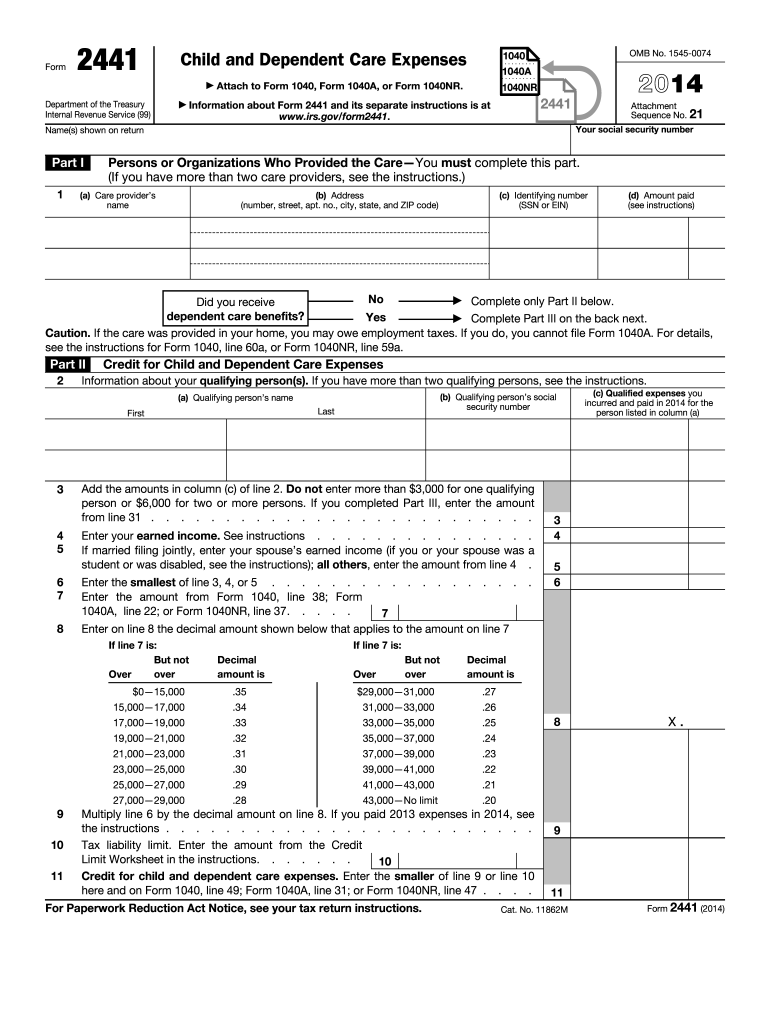
MB No. 1545-0074 2441 Information about Form 2441 and its separate instructions is at www.irs.gov/form2441. 1 Attachment Sequence No. 21 Your social security number Name(s) shown on return Part I 2014 1040NR Persons or Organizations Who Provided the Care You must complete this part. (If you have more than two care providers, see the instructions.) (a) Care provider s name (b) Address (number, street, apt. no., city, state, and ZIP code) (c) Identifying number (SSN or EIN) (d.

Open form follow the instructions

Easily sign the form with your finger

Send filled & signed form or save
How to fill out the IRS 2441 online
The IRS 2441 form is designed for claiming child and dependent care expenses on your tax return. This guide provides clear, step-by-step instructions to assist you in completing the form online, ensuring you accurately report your eligible expenses.
Follow the steps to complete the form accurately.
- Click ‘Get Form’ button to obtain the form and open it in the editor.
- Begin by entering your social security number and the names of all individuals shown on your tax return at the top of the form.
- In Part I, list the persons or organizations that provided care. For each provider, include their name, address, identifying number (SSN or EIN), and the total amount you paid for their services.
- Indicate whether you received dependent care benefits by checking 'Yes' or 'No.' If you answer 'Yes,' complete Part III next.
- For Part II, provide information about qualifying persons. List each qualifying person's name along with their social security number.
- Add the total amounts from column (c) of line 2. Remember that you cannot enter more than $3,000 for one person or $6,000 for two or more.
- Enter your earned income as instructed. If married and filing jointly, also include your spouse’s earned income.
- Determine the smallest amount from lines 3, 4, or 5 and enter it on line 6. Then, enter the amount from your main tax form (1040, 1040A, or 1040NR) on line 8.
- Find the decimal amount on line 9 that corresponds to the amount on line 7, and multiply it by the amount on line 6.
- Complete Part III if applicable by entering total dependent care benefits received, any amounts carried over, and calculated deductible and taxable benefits as outlined.
- Finally, review your completed form, and make sure all information is accurate before saving your changes. You can then download, print, or share the form as needed.
Start your online filing process now to complete the IRS 2441 form efficiently.
Experience a faster way to fill out and sign forms on the web. Access the most extensive library of templates available.
Related content
Dec 4, 2024 — Information about Form 2441, Child and Dependent Care Expenses, including...
Dec 19, 2017 — You must include on line 2 of Form. 2441, Child and Dependent Care...
Attach to Form 1040, 1040-SR, or 1040-NR. Go to www.irs.gov/Form2441 for instructions and...
Get answers to your most pressing questions about US Legal Forms API.
What qualifies as 2441 expense?
IRS Form 2441 is completed by the taxpayer to report child and dependent care expenses paid for the year. This form must be filed if you're planning to claim a credit for child and dependent care expenses.
Why do I have to fill out Form 2441?
IRS Form 2441 is completed by the taxpayer to report child and dependent care expenses paid for the year. This form must be filed if you're planning to claim a credit for child and dependent care expenses.
Do I need a tax form from my daycare?
Daycare receipt and tax statements A childcare or daycare receipt is a document provided to families that totals their childcare payments from January 1 to December 31 of the previous year. Parents and guardians need this information to claim the expense on their taxes and receive a tax credit.
How do you calculate child and dependent care credit?
Calculating the amount you can claim for the CDCC Total qualifying care expenses. Number of qualifying persons. Your earned income for the year (and your spouse's, if you're married) Your adjusted gross income — this determines the percentage to multiply your qualifying expenses by to get the amount of your credit.
Why don't I qualify for the child and dependent care credit?
To receive the credit for Child and Dependent Care Expenses, the expenses had to have been paid for care to be provided so that you (and your spouse, if filing jointly) could work or look for work. If both spouses do not show "earned income" (W-2's, business income, etc.), you generally cannot claim the credit.
How do I remove Form 2441 from my tax return?
by TurboTax• 408• Updated about 11 hours ago Open or continue your return. Select Federal, then Deductions & credits. In the Your tax breaks box, select Edit/Add next to Dependent Care Credit. Answer No on the next screen. ... Now you'll need to delete the 2441. ... Select Delete a form in the pop-up.
Why am I being asked to fill out form 2441?
If you hire someone to care for a dependent or your disabled spouse, and you report income from employment or self-employment on your tax return, you may be able to take the credit for child and dependent care expenses on Form 2441.
Use professional pre-built templates to fill in and sign documents online faster. Get access to thousands of forms.
If you believe that this page should be taken down, please follow our DMCA take down process here.