Loading
Form preview
  • US Legal Forms
  • Form Library
  • More Forms
  • More Multi-State Forms
  • Irs 1040 Schedule R 1995

Get Irs 1040 Schedule R 1995-2026

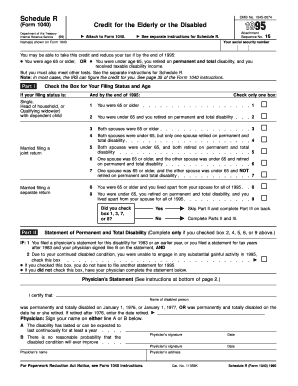
Ee separate instructions for Schedule R. Name(s) shown on Form 1040 16 Your social security number You may be able to take this credit and reduce your tax if by the end of 1995: You were age 65 or older, OR You were under age 65, you retired on permanent and total disability, and you received taxable disability income. But you must also meet other tests. See the separate instructions for Schedule R. Note: In most cases, the IRS can figure the credit for you. See page 35 of the Form 1.

How it works

  1. Open form

    Open form follow the instructions

  2. Easily sign form

    Easily sign the form with your finger

  3. Share form

    Send filled & signed form or save

How to fill out the IRS 1040 Schedule R online

Filling out the IRS 1040 Schedule R can help individuals claim a credit for the elderly or disabled, potentially reducing their tax burden. This guide provides a straightforward approach to completing the form online, ensuring users can effectively navigate each component of the document.

Follow the steps to successfully complete Schedule R online.

  1. Click ‘Get Form’ button to obtain the form and open it in the editor.
  2. Enter the names as shown on Form 1040 in the designated field at the top of Schedule R.
  3. Input your social security number in the appropriate space provided.
  4. In Part I, check the box that accurately reflects your filing status and age at the end of 1995. Ensure you are aware of the eligibility criteria concerning age and disability.
  5. If applicable, answer the question in Part II regarding the completion of a physician's statement for permanent and total disability.
  6. If you checked certain boxes in Part I that require a physician's statement, complete the physician's certification section, including the physician's signature and date.
  7. Proceed to Part III to determine your credit by entering relevant amounts based on your filing status and income situation as outlined on the form.
  8. Ensure that you verify all entries before finalizing your information, including checking calculations for lines 10, 11, and beyond.
  9. Once completed, users can save changes, download a copy for their records, print the form, or share it as needed.

Start completing your IRS 1040 Schedule R online today and make sure to maximize your credits!

Get form

Experience a faster way to fill out and sign forms on the web. Access the most extensive library of templates available.
Get form

Related content

About Schedule R (Form 1040), Credit for the...
Sep 11, 2024 — More In Forms and Instructions​​ Use Schedule R (Form 1040) to figure...
Learn more
1995 Publication 519
Beginning in. 1995, 85% of any U.S. social security benefit received by a nonresident...
Learn more
Form IT-203-I:2017:Instructions for From IT-203...
IT-201-V make a payment by check or money order with your return. IT-203-B allocate...
Learn more

Related links form

T R S Z - Associatedurologistsofnashville.com Application For APC Part II Assessment June 2018 Mvr 9 This Application Is Used To Apply For Nursing Home, Waiver Services, Or Optional State

Questions & Answers

Get answers to your most pressing questions about US Legal Forms API.

Contact support

Tax forms 1040 and 1040-SR are nearly identical. The main advantage of using Form 1040-SR is that it has a larger type, making it easier to read if you're doing your taxes by hand. It also emphasizes some specific tax benefits for those over age 65, although these benefits are also included in Form 1040.

Tax forms 1040 and 1040-SR are nearly identical. The main advantage of using Form 1040-SR is that it has a larger type, making it easier to read if you're doing your taxes by hand. It also emphasizes some specific tax benefits for those over age 65, although these benefits are also included in Form 1040.

Form 1040-NR is often required for nonresident aliens who engaged in a trade or business in the United States or otherwise earned income from U.S. sources. A non-resident alien is somebody who is not American and lives abroad, but who earns taxable income in the U.S.

To qualify for the Tax Credit for Elderly or Disabled, you must be either at least 65 years old by the end of the tax year, or disabled, meaning you meet specific criteria like being permanently and totally disabled before retirement. If you qualify, you'll need to complete Schedule R.

Schedule R (Form 1040) is used by taxpayers to calculate the Credit for the Elderly or the Disabled. This credit is designed to provide tax relief for individuals who are either 65 years or older or permanently and totally disabled, and who meet certain income requirements.

Schedule R to claim a nonrefundable credit for the elderly or disabled. Taxpayers age 65 or older, or under age 65 and receiving disability income due to permanent and total disability, may be eligible for the credit.

Example 1. 1.Initial amount based on filing status (line 10)$5,000 2. Taxable disability pension (line 11) $15,000 3. Initial amount (smaller of line 1 or line 2) (line 12) $5,000 4. Nontaxable social security benefits (line 13c) 5. Excess adjusted gross income (line 17) ($15,100 − $7,500) ÷ 2 5 more rows

Before completing Schedule R, make sure you meet the eligibility criteria for the Credit for the Elderly or the Disabled. Generally, you must be 65 years of age or older, or under 65 and retired on permanent and total disability, and have taxable disability income.

Get This Form Now!

Use professional pre-built templates to fill in and sign documents online faster. Get access to thousands of forms.
Get form
If you believe that this page should be taken down, please follow our DMCA take down processhere.
Get IRS 1040 Schedule R
Get form
  • Adoption
  • Bankruptcy
  • Contractors
  • Divorce
  • Home Sales
  • Employment
  • Identity Theft
  • Incorporation
  • Landlord Tenant
  • Living Trust
  • Name Change
  • Personal Planning
  • Small Business
  • Wills & Estates
  • Packages A-Z
  • Affidavits
  • Bankruptcy
  • Bill of Sale
  • Corporate - LLC
  • Divorce
  • Employment
  • Identity Theft
  • Internet Technology
  • Landlord Tenant
  • Living Wills
  • Name Change
  • Power of Attorney
  • Real Estate
  • Small Estates
  • Wills
  • All Forms
  • Forms A-Z
  • Form Library
  • Legal Hub
  • About Us
  • Help Portal
  • Legal Resources
  • Blog
  • Affiliates
  • Contact Us
  • Delete My Account
  • Site Map
  • Industries
  • Forms in Spanish
  • Localized Forms
  • State-specific Forms
  • Forms Kit
  • Real Estate Handbook
  • All Guides
  • Notarize
  • Incorporation services
  • For Consumers
  • For Small Business
  • For Attorneys
  • USLegal
  • FormsPass
  • pdfFiller
  • signNow
  • altaFlow
  • DocHub
  • Instapage
Form Packages
  • Adoption
  • Bankruptcy
  • Contractors
  • Divorce
  • Home Sales
  • Employment
  • Identity Theft
  • Incorporation
  • Landlord Tenant
  • Living Trust
  • Name Change
  • Personal Planning
  • Small Business
  • Wills & Estates
  • Packages A-Z
Form Categories
  • Affidavits
  • Bankruptcy
  • Bill of Sale
  • Corporate - LLC
  • Divorce
  • Employment
  • Identity Theft
  • Internet Technology
  • Landlord Tenant
  • Living Wills
  • Name Change
  • Power of Attorney
  • Real Estate
  • Small Estates
  • Wills
  • All Forms
  • Forms A-Z
  • Form Library
Customer Service
  • Legal Hub
  • About Us
  • Help Portal
  • Legal Resources
  • Blog
  • Affiliates
  • Contact Us
  • Delete My Account
  • Site Map
  • Industries
  • Forms in Spanish
  • Localized Forms
  • State-specific Forms
  • Forms Kit
Legal Guides
  • Real Estate Handbook
  • All Guides
Prepared for you
  • Notarize
  • Incorporation services
Our Customers
  • For Consumers
  • For Small Business
  • For Attorneys
Our Sites
  • USLegal
  • FormsPass
  • pdfFiller
  • signNow
  • altaFlow
  • DocHub
  • Instapage
Social Media
Call us now toll free:
+1 833 426 79 33
As seen in:
© Copyright 1999-2026 airSlate Legal Forms, Inc. 3720 Flowood Dr, Flowood, Mississippi 39232
  • Your Privacy Choices
  • Terms of Service
  • Privacy Notice
  • Content Takedown Policy
  • Bug Bounty Program