Loading
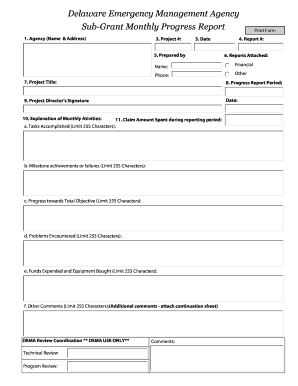
Get Sub-grant Monthly Progress Report Delaware Emergency ...
How it works
-

Open form follow the instructions
-

Easily sign the form with your finger
-

Send filled & signed form or save
How to fill out the Sub-Grant Monthly Progress Report Delaware Emergency online
Completing the Sub-Grant Monthly Progress Report is essential for tracking project progress and ensuring compliance with funding requirements. This guide provides a clear, step-by-step approach to filling out the report online, making the process straightforward for users of all experience levels.
Follow the steps to successfully complete and submit the form.
- Click ‘Get Form’ button to obtain the form and open it in the editor.
- Begin by entering your agency's name and address in the designated fields at the top of the form.
- Fill in the project number to uniquely identify your project, ensuring accuracy.
- Input the current date to provide a timeline reference for the report.
- Complete the 'Prepared by' section with your name and contact information, ensuring follow-up is possible.
- Indicate the report number, which helps in tracking multiple submissions.
- Attach any relevant reports listed in the ‘Reports Attached’ section, identifying each type (financial, other).
- Provide the project title for clear identification of the report subject.
- Specify the progress report period to define the timeframe covered in the report.
- Ensure the Project Director's signature is included for validation and authority.
- Document the explanation of monthly activities in the appropriate section, ensuring transparency of actions taken.
- Enter the claim amount spent during the reporting period, ensuring it reflects accurate financial data.
- Detail tasks accomplished, milestone achievements or failures, progress towards total objectives, problems encountered, funds expended, and any other relevant comments, each limited to 255 characters.
- Review all entries for completeness and accuracy before final submission.
- Once completed, save changes, and choose to download, print, or share the form as needed.
Take action now and complete your Sub-Grant Monthly Progress Report online to stay on track with your funding requirements.
Industry-leading security and compliance
US Legal Forms protects your data by complying with industry-specific security standards.
-
In businnes since 199725+ years providing professional legal documents.
-
Accredited businessGuarantees that a business meets BBB accreditation standards in the US and Canada.
-
Secured by BraintreeValidated Level 1 PCI DSS compliant payment gateway that accepts most major credit and debit card brands from across the globe.